Auto: Automatically select between enabling/disabling Native ASPM
Enabled: OS Controlled ASPM
Disabled: BIOS Controlled ASPM
| | **Default Value** | Auto | **BDAT ACPI Table Support** | **Type** | Configurable Setting | | ----------------- | ------------------------------------------- | | **BIOS Page** | Advanced > RC Advanced Menu > ACPI Settings | | **Description** | Enables support for the BDAT ACPI table | | **Default Value** | Enabled | **Low Power S0 Idle Capability** | **Type** | Configurable Setting | | ----------------- | --------------------------------------------------------------------------------------------------------------------------------------------------------------- | | **BIOS Page** | Advanced > RC Advanced Menu > ACPI Settings | | **Description** | Enable ACPI Lower Power S0 Idle Capability (Mutually exclusive with Smart connect). While this is enabled, it also disables the 8254 timer for SLP\_S0 support. | | **Default Value** | Disabled | **SSDT Table From File** | **Type** | Configurable Setting | | ----------------- | ------------------------------------------- | | **BIOS Page** | Advanced > RC Advanced Menu > ACPI Settings | | **Description** | Generate SSDT table from its file | | **Default Value** | Disabled | **PCI Delay Optimization** | **Type** | Configurable Setting | | ----------------- | ------------------------------------------------------- | | **BIOS Page** | Advanced > RC Advanced Menu > ACPI Settings | | **Description** | Experimental ACPI additions for FW latency optimization | | **Default Value** | Disabled | **MSI Enabled** | **Type** | Configurable Setting | | ----------------- | ---------------------------------------------- | | **BIOS Page** | Advanced > RC Advanced Menu > ACPI Settings | | **Description** | When disabled, MSU support is disabled in FADT | | **Default Value** | Enabled | #### CPU Configuration  **CPU Flex Ratio Settings** | **Type** | Configurable Setting | | ----------------- | -------------------------------------------------------------------------------------------------------------------------------- | | **BIOS Page** | Advanced > RC Advanced Menu > CPU Configuration | | **Description** | CPU flex ratio value. It must fall between the Max Efficiency Ratio (LFM) and the Maximum non-turbo ratio set by hardware (HFM). | | **Default Value** | 20 | **Hardware Prefetcher** | **Type** | Configurable Setting | | ----------------- | ----------------------------------------------- | | **BIOS Page** | Advanced > RC Advanced Menu > CPU Configuration | | **Description** | Turn on/off the MLC streamer prefetcher. | | **Default Value** | Enabled | **Adjacent Cache Line Prefetch** | **Type** | Configurable Setting | | ----------------- | ------------------------------------------------ | | **BIOS Page** | Advanced > RC Advanced Menu > CPU Configuration | | **Description** | Turn on/off prefetching of adjacent cache lines. | | **Default Value** | Enabled | **PECI** | **Type** | Configurable Setting | | ----------------- | ----------------------------------------------- | | **BIOS Page** | Advanced > RC Advanced Menu > CPU Configuration | | **Description** | Turn on/off PECI. | | **Default Value** | Enabled | #### CPU - Power Management Control **Boot Performance Mode** | **Type** | Configurable Setting | | ----------------- | ----------------------------------------------------------------------------------- | | **BIOS Page** | Advanced > RC Advanced Menu > Power & Performance > CPU - Power Management Control | | **Description** | Select the performance state that the BIOS will set starting from the reset vector. | | **Default Value** | Max Non-Turbo Performance | **Intel SpeedStep** | **Type** | Configurable Setting | | ----------------- | ---------------------------------------------------------------------------------- | | **BIOS Page** | Advanced > RC Advanced Menu > Power & Performance > CPU - Power Management Control | | **Description** | Allows more than two frequency ranges to be supported. | | **Default Value** | Enabled | **Platform PL1 Enable** | **Type** | Configurable Setting | | ----------------- | --------------------------------------------------------------------------------------------------------------------------------------------------------------------------------------- | | **BIOS Page** | Advanced > RC Advanced Menu > Power & Performance > CPU - Power Management Control | | **Description** | Enable/Disable Platform Power Limit 1 programming. If this option is enabled, it activates the PL1 value to be used by the processor to limit the average power of a given time window. | | **Default Value** | Disabled | **Platform PL2 Enable** | **Type** | Configurable Setting | | ----------------- | ----------------------------------------------------------------------------------------------------------------------------------------------- | | **BIOS Page** | Advanced > RC Advanced Menu > Power & Performance > CPU - Power Management Control | | **Description** | Enable/Disable Platform Power Limit 2 programming. If this option is disabled, BIOS will program the default values for Platform Power Limit 2. | | **Default Value** | Disabled | **Energy Performance Gain** | **Type** | Configurable Setting | | ----------------- | ---------------------------------------------------------------------------------- | | **BIOS Page** | Advanced > RC Advanced Menu > Power & Performance > CPU - Power Management Control | | **Description** | Enable/Disable energy performance gain | | **Default Value** | Disabled | **Energy Efficient Turbo** | **Type** | Configurable Setting | | ----------------- | ----------------------------------------------------------------------------------------------------------------------------------------------------------------------------------------------------------------------------------------------------------------- | | **BIOS Page** | Advanced > RC Advanced Menu > Power & Performance > CPU - Power Management Control | | **Description** | Enable/Disable Energy Efficient Turbo Feature. This feature will opportunistically lower the turbo frequency to increase efficiency. Recommended only to disable in overclocking situations where turbo frequency must remain constant. Otherwise, leave enabled. | | **Default Value** | Enabled | #### GT - Power Management Control **Maximum GT Frequency** | **Type** | Configurable Setting | | ----------------- | --------------------------------------------------------------------------------- | | **BIOS Page** | Advanced > RC Advanced Menu > Power & Performance > GT - Power Management Control | | **Description** | Automatically updated GT max frequency | | **Default Value** | Default Max Frequency | **Disable Turbo GT Frequency** | **Type** | Configurable Setting | | ----------------- | --------------------------------------------------------------------------------- | | **BIOS Page** | Advanced > RC Advanced Menu > Power & Performance > GT - Power Management Control | | **Description** | Set as ‘Disabled’ to prevent limiting GT frequency | | **Default Value** | Disabled | #### Intel Time Coordinated Computing  **Intel TCC Mode** | **Type** | Configurable Setting | | ----------------- | ------------------------------------------------------------------------------------------------------------------------------------------------------------------------------------------------------------------------------ | | **BIOS Page** | Advanced > RC Advanced Menu > Intel(R) Time Coordinated Computing | | **Description** | Enable or Disable Intel(R) TCC mode. When enabled, this will modify system settings to improve real-time performance. The full list of settings and their current state are displayed below when Intel(R) TCC mode is enabled. | | **Default Value** | Disabled | **IO Fabric Low Latency** | **Type** | Configurable Setting | | ----------------- | ----------------------------------------------------------------------------------------------------------------------------------------------------------------------------------------------------------- | | **BIOS Page** | Advanced > RC Advanced Menu > Intel(R) Time Coordinated Computing | | **Description** | Enable or Disable IO Fabric Low Latency. This will turn off some power management in the PCH IO fabrics. This option provides the most aggressive IO Fabric performance setting. S3 state is NOT supported. | | **Default Value** | Disabled | **GT CLOS** #### Memory Configuration  **Max TOLUD** | **Type** | Configurable Setting | | ----------------- | ---------------------------------------------------------------------------------------------------------------------------------------- | | **BIOS Page** | Advanced > RC Advanced Menu > Memory Configuration | | **Description** | Maximum Value of TOLUD. Dynamic assignment would adjust TOLUD automatically based on largest MMIO length of installed graphic controller | | **Default Value** | Dynamic | #### System Agent (SA) Configuration  **VT-d** | **Type** | Info | | --------------- | ------------------------------------------------------------- | | **BIOS Page** | Advanced > RC Advanced Menu > System Agent (SA) Configuration | | **Description** | If the system supports VT-d capabilities | **DMA Control Guarantee** | **Type** | Configurable Setting (Locked) | | ----------------- | ------------------------------------------------------------- | | **BIOS Page** | Advanced > RC Advanced Menu > System Agent (SA) Configuration | | **Description** | Program the state of the DMA\_CONTROL\_GUARANTEE bit | | **Default Value** | Disabled | **IGD VTD Enable** | **Type** | Configurable Setting (Locked) | | ----------------- | ------------------------------------------------------------- | | **BIOS Page** | Advanced > RC Advanced Menu > System Agent (SA) Configuration | | **Description** | Enable/Disable IGD VTD | | **Default Value** | Enabled | **IOP VTD Enable** | **Type** | Configurable Setting (Locked) | | ----------------- | ------------------------------------------------------------- | | **BIOS Page** | Advanced > RC Advanced Menu > System Agent (SA) Configuration | | **Description** | Enable/Disable IOP VTD | | **Default Value** | Enabled | **Cpu CrashLog** | **Type** | Configurable Setting | | ----------------- | ------------------------------------------------------------- | | **BIOS Page** | Advanced > RC Advanced Menu > System Agent (SA) Configuration | | **Description** | Enable or disabled the CPU CrashLog on Device 10 | | **Default Value** | Enabled | **GNA Device** | **Type** | Configurable Setting | | ----------------- | ------------------------------------------------------------- | | **BIOS Page** | Advanced > RC Advanced Menu > System Agent (SA) Configuration | | **Description** | Enable/Disable the SA GNA device | | **Default Value** | Enabled | **CRID Support** | **Type** | Configurable Setting | | ----------------- | ------------------------------------------------------------- | | **BIOS Page** | Advanced > RC Advanced Menu > System Agent (SA) Configuration | | **Description** | Enable/Disable SA CRID and TCSS CRID control for Intel SIPP | | **Default Value** | Disabled | **Above 4G MMIO BIOS Assignment** | **Type** | Configurable Setting | | ----------------- | --------------------------------------------------------------------------------------------------------------------------- | | **BIOS Page** | Advanced > RC Advanced Menu > System Agent (SA) Configuration | | **Description** | Enable/Disable above 4GB MemoryMappedIO BIOS assignment. This is enabled automatically when Aperture Size is set to 2048MB. | | **Default Value** | Disabled | #### Graphics Configuration **Skip Scanning of External Gfx Card** | **Type** | Configurable Setting | | ----------------- | -------------------------------------------------------------------------------------- | | **BIOS Page** | Advanced > RC Advanced Menu > System Agent (SA) Configuration > Graphics Configuration | | **Description** | If Enabled, the BIOS will not scan for External Gfx Card on PEG and PCH PCIE Ports | | **Default Value** | Disabled | **Internal Graphics** | **Type** | Configurable Setting | | ----------------- | --------------------------------------------------------------------------------------------------------------------------------- | | **BIOS Page** | Advanced > RC Advanced Menu > System Agent (SA) Configuration > Graphics Configuration | | **Description** | Force the Internal Graphics enable state. Setting this to disabled without an external graphics card will prevent display output. | | **Default Value** | Auto | **GTT Size** | **Type** | Configurable Setting | | ----------------- | -------------------------------------------------------------------------------------- | | **BIOS Page** | Advanced > RC Advanced Menu > System Agent (SA) Configuration > Graphics Configuration | | **Description** | Set the GTT size to 2, 4, or 8 MB | | **Default Value** | 8MB | **Aperture Size** | **Type** | Configurable Setting | | ----------------- | ------------------------------------------------------------------------------------------------------------------------------------------------------------------ | | **BIOS Page** | Advanced > RC Advanced Menu > System Agent (SA) Configuration > Graphics Configuration | | **Description** | Select the Aperture Size. Above 4GB MMIO BIOS assignment is automatically enabled when selecting 2048MB aperture. To use this feature, please disable CSM Support. | | **Default Value** | 256MB | **PSMI Support** | **Type** | Configurable Setting | | ----------------- | -------------------------------------------------------------------------------------- | | **BIOS Page** | Advanced > RC Advanced Menu > System Agent (SA) Configuration > Graphics Configuration | | **Description** | Enable/Disable PSMI Support. | | **Default Value** | Disabled | **DVMT Pre-Allocated** | **Type** | Configurable Setting | | ----------------- | ------------------------------------------------------------------------------------------------ | | **BIOS Page** | Advanced > RC Advanced Menu > System Agent (SA) Configuration > Graphics Configuration | | **Description** | Select DVMT 5.0 Pre-Allocated (Fixed) Graphics Memory size used by the Internal Graphics Device. | | **Default Value** | 60M | **DVMT Total Gfx Mem** | **Type** | Configurable Setting | | ----------------- | -------------------------------------------------------------------------------------- | | **BIOS Page** | Advanced > RC Advanced Menu > System Agent (SA) Configuration > Graphics Configuration | | **Description** | Select DVMT5.0 Total Graphic Memory size used by the Internal Graphics Device. | | **Default Value** | 256M | **DiSM Size** | **Type** | Configurable Setting | | ----------------- | -------------------------------------------------------------------------------------- | | **BIOS Page** | Advanced > RC Advanced Menu > System Agent (SA) Configuration > Graphics Configuration | | **Description** | DiSM Size for 2LM Sku. | | **Default Value** | 0GB | **VDD Enable** | **Type** | Configurable Setting | | ----------------- | -------------------------------------------------------------------------------------- | | **BIOS Page** | Advanced > RC Advanced Menu > System Agent (SA) Configuration > Graphics Configuration | | **Description** | Enable/Disable forcing of VDD in the BIOS | | **Default Value** | Enabled | **PM Support** | **Type** | Configurable Setting | | ----------------- | -------------------------------------------------------------------------------------- | | **BIOS Page** | Advanced > RC Advanced Menu > System Agent (SA) Configuration > Graphics Configuration | | **Description** | Enable/Disable PM support | | **Default Value** | Enabled | **PAVP Enable** | **Type** | Configurable Setting | | ----------------- | -------------------------------------------------------------------------------------- | | **BIOS Page** | Advanced > RC Advanced Menu > System Agent (SA) Configuration > Graphics Configuration | | **Description** | Enable/Disable PAVP | | **Default Value** | Enabled | **Cdynmax Clamping Enable** | **Type** | Configurable Setting | | ----------------- | -------------------------------------------------------------------------------------- | | **BIOS Page** | Advanced > RC Advanced Menu > System Agent (SA) Configuration > Graphics Configuration | | **Description** | Enable/Disable Cdynmax Clamping | | **Default Value** | Disabled | **Skip Full CD Clock Init** | **Type** | Configurable Setting | | ----------------- | ------------------------------------------------------------------------------------------------------------------------------ | | **BIOS Page** | Advanced > RC Advanced Menu > System Agent (SA) Configuration > Graphics Configuration | | **Description** |Enabled: Skip Full CD clock initialization.
Disabled: Initialize the full CD clock if not initialized by Gfx PEIM
| | **Default Value** | Disabled | #### PCH-IO Configuration  **EFI Network** | **Type** | Configurable Setting | | ----------------- | --------------------------------------------------------------------------------------------------- | | **BIOS Page** | Advanced > RC Advanced Menu > PCH-IO Configuration | | **Description** | Enable/Disable networking functionality for the onboard network interfaces in the UEFI environment. | | **Default Value** | Onboard NIC | **WWAN Device Wake GPIO** | **Type** | Configurable Setting | | ----------------- | ------------------------------------------------------------------------------ | | **BIOS Page** | Advanced > RC Advanced Menu > PCH-IO Configuration | | **Description** | Enable/Disable using the WWAN device wake gpio pins as potential wake sources. | | **Default Value** | Enabled | **Wake on WLAN and BT Enable** | **Type** | Configurable Setting | | ----------------- | ------------------------------------------------------------------------- | | **BIOS Page** | Advanced > RC Advanced Menu > PCH-IO Configuration | | **Description** | Enable/Disable PCI Express Wireless LAN and Bluetooth to wake the system. | | **Default Value** | Disabled | **PXE ROM** | **Type** | Configurable Setting | | ----------------- | -------------------------------------------------- | | **BIOS Page** | Advanced > RC Advanced Menu > PCH-IO Configuration | | **Description** | Enable/Disable PXE Option ROM execution. | | **Default Value** | Enabled | **State After G3** | **Type** | Configurable Setting | | ----------------- | ------------------------------------------------------------------------------------- | | **BIOS Page** | Advanced > RC Advanced Menu > PCH-IO Configuration | | **Description** | Specify what state to go to when power is reapplied after a power failure (G3 state). | | **Default Value** | S5 State (Off) | **Enable TCO Timer** | **Type** | Configurable Setting | | ----------------- | -------------------------------------------------------------------------------------------------------------------------------- | | **BIOS Page** | Advanced > RC Advanced Menu > PCH-IO Configuration | | **Description** | Enable/Disable TCO timer. When disabled, it disables PCH ACPI timer, stops TCO timer, and ACPI WDAT table will not be published. | | **Default Value** | Disabled | **Enable Timed GPIO0** | **Type** | Configurable Setting | | ----------------- | ------------------------------------------------------------------------------------------------------------------------------------------------- | | **BIOS Page** | Advanced > RC Advanced Menu > PCH-IO Configuration | | **Description** | Enable/Disable Timed GPIO0. When disabled, it disables cross time stamp time-synchronization as extension of Hammock Harbor time synchronization. | | **Default Value** | Disabled | #### PCI Express Configuration **DMI Link ASPM Control** | **Type** | Configurable Setting | | ----------------- | ------------------------------------------------------------------------------ | | **BIOS Page** | Advanced > RC Advanced Menu > PCH-IO Configuration > PCI Express Configuration | | **Description** | The control of Active State Power Management of the DMI Link. | | **Default Value** | Auto | **Port8xh Decode** | **Type** | Configurable Setting | | ----------------- | ------------------------------------------------------------------------------ | | **BIOS Page** | Advanced > RC Advanced Menu > PCH-IO Configuration > PCI Express Configuration | | **Description** | PCI Express Port8xh Decode Enable/Disable. | | **Default Value** | Disabled | #### PCI Express Root Port Configuration **PCI Express Root Port** | **Type** | Configurable Setting | | ----------------- | ------------------------------------------------------------------------------------------------- | | **BIOS Page** | Advanced Page > PCH-IO Configuration > PCI Express Configuration > PCI Express Root Port Settings | | **Description** | Enables or disables the selected PCI Express Root Port | | **Default Value** | Enabled | **ASPM** | **Type** | Configurable Setting | | ------------------- | ------------------------------------------------------------------------------------------------- | | **BIOS Page** | Advanced Page > PCH-IO Configuration > PCI Express Configuration > PCI Express Root Port Settings | | **Description** | Sets the PCI Express Active State Power Management mode | | **Possible Values** | Auto, Disabled, L0s, L1, L0sL1 | | **Default Value** | Auto | **PCIE Speed** | **Type** | Configurable Setting | | ------------------- | ------------------------------------------------------------------------------------------------- | | **BIOS Page** | Advanced Page > PCH-IO Configuration > PCI Express Configuration > PCI Express Root Port Settings | | **Description** | Sets the PCIe Speed of the selected port | | **Possible Values** | Auto, Gen1, Gen2, Gen3 | | **Default Value** | Auto | **Detect Timeout** | **Type** | Configurable Setting | | ----------------- | ---------------------------------------------------------------------------------------------------------------------------------------------------------------------------------- | | **BIOS Page** | Advanced Page > PCH-IO Configuration > PCI Express Configuration > PCI Express Root Port Settings | | **Description** | Sets the number of milliseconds reference code will wait for the link to exit detect state for enabled ports before assuming there is no device and potentially disabling the port | | **Default Value** | 0 | #### SATA Configuration **SATA Controller(s)** | **Type** | Configurable Setting | | ----------------- | ----------------------------------------------------------------------- | | **BIOS Page** | Advanced > RC Advanced Menu > PCH-IO Configuration > SATA Configuration | | **Description** | Enable/Disable SATA Device. | | **Default Value** | Enabled | **SATA Mode Selection** | **Type** | Configurable Setting | | ----------------- | ----------------------------------------------------------------------- | | **BIOS Page** | Advanced > RC Advanced Menu > PCH-IO Configuration > SATA Configuration | | **Description** | Set the SATA operation mode | | **Default Value** | AHCI | **SATA Ports Multiplier** | **Type** | Configurable Setting | | ----------------- | ----------------------------------------------------------------------- | | **BIOS Page** | Advanced > RC Advanced Menu > PCH-IO Configuration > SATA Configuration | | **Description** | Ports Multiplier Enable/Disable | | **Default Value** | Disabled | **SATA Speed** | **Type** | Configurable Setting | | ----------------- | ----------------------------------------------------------------------- | | **BIOS Page** | Advanced > RC Advanced Menu > PCH-IO Configuration > SATA Configuration | | **Description** | Set the SATA generation to Gen 1, 2, or 3 | | **Default Value** | Gen3 | **Aggressive LPM Support** | **Type** | Configurable Setting | | ----------------- | ----------------------------------------------------------------------- | | **BIOS Page** | Advanced > RC Advanced Menu > PCH-IO Configuration > SATA Configuration | | **Description** | Enable PCH to aggressively enter link power state. | | **Default Value** | Enabled | **Port X** | **Type** | Configurable Setting | | ----------------- | ----------------------------------------------------------------------- | | **BIOS Page** | Advanced > RC Advanced Menu > PCH-IO Configuration > SATA Configuration | | **Description** | Enable or disable the given SATA port. | | **Default Value** | Enabled | **Hot Plug** | **Type** | Configurable Setting | | ----------------- | ----------------------------------------------------------------------- | | **BIOS Page** | Advanced > RC Advanced Menu > PCH-IO Configuration > SATA Configuration | | **Description** | Enable or disable SATA hot plug drive detection for the given port. | | **Default Value** | Disabled | #### USB Configuration **xDCI Support** | **Type** | Configurable Setting | | ----------------- | ---------------------------------------------------------------------- | | **BIOS Page** | Advanced > RC Advanced Menu > PCH-IO Configuration > USB Configuration | | **Description** | Enable/Disable xDCI (USB OTG Device). | | **Default Value** | Disabled | **USB2 PHY Sus Well Power Gating** | **Type** | Configurable Setting | | ----------------- | --------------------------------------------------------------------------------------- | | **BIOS Page** | Advanced > RC Advanced Menu > PCH-IO Configuration > USB Configuration | | **Description** | Select 'Enabled' to enable SUS Well PG for USB2 PHY. This option has no effect on PCH-H | | **Default Value** | Enabled | **USB3 Link Speed Selection** | **Type** | Configurable Setting | | ----------------- | ---------------------------------------------------------------------- | | **BIOS Page** | Advanced > RC Advanced Menu > PCH-IO Configuration > USB Configuration | | **Description** | This option is to select USB3 Link Speed GEN1 or GEN2 | | **Default Value** | GEN2 | **USB Overcurrent** | **Type** | Configurable Setting | | ----------------- | ---------------------------------------------------------------------- | | **BIOS Page** | Advanced > RC Advanced Menu > PCH-IO Configuration > USB Configuration | | **Description** | Enable/disable USB overcurrent detection | | **Default Value** | Enabled | **USB Overcurrent Lock** | **Type** | Configurable Setting | | ----------------- | ----------------------------------------------------------------------------------------------------------------------------------- | | **BIOS Page** | Advanced > RC Advanced Menu > PCH-IO Configuration > USB Configuration | | **Description** | Select 'Enabled' if Overcurrent functionality is used. Enabling this will make xHCI controller consume the Overcurrent mapping data | | **Default Value** | Enabled | **USB Port Disable Override** | **Type** | Configurable Setting | | ----------------- | ----------------------------------------------------------------------------------------------------------- | | **BIOS Page** | Advanced > RC Advanced Menu > PCH-IO Configuration > USB Configuration | | **Description** | Selectively Enable/Disable the corresponding USB port from reporting a Device Connection to the controller. | | **Default Value** | Disabled | **USB Device/Host Mode Override** | **Type** | Configurable Setting | | ----------------- | --------------------------------------------------------------------------------- | | **BIOS Page** | Advanced > RC Advanced Menu > PCH-IO Configuration > USB Configuration | | **Description** | Selectively Enable/Disable the corresponding USB 2.0 and USB 3.0 port device mode | | **Default Value** | Disabled | **USB UCSI ACPI Device** | **Type** | Configurable Setting | | ----------------- | ---------------------------------------------------------------------- | | **BIOS Page** | Advanced > RC Advanced Menu > PCH-IO Configuration > USB Configuration | | **Description** | Enable/Disable USB UCSI ACPI device | | **Default Value** | Disabled | #### Security Configuration **RTC Memory Lock** | **Type** | Configurable Setting | | ----------------- | --------------------------------------------------------------------------- | | **BIOS Page** | Advanced > RC Advanced Menu > PCH-IO Configuration > Security Configuration | | **Description** | Enable will lock bytes 38h-3Fh in the lower/upper 128-byte bank of RTC RAM | | **Default Value** | Enabled | **BIOS Lock** | **Type** | Configurable Setting | | ----------------- | ---------------------------------------------------------------------------------------------------------- | | **BIOS Page** | Advanced > RC Advanced Menu > PCH-IO Configuration > Security Configuration | | **Description** | Enable/Disable the PCH BIOS Lock Enable feature. Required to be enabled to ensure SMM protection of flash. | | **Default Value** | Enabled | **Force Unlock on All GPIO Pads** | **Type** | Configurable Setting | | ----------------- | --------------------------------------------------------------------------- | | **BIOS Page** | Advanced > RC Advanced Menu > PCH-IO Configuration > Security Configuration | | **Description** | If enabled BIOS will force all GPIO pads to be in unlocked state | | **Default Value** | Disabled | #### SerialIo Configuration **Device Controller** | **Type** | Configurable Setting | | ----------------- | ----------------------------------------------------------------------------------- | | **BIOS Page** | Advanced > RC Advanced Menu > PCH-IO Configuration > SerialIo Configuration | | **Description** | Enable or disable the PCH controller for the platform’s I2C, SPI, and UART devices. | | **Default Value** | \[Enabled/Disabled] | **UARTX Hardware Flow Control** | **Type** | Configurable Setting | | ----------------- | ------------------------------------------------------------------------------------------------------ | | **BIOS Page** | Advanced > RC Advanced Menu > PCH-IO Configuration > SerialIo Configuration > Serial IO UARTX Settings | | **Description** | Enable or disable the UART hardware flow control signals | | **Default Value** | Enabled | **UARTX DMA Enable** | **Type** | Configurable Setting | | ----------------- | ------------------------------------------------------------------------------------------------------ | | **BIOS Page** | Advanced > RC Advanced Menu > PCH-IO Configuration > SerialIo Configuration > Serial IO UARTX Settings | | **Description** | Enable or disable the DMA support for the UART interface | | **Default Value** | Enabled | **UARTX Power Gating** | **Type** | Configurable Setting | | ----------------- | ------------------------------------------------------------------------------------------------------ | | **BIOS Page** | Advanced > RC Advanced Menu > PCH-IO Configuration > SerialIo Configuration > Serial IO UARTX Settings | | **Description** | Configure option power gating of the UART device in some platform off-states. | | **Default Value** | Auto | #### PSE Configuration **PSE Controller** | **Type** | Configurable Setting | | ----------------- | ---------------------------------------------------------------------------------------------------------------- | | **BIOS Page** | Advanced > RC Advanced Menu > PCH-IO Configuration > PSE Configuration | | **Description** | Enable or disable the Programmable Services Engine. Disabling the PSE will disable: CAN, DIO, Power LED, and HPD | | **Default Value** | Enabled | **Log Output Channel** | **Type** | Configurable Setting | | ----------------- | ---------------------------------------------------------------------------------------------- | | **BIOS Page** | Advanced > RC Advanced Menu > PCH-IO Configuration > PSE Configuration | | **Description** |Target device for the PSE log output.
0: Memory
1-6: UART
7: Disabled
| | **Default Value** | 0 | **Shell** | **Type** | Configurable Setting | | ----------------- | ---------------------------------------------------------------------- | | **BIOS Page** | Advanced > RC Advanced Menu > PCH-IO Configuration > PSE Configuration | | **Description** | Enable or disable the PSE shell features | | **Default Value** | Enabled | **Eclite** | **Type** | Configurable Setting | | ----------------- | ---------------------------------------------------------------------- | | **BIOS Page** | Advanced > RC Advanced Menu > PCH-IO Configuration > PSE Configuration | | **Description** | Enable or disable the PSE EC-Lite features | | **Default Value** | Disabled | **OOB** | **Type** | Configurable Setting | | ----------------- | ---------------------------------------------------------------------- | | **BIOS Page** | Advanced > RC Advanced Menu > PCH-IO Configuration > PSE Configuration | | **Description** | Enable or disable the PSE OOB features | | **Default Value** | Enabled | #### PCH-FW Configuration  **ME Firmware Version** | **Type** | Information | | --------------- | ------------------------------------------------------- | | **BIOS Page** | Advanced Page > RC Advanced Menu > PCH-FW Configuration | | **Description** | Displays Management Engine firmware version | **ME Firmware Mode** | **Type** | Information | | --------------- | ------------------------------------------------------- | | **BIOS Page** | Advanced Page > RC Advanced Menu > PCH-FW Configuration | | **Description** | Displays Management Engine firmware mode | **ME Firmware SKU** | **Type** | Information | | --------------- | ------------------------------------------------------- | | **BIOS Page** | Advanced Page > RC Advanced Menu > PCH-FW Configuration | | **Description** | Displays Management Engine firmware SKU | **ME Firmware Status 1** | **Type** | Information | | --------------- | ------------------------------------------------------- | | **BIOS Page** | Advanced Page > RC Advanced Menu > PCH-FW Configuration | | **Description** | Displays Management Engine firmware status 1 | **ME Firmware Status 2** | **Type** | Information | | --------------- | ------------------------------------------------------- | | **BIOS Page** | Advanced Page > RC Advanced Menu > PCH-FW Configuration | | **Description** | Displays Management Engine firmware status 2 | **ME State** | **Type** | Configurable Setting | | ------------------- | ------------------------------------------------------------------------------------------------------------------------------------- | | **BIOS Page** | Advanced Page > RC Advanced Menu > PCH-FW Configuration | | **Description** | When Disabled ME will be put into ME Temporarily Disabled Mode. Default value: Enabled | | **Possible Values** |Enabled (Management Engine will act normally)
Disabled (Management Engine will be put into ME Temporarily Disabled Mode)
| | **Default Value** | Enabled | **Comms Hub Support** | **Type** | Configurable Setting | | ----------------- | ------------------------------------------------------- | | **BIOS Page** | Advanced Page > RC Advanced Menu > PCH-FW Configuration | | **Description** | Enables or Disables support for Comms Hub | | **Default Value** | Disabled | **JHI Support** | **Type** | Configurable Setting | | ----------------- | ---------------------------------------------------------- | | **BIOS Page** | Advanced Page > RC Advanced Menu > PCH-FW Configuration | | **Description** | Enables or Disables Intel DAL Host Interface Service (JHI) | | **Default Value** | Disabled | **Core BIOS Done Message** | **Type** | Configurable Setting | | ----------------- | ------------------------------------------------------- | | **BIOS Page** | Advanced Page > RC Advanced Menu > PCH-FW Configuration | | **Description** | Enable or Disable sending Core BIOS Done Message to ME | | **Default Value** | Enabled | **HECI Timeouts** | **Type** | Configurable Setting | | ----------------- | -------------------------------------------------------------------------------- | | **BIOS Page** | Advanced Page > RC Advanced Menu > PCH-FW Configuration > ME Debug Configuration | | **Description** | Enable Host Embedded Control Interface timeouts | | **Default Value** | Enabled | #### Firmware Update Configuration **ME Firmware Re-Flash** | **Type** | Configurable Setting | | ----------------- | --------------------------------------------------------------------------------------- | | **BIOS Page** | Advanced Page > RC Advanced Menu > PCH-FW Configuration > Firmware Update Configuration | | **Description** | Enables or Disables Management Engine Firmware Image Re-Flash function | | **Default Value** | Disabled | **FW Update** | **Type** | Configurable Setting | | ----------------- | --------------------------------------------------------------------------------------- | | **BIOS Page** | Advanced Page > RC Advanced Menu > PCH-FW Configuration > Firmware Update Configuration | | **Description** | Enables or Disabled FW Update | | **Default Value** | Enabled | #### PTT Configuration **PTT Capability / State** | **Type** | Info | | --------------- | --------------------------------------------------------------------------- | | **BIOS Page** | Advanced Page > RC Advanced Menu > PCH-FW Configuration > PTT Configuration | | **Description** | Report if the PTT (firmware TPM) is enabled and ready. | #### FIPS Configuration **FIPS Mode Select** | **Type** | Configurable Setting | | ----------------- | ---------------------------------------------------------------------------- | | **BIOS Page** | Advanced Page > RC Advanced Menu > PCH-FW Configuration > FIPS Configuration | | **Description** | Enables or Disables FIPS | | **Default Value** | Disabled | **Current FIPS Mode** | **Type** | Info | | --------------- | ---------------------------------------------------------------------------- | | **BIOS Page** | Advanced Page > RC Advanced Menu > PCH-FW Configuration > FIPS Configuration | | **Description** | Report the current FIPS mode | **Crypto Driver FIPS Version** | **Type** | Info | | --------------- | ---------------------------------------------------------------------------- | | **BIOS Page** | Advanced Page > RC Advanced Menu > PCH-FW Configuration > FIPS Configuration | | **Description** | Report the FIPS crypto driver version | #### Anti-Rollback SVN Configuration **Automatic HW-Enforced Anti-Rollback SVN** | **Type** | Configurable Setting | | ----------------- | ----------------------------------------------------------------------------------------- | | **BIOS Page** | Advanced Page > RC Advanced Menu > PCH-FW Configuration > Anti-Rollback SVN Configuration | | **Description** | Enables or disables Automatic HW-Enforced Anti-Rollback SVN | | **Default Value** | Disabled | **Set HW-Enforced Anti-Rollback for Current SVN** | **Type** | Configurable Setting | | ----------------- | ----------------------------------------------------------------------------------------- | | **BIOS Page** | Advanced Page > RC Advanced Menu > PCH-FW Configuration > Anti-Rollback SVN Configuration | | **Description** | Enables or disables setting the HW-Enforced Anti-Rollback for Current SVN | | **Default Value** | Disabled | **Minimal Allowed Anti-Rollback SVN** | **Type** | Info | | --------------- | ---------------------------------------------------------------------------- | | **BIOS Page** | Advanced Page > RC Advanced Menu > PCH-FW Configuration > FIPS Configuration | | **Description** | Report the current Minimal Allowed Anti-Rollback SVN | **Executing Anti-Rollback SVN** | **Type** | Info | | --------------- | ---------------------------------------------------------------------------- | | **BIOS Page** | Advanced Page > RC Advanced Menu > PCH-FW Configuration > FIPS Configuration | | **Description** | Report the Executing Anti-Rollback SVN | #### OEM Key Revocation Configuration **Automatic OEM Key Revocation** | **Type** | Configurable Setting | | ----------------- | ------------------------------------------------------------------------------------------ | | **BIOS Page** | Advanced Page > RC Advanced Menu > PCH-FW Configuration > OEM Key Revocation Configuration | | **Description** | Enables or disables automatically revoking OEM keys | | **Default Value** | Disabled | **Invoke OEM Key Revocation** | **Type** | Configurable Setting | | ----------------- | ------------------------------------------------------------------------------------------ | | **BIOS Page** | Advanced Page > RC Advanced Menu > PCH-FW Configuration > OEM Key Revocation Configuration | | **Description** | Enable to execute OEM key revocation | | **Default Value** | Disabled | #### Thermal Configuration  **Enable All Thermal Functions** | **Type** | Configurable Setting | | ----------------- | -------------------------------------------------------------------------------------------------------------------------------- | | **BIOS Page** | Advanced Page > RC Advanced Menu > Thermal Configuration | | **Description** | Enables ‘Memory Thermal Management’, ‘Active Trip Points’, and ‘Critical Trip Points’. Set to disabled for manual configuration. | | **Default Value** | Disabled | #### CPU Thermal Configuration **DTS SMM** | **Type** | Configurable Setting | | ----------------- | ------------------------------------------------------------------------------------------------------------------------------------------------------------------------------------------------------------------------------------------------------------------------------------------------------------------ | | **BIOS Page** | Advanced Page > RC Advanced Menu > Thermal Configuration > CPU Thermal Configuration | | **Description** |Disabled: ACPI thermal management uses EC reported temperature values.
Enabled: ACPI thermal management uses DTS SMM mechanism to obtain CPU temperature values.
Out of Spec: ACPI Thermal Management uses EC reported temperature values and DTS SMM is used to handle Out of Spec conditions.
| | **Default Value** | Disabled | **TCC Activation Offset** | **Type** | Configurable Setting | | ----------------- | ------------------------------------------------------------------------------------------------------------------------------------------------------------------------------------------------------------------------ | | **BIOS Page** | Advanced Page > RC Advanced Menu > Thermal Configuration > CPU Thermal Configuration | | **Description** | Offset from factory set Tcc activation temprature at which the Thermal Control Circuit must be activated. Tcc will be activated at: Tcc Activation Temp - Tcc Activation Offset. Tcc Activation Offset range is 0 to 63. | | **Default Value** | 0 | **TCC Offset Time Window** | **Type** | Configurable Setting | | ----------------- | ---------------------------------------------------------------------------------------------------------------------------------- | | **BIOS Page** | Advanced Page > RC Advanced Menu > Thermal Configuration > CPU Thermal Configuration | | **Description** | Tcc Offset Time Window for Running Average Temperature Limit(RATL) feature. The Tcc offset time window can range from 5ms to 448s. | | **Default Value** | Disabled | **TCC Offset Clamp Enable** | **Type** | Configurable Setting | | ----------------- | ------------------------------------------------------------------------------------------------------------------ | | **BIOS Page** | Advanced Page > RC Advanced Menu > Thermal Configuration > CPU Thermal Configuration | | **Description** | Tcc Offset Clamp bit Enable for Running Average Temperature Limit(RATL) feature to allow CPU to throttle below P1. | | **Default Value** | Disabled | **TCC Offset Lock Enable** | **Type** | Configurable Setting | | ----------------- | ----------------------------------------------------------------------------------------------- | | **BIOS Page** | Advanced Page > RC Advanced Menu > Thermal Configuration > CPU Thermal Configuration | | **Description** | Lock Enable for Running Average Temperature Limit(RATL) feature to lock Temperature Target MSR. | | **Default Value** | Enabled | **Bi-directional PROCHOT#** | **Type** | Configurable Setting | | ----------------- | ----------------------------------------------------------------------------------------------------------------------------------------------------------------------------------------- | | **BIOS Page** | Advanced Page > RC Advanced Menu > Thermal Configuration > CPU Thermal Configuration | | **Description** |When a processor thermal sensor trips (either core), then PROCHOT# will be driven.
If bi-direction is enabled, external agents can drive PROCHOT# to throttle the processor.
| | **Default Value** | Enabled | **Disable PROCHOT# Output** | **Type** | Configurable Setting | | ----------------- | ------------------------------------------------------------------------------------ | | **BIOS Page** | Advanced Page > RC Advanced Menu > Thermal Configuration > CPU Thermal Configuration | | **Description** | Enable/Disable PROCHOT# Output | | **Default Value** | Enabled | **Disable VR Thermal Alert** | **Type** | Configurable Setting | | ----------------- | ------------------------------------------------------------------------------------ | | **BIOS Page** | Advanced Page > RC Advanced Menu > Thermal Configuration > CPU Thermal Configuration | | **Description** | Enable/Disable VR Thermal Alert | | **Default Value** | Disabled | **PROCHOT Response** | **Type** | Configurable Setting | | ----------------- | ------------------------------------------------------------------------------------ | | **BIOS Page** | Advanced Page > RC Advanced Menu > Thermal Configuration > CPU Thermal Configuration | | **Description** | Enable/Disable PROCHOT Response | | **Default Value** | Enabled | **PROCHOT Lock** | **Type** | Configurable Setting | | ----------------- | ------------------------------------------------------------------------------------ | | **BIOS Page** | Advanced Page > RC Advanced Menu > Thermal Configuration > CPU Thermal Configuration | | **Description** | Enable/Disable PROCHOT Lock | | **Default Value** | Disabled | **ACPI T-States** | **Type** | Configurable Setting | | ----------------- | ------------------------------------------------------------------------------------ | | **BIOS Page** | Advanced Page > RC Advanced Menu > Thermal Configuration > CPU Thermal Configuration | | **Description** | Enable/Disable ACPI T-States | | **Default Value** | Disabled | #### Platform Thermal Configuration **Critical Trip Point** | **Type** | Configurable Setting | | ------------------- | -------------------------------------------------------------------------------------------------------------------------------------------------------------------------------------------------------- | | **BIOS Page** | Advanced Page > RC Advanced Menu > Thermal Configuration > Platform Thermal Configuration | | **Description** |Sets the temperature value of the ACPI Critical Trip Point (the point at which the system will shut off.)
Note: 119C is the Plan Of Record (POR) for all Intel processors.
| | **Possible Values** | 15, 23, 31, 39, 47, 55, 63, 71, 79, 87, 95, 100, 103, 111, 119, 127 (C) | | **Default Value** | 119 C (POR) | **Active Trip Point 0** | **Type** | Configurable Setting | | ------------------- | -------------------------------------------------------------------------------------------------------------------------------------------------- | | **BIOS Page** | Advanced Page > RC Advanced Menu > Thermal Configuration > Platform Thermal Configuration | | **Description** | Sets the temperature value of the ACPI Active Trip Point 0 (the point at which the OS will set the processor fan to Active Trip Point 0 Fan Speed) | | **Possible Values** | 15, 23, 31, 39, 47, 55, 63, 71, 79, 87, 95, 100, 111, 127 (C) | | **Default Value** | 71 C | **Active Trip Point 0 Fan Speed** | **Type** | Configurable Setting | | ------------------- | --------------------------------------------------------------------------------------------------------------------------------------------- | | **BIOS Page** | Advanced Page > RC Advanced Menu > Thermal Configuration > Platform Thermal Configuration | | **Description** | Sets Active Trip Point 0 Fan Speed percentage (the percentage of maximum speed at which the fan will run when Active Trip Point 0 is crossed) | | **Possible Values** | 0 to 100 | | **Default Value** | 100 | **Active Trip Point 1** | **Type** | Configurable Setting | | ------------------- | -------------------------------------------------------------------------------------------------------------------------------------------------- | | **BIOS Page** | Advanced Page > RC Advanced Menu > Thermal Configuration > Platform Thermal Configuration | | **Description** | Sets the temperature value of the ACPI Active Trip Point 1 (the point at which the OS will set the processor fan to Active Trip Point 1 Fan Speed) | | **Possible Values** | 15, 23, 31, 39, 47, 55, 63, 71, 79, 87, 95, 100, 111, 127 (C) | | **Default Value** | 55 C | **Active Trip Point 1 Fan Speed** | **Type** | Configurable Setting | | ------------------- | --------------------------------------------------------------------------------------------------------------------------------------------- | | **BIOS Page** | Advanced Page > RC Advanced Menu > Thermal Configuration > Platform Thermal Configuration | | **Description** | Sets Active Trip Point 1 Fan Speed percentage (the percentage of maximum speed at which the fan will run when Active Trip Point 1 is crossed) | | **Possible Values** | 0 to 100 | | **Default Value** | 75 | **Passive Trip Point** | **Type** | Configurable Setting | | ------------------- | ----------------------------------------------------------------------------------------------------------------------------------- | | **BIOS Page** | Advanced Page > RC Advanced Menu > Thermal Configuration > Platform Thermal Configuration | | **Description** | Sets the temperature value of the ACPI Passive Trip Point (the point in which the OS will begin throttling the processor frequency) | | **Possible Values** | 15, 23, 31, 39, 47, 55, 63, 71, 79, 87, 100, 103, 111, 119 (POR), 127 (C) | | **Default Value** | 95 C | **Passive TC1 Value** | **Type** | Configurable Setting | | ------------------- | ----------------------------------------------------------------------------------------- | | **BIOS Page** | Advanced Page > RC Advanced Menu > Thermal Configuration > Platform Thermal Configuration | | **Description** | Sets the TC1 value for the ACPI Passive Cooling Formula | | **Possible Values** | 1 to 16 | | **Default Value** | 1 | **Passive TC2 Value** | **Type** | Configurable Setting | | ------------------- | ----------------------------------------------------------------------------------------- | | **BIOS Page** | Advanced Page > RC Advanced Menu > Thermal Configuration > Platform Thermal Configuration | | **Description** | Sets the TC2 value for the ACPI Passive Cooling Formula | | **Possible Values** | 1 to 16 | | **Default Value** | 5 | **Passive TSP Value** | **Type** | Configurable Setting | | ------------------- | --------------------------------------------------------------------------------------------------------------------------------------------------------------------------------- | | **BIOS Page** | Advanced Page > RC Advanced Menu > Thermal Configuration > Platform Thermal Configuration | | **Description** | Sets the TSP value for the ACPI Passive Cooling Formula. This value represents how often (in tenths of a second) the OS will read the temperature when passive cooling is enabled | | **Possible Values** | 2 to 32 | | **Default Value** | 10 | **Active Trip Points** | **Type** | Configurable Setting | | ----------------- | ----------------------------------------------------------------------------------------- | | **BIOS Page** | Advanced Page > RC Advanced Menu > Thermal Configuration > Platform Thermal Configuration | | **Description** | Enables or Disables Active Trip Points | | **Default Value** | Enabled | **Passive Trip Points** | **Type** | Configurable Setting | | ----------------- | --------------------------------------- | | **BIOS Page** | Advanced Page > Thermal Configuration | | **Description** | Enables or Disables Passive Trip Points | | **Default Value** | Disabled | **Critical Trip Points** | **Type** | Configurable Setting | | ----------------- | ----------------------------------------------------------------------------------------- | | **BIOS Page** | Advanced Page > RC Advanced Menu > Thermal Configuration > Platform Thermal Configuration | | **Description** | Enables or Disables Critical Trip Points | | **Default Value** | Enabled | **Active Trip Points** | **Type** | Configurable Setting | | ----------------- | ----------------------------------------------------------------------------------------- | | **BIOS Page** | Advanced Page > RC Advanced Menu > Thermal Configuration > Platform Thermal Configuration | | **Description** | Enables or Disables Active Trip Points | | **Default Value** | Enabled | **PCH Temp Read** | **Type** | Configurable Setting | | ----------------- | ----------------------------------------------------------------------------------------- | | **BIOS Page** | Advanced Page > RC Advanced Menu > Thermal Configuration > Platform Thermal Configuration | | **Description** | Enables or Disables reading of PCH temperature | | **Default Value** | \[X] (enabled) | **CPU Energy Read** | **Type** | Configurable Setting | | ----------------- | ----------------------------------------------------------------------------------------- | | **BIOS Page** | Advanced Page > RC Advanced Menu > Thermal Configuration > Platform Thermal Configuration | | **Description** | Enables or Disables reading of CPU power draw | | **Default Value** | \[X] (enabled) | **CPU Temp Read** | **Type** | Configurable Setting | | ----------------- | ----------------------------------------------------------------------------------------- | | **BIOS Page** | Advanced Page > RC Advanced Menu > Thermal Configuration > Platform Thermal Configuration | | **Description** | Enables or Disables reading of CPU temperatures | | **Default Value** | \[X] (enabled) | **Alert Enable Lock** | **Type** | Configurable Setting | | ----------------- | ----------------------------------------------------------------------------------------- | | **BIOS Page** | Advanced Page > RC Advanced Menu > Thermal Configuration > Platform Thermal Configuration | | **Description** | Enables or Disables locking of all Alert Enable settings | | **Default Value** | Disabled | **CPU Temp** | **Type** | Configurable Setting | | ----------------- | ----------------------------------------------------------------------------------------- | | **BIOS Page** | Advanced Page > RC Advanced Menu > Thermal Configuration > Platform Thermal Configuration | | **Description** | Sets the Fail Safe temperature that the embedded controller will use if the OS is hung | | **Default Value** | 75 | **CPU Fan Speed** | **Type** | Configurable Setting | | ------------------- | ----------------------------------------------------------------------------------------- | | **BIOS Page** | Advanced Page > RC Advanced Menu > Thermal Configuration > Platform Thermal Configuration | | **Description** | Sets the fan speed that the embedded controller will use if the OS is hung | | **Possible Values** | 0-100% | | **Default Value** | 65% | #### ACPI D3Cold Settings  **ACPI D3Cold Support** | **Type** | Configurable Setting | | ----------------- | ------------------------------------------------------- | | **BIOS Page** | Advanced Page > RC Advanced Menu > ACPI D3Cold Settings | | **Description** | Enable/Disable ACPI D3Cold (RTD3) support | | **Default Value** | Disabled | ### 3.7- H2OUVE Configuration  **H2OUVE Support** | **Type** | Configurable Setting | | ----------------- | ---------------------------------------------------------------------- | | **BIOS Page** | Advanced Page > H2OUVE Configuration | | **Description** | Enable/Disable interface for configuring settings via the H2OUVE tool. | | **Default Value** | Disabled | ### 3.7- OnLogic Feature Configuration  **Low Power Enable** | **Type** | Configurable Setting | | ----------------- | ----------------------------------------------------------------------------------------------------------------------------------------------------------------- | | **BIOS Page** | Advanced > OnLogic Feature Configuration | | **Description** | When enabled, the system will transition to a lower power state after shutting down. When enabled, the only wake source for the system is the front power button. | | **Default Value** | Disabled | #### COM **COMx Mode Selection** | **Type** | Configurable Setting | | ----------------- | --------------------------------------------------------------------------------------------------------------------------------------------------------------------------------------------------------------------------------------------------------------------------------------------------------------------------------------------------------------------------------------------------------------------------------------------------------------------------------------- | | **BIOS Page** | Advanced > OnLogic Feature Configuration > COM | | **Description** |RS-232: Set COM mode as RS-232.
RS-485 Half Duplex: Set COM mode as RS-485.
RS-485 Half Duplex (Terminated): Set COM mode as RS-485, and enable internal termination and bias resistors.
RS-422 Full Duplex: Set COM mode as RS-422.
RS-422 Full Duplex (Terminated): Set COM mode as RS-422, and enable internal termination and bias resistors.
Note: RS-422 and RS-485 modes use a different driver framework at the OS level.
| | **Default Value** | RS-232 | **COMx Slew Rate** | **Type** | Configurable Setting | | ----------------- | ----------------------------------------------------- | | **BIOS Page** | Advanced > OnLogic Feature Configuration > COM | | **Description** | Set the slew rate of a given COM port to slow or fast | | **Default Value** | Fast | #### Lan Dev Off **LAN x Dev Off** | **Type** | Configurable Setting | | ----------------- | ----------------------------------------------------------------- | | **BIOS Page** | Advanced > OnLogic Feature Configuration > LAN Dev Off | | **Description** | Disable the corresponding onboard NIC with a hardware power gate. | | **Default Value** | Disabled | ## 4- Security Page  **Current TPM Device** | **Type** | Information | | --------------- | --------------------------- | | **BIOS Page** | Security Page | | **Description** | Displays current TPM device | **TPM State** | **Type** | Information | | --------------- | -------------------------- | | **BIOS Page** | Security Page | | **Description** | Displays current TPM state | **TPM Active PCR Hash Algorithm** | **Type** | Information | | --------------- | ---------------------------------- | | **BIOS Page** | Security Page | | **Description** | Displays active PCR hash algorithm | **TPM Hardware Supported Hash Algorithm** | **Type** | Information | | --------------- | ------------------------------------------ | | **BIOS Page** | Security Page | | **Description** | Displays hardware supported hash algorithm | **BIOS Supported Hash Algorithm** | **Type** | Information | | --------------- | -------------------------------------- | | **BIOS Page** | Security Page | | **Description** | Displays BIOS supported hash algorithm | **TrEE Protocol Version** | **Type** | Configurable Setting | | ------------------- | ----------------------------------------------------------------------------------------- | | **BIOS Page** | Security Page | | **Description** | Sets the TrEE Protocol Version: 1.0 or 1.1. Possible values: 1.1, 1.0. Default value: 1.1 | | **Possible Values** | 1.1, 1.0 | | **Default Value** | 1.1 | **TPM Availability** | **Type** | Configurable Setting | | ------------------- | -------------------------------------- | | **BIOS Page** | Security Page | | **Description** | Enables or Disables the TPM hardware | | **Possible Values** | Available (enabled), Hidden (disabled) | | **Default Value** | Available | **TPM Operation** | **Type** | Configurable Setting | | ------------------- | ---------------------------------------------------------------------------------------------------------------------------------------------------------------------------------------------------------------------------------------------------------------------------------------------------------------------------------------------------------------------------------------------------------------------------------------------------------------------------------------------------------------- | | **BIOS Page** | Security Page | | **Description** | Sets the TPM2 operation state | | **Possible Values** |- No Operation
- Enable
- SetPCRBanks(Algorithm)
- LogAllDigests
- SetPPRequiredForClear\_True
- SetPPRequiredForClear\_False
- SetPPRequiredForTurnOn\_False
- SetPPRequiredForTurnOn\_True
- SetPPRequiredForTurnOff\_False
- SetPPRequiredForTurnOff\_True
- SetPPRequiredForChangePCRs\_False
- SetPPRequriedForChangePCRs\_True
- SetPPRequiredForChangeEPS\_False
- SetPPRequiredForChangeEPS\_True
- ChangeEPS
| | **Default Value** | No Operation | **Clear TPM** | **Type** | Configurable Setting | | ----------------- | ------------------------------------------------------------------------------------ | | **BIOS Page** | Security Page | | **Description** | Enables or Disables clearing TPM user data such as passwords, certificates, and keys | | **Default Value** | \[ ] (disabled) | **Set Supervisor Password** | **Type** | Configurable Setting | | --------------- | ---------------------------------------------------------------------------------------------------------------------------------- | | **BIOS Page** | Security Page | | **Description** |Sets or Changes the supervisor password
Note: The password must be more than one character in length
| ## 5- Power Page  **Wake on PME** | **Type** | Configurable Setting | | --------------- | ----------------------------------------------------------------------------------- | | **BIOS Page** | Power | | **Description** | Enable wake from a PCI Power Management Enable wake up event when the system is off | | **Default** | Enabled | **Auto Wake on S5** | **Type** | Configurable Setting | | --------------- | -------------------------------------------------------------------------------------------------------------------------- | | **BIOS Page** | Power | | **Description** | Software auto-power-on feature. This motherboard also features a hardware ATX jumper that provides the same functionality. | | **Default** | Disabled | **S5 Long Run Test** | **Type** | Configurable Setting | | --------------- | --------------------------------------------------------------------------------------------------------- | | **BIOS Page** | Power | | **Description** | Force to enable RTC S5 wake up, even if the OS disables it. Supports ‘ipwrtest’ performing RTC S5 wakeup. | | **Default** | Disabled | ## 6- Boot Page  **Boot Type** | **Type** | Configurable Setting | | ------------------- | ------------------------------------------------ | | **BIOS Page** | Boot Page | | **Description** | Sets the boot mode | | **Possible Values** | UEFI Boot Type, Legacy Boot Type, Dual Boot Type | | **Default Value** | UEFI Boot Type | **Network Stack** | **Type** | Configurable Setting | | ----------------- | --------------------------------------------------------------------------------------------- | | **BIOS Page** | Boot Page | | **Description** |Enables or Disables the onboard NICs before UEFI handoff
Default value: Disabled
| | **Default Value** | Disabled | **PXE Boot Capability** | **Type** | Configurable Setting | | ------------------- | --------------------------------------------------------------------------------------------------------------------------------------------------------------------------------------------------------------------------------------------------------------- | | **BIOS Page** | Boot Page | | **Description** |Sets the PXE Boot mode
Note: This setting is unavailable unless Network Stack is Enabled. Additionally to support PXE Boot (network boot) update your system to the latest BIOS revision available at this system's support page.
| | **Possible Values** |- Disabled
- UEFI: IPv4
- UEFI: IPv6
- UEFI: IPv4/IPv6
| | **Default Value** | Disabled | **Add Boot Options** | **Type** | Configurable Setting | | ------------------- | -------------------------------------------------------------------------------------------------------------------------------------------------------------------------------------------------------------------- | | **BIOS Page** | Boot Page | | **Description** | Sets which device in the boot order list the system will attempt to boot first and the direction it will move through the list (see section 5.1 below) | | **Possible Values** |- Auto (boot order is not configurable, uses the system default)
- First (system moves through the boot order list top to bottom)
- Last (system moves through the boot order list bottom to top)
| | **Default Value** | Auto | **USB Boot** | **Type** | Configurable Setting | | ----------------- | -------------------------------------------- | | **BIOS Page** | Boot Page | | **Description** | Enables or Disables booting from USB devices | | **Default Value** | Enabled | **UEFI OS Fast Boot** | **Type** | Configurable Setting | | ----------------- | ------------------------------------------------------------------------------------------------------------------------------------------- | | **BIOS Page** | Boot Page | | **Description** | Enables or Disables Fast Boot mode. When enabled, the BIOS will not initialize the keyboard during boot or watch for the BIOS menu keypress | | **Default Value** | Disabled | **EFI** | **Type** | Sub-Menu | | --------------- | --------------------------------------------------------- | | **BIOS Page** | Boot Page | | **Description** | Opens the EFI Boot Order sub-menu (see section 5.1 below) | ### 6.1- EFI  **Note:** The EFI boot order configuration in this menu can only be changed if the Add Boot Options option above is set to First or Last. In this menu, you set which devices the system can boot to, as well as change the order in which it attempts to boot. Highlight a boot device and press Enter to enable or disable booting to it. Use the F5 and F6 keys to move the boot device up and down the list. ## 7- Exit Page| Type | Exit Mode |
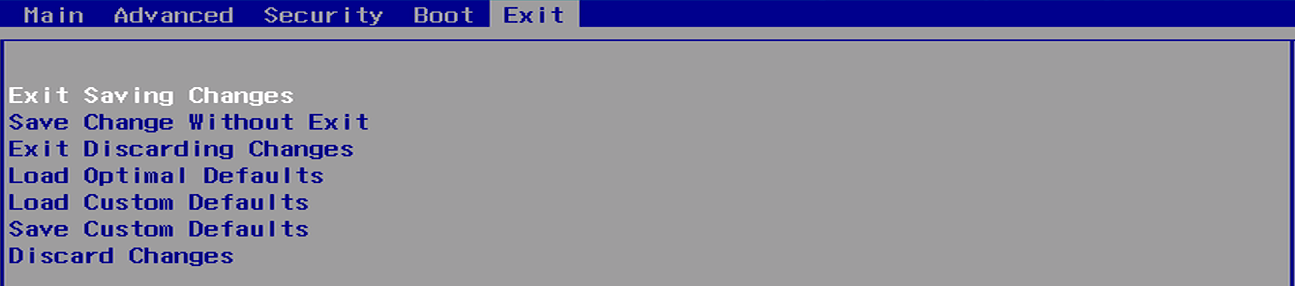
| BIOS Page | Exit Page |
| Description | Saves your changes and exits the BIOS setup menu |