
# HX500 / HX600 BIOS Manual

HX500 / HX600 BIOS Manual

![](/files/4B7qaiSXtNXQcpyUGykT)

**NOTE:** To enter the BIOS on Helix systems, hold the ‘Delete’ key on your keyboard during boot.

## 1 - Front Page <a href="#qp8w8bz5apxo" id="qp8w8bz5apxo"></a>

![](/files/8AiJR670pGtsBqVRHxbR)

**Boot Manager**

| **Type**        | Menu                                                                                                                |
| --------------- | ------------------------------------------------------------------------------------------------------------------- |
| **BIOS Page**   | Front Page                                                                                                          |
| **Description** | Opens the list of detected bootable devices, allowing you to manually select a device to boot, such as an OS or PXE |

**Device Management**

| **Type**        | Menu                                                                                                                                                                  |
| --------------- | --------------------------------------------------------------------------------------------------------------------------------------------------------------------- |
| **BIOS Page**   | Front Page                                                                                                                                                            |
| **Description** | Opens the Device Manager menu which includes a configuration menu for Intel Rapid Storage Technology and a Network Device List (if RST and Network Stack are enabled) |

**Boot From File**

| **Type**        | Menu                                         |
| --------------- | -------------------------------------------- |
| **BIOS Page**   | Front Page                                   |
| **Description** | Allows you to boot from a UEFI bootable file |

**Administer Secure Boot**

| **Type**        | Menu                                     |
| --------------- | ---------------------------------------- |
| **BIOS Page**   | Front Page                               |
| **Description** | Opens the Secure Boot configuration menu |

**Setup Utility**

| **Type**        | Menu                                                                                        |
| --------------- | ------------------------------------------------------------------------------------------- |
| **BIOS Page**   | Front Page                                                                                  |
| **Description** | Opens the primary BIOS configuration menu referenced in sections 2 through 6 of this manual |

**Intel(R) Management Engine BIOS Extension**

| **Type**        | Menu                                                                            |
| --------------- | ------------------------------------------------------------------------------- |
| **BIOS Page**   | Front Page                                                                      |
| **Description** | Opens the Intel Management Engine BIOS Extension (MEBx) configuration interface |

## 2 - Main Page <a href="#id-2l77pjo3erd" id="id-2l77pjo3erd"></a>

![](/files/xfIDhhIFnsAsQ7mu05js)

**InsydeH2O Version**

| **Type**        | Information                                       |
| --------------- | ------------------------------------------------- |
| **BIOS Page**   | Main Page                                         |
| **Description** | Displays current InsydeH2O BIOS Framework version |

**BIOS Version**

| **Type**        | Information                   |
| --------------- | ----------------------------- |
| **BIOS Page**   | Main Page                     |
| **Description** | Displays current BIOS version |

**Build Date**

| **Type**        | Information                                |
| --------------- | ------------------------------------------ |
| **BIOS Page**   | Main Page                                  |
| **Description** | Displays the BIOS build date in MM/DD/YYYY |

**Processor Type**

| **Type**        | Information                            |
| --------------- | -------------------------------------- |
| **BIOS Page**   | Main Page                              |
| **Description** | Displays model number of installed CPU |

**CPU Speed**

| **Type**        | Information                              |
| --------------- | ---------------------------------------- |
| **BIOS Page**   | Main Page                                |
| **Description** | Displays base frequency of installed CPU |

**Number of Processors**

| **Type**        | Information                                     |
| --------------- | ----------------------------------------------- |
| **BIOS Page**   | Main Page                                       |
| **Description** | Displays core and thread count of installed CPU |

**PCH SKU**

| **Type**        | Information                  |
| --------------- | ---------------------------- |
| **BIOS Page**   | Main Page                    |
| **Description** | Displays model number of PCH |

**Total Memory**

| **Type**        | Information                                               |
| --------------- | --------------------------------------------------------- |
| **BIOS Page**   | Main Page                                                 |
| **Description** | Displays total capacity of all memory installed in system |

**Channel A**

| **Type**        | Information                                        |
| --------------- | -------------------------------------------------- |
| **BIOS Page**   | Main Page                                          |
| **Description** | Displays capacity of memory installed in Channel A |

**Channel B**

| **Type**        | Information                                        |
| --------------- | -------------------------------------------------- |
| **BIOS Page**   | Main Page                                          |
| **Description** | Displays capacity of memory installed in Channel B |

**Memory Speed**

| **Type**        | Information                                 |
| --------------- | ------------------------------------------- |
| **BIOS Page**   | Main Page                                   |
| **Description** | Displays base frequency of installed memory |

**Language**

| **Type**        | Information                                           |
| --------------- | ----------------------------------------------------- |
| **BIOS Page**   | Main Page                                             |
| **Description** | Selects the current default language used by the BIOS |

**System Time**

| **Type**        | Information                                                                                                |
| --------------- | ---------------------------------------------------------------------------------------------------------- |
| **BIOS Page**   | Main Page                                                                                                  |
| **Description** | Displays the time in HH:MM:SS. Valid range is from 0 to 23, 0 to 59, 0 to 59. Use +/- to increase/decrease |

**System Date**

| **Type**        | Information                                                                                                       |
| --------------- | ----------------------------------------------------------------------------------------------------------------- |
| **BIOS Page**   | Main Page                                                                                                         |
| **Description** | Displays the date in MM:DD:YYYY. Valid range is from 1 to 12, 1 to 31, 2000 to 2099. Use +/- to increase/decrease |

## 3 - Advanced Page <a href="#id-7dhbdemyl9bg" id="id-7dhbdemyl9bg"></a>

![](/files/e5Ahizs6SuGVeSYJq8x0)

### 3.1 - Boot Configuration  <a href="#id-4214x6l5qfy" id="id-4214x6l5qfy"></a>

<figure><img src="/files/lckd60L919vrwTkNhYkK" alt=""><figcaption></figcaption></figure>

**Numlock**

| **Type**          | Configurable Setting                             |
| ----------------- | ------------------------------------------------ |
| **BIOS Page**     | Advanced Page > Boot Configuration               |
| **Description**   | Sets state of Num Lock key when system is booted |
| **Default Value** | Off                                              |

### 3.2 - SATA Configuration  <a href="#id-595ywiojvyrt" id="id-595ywiojvyrt"></a>

<figure><img src="/files/vjppO6o0Sef947VHvj0I" alt=""><figcaption></figcaption></figure>

**Serial ATA Port X**

| **Type**        | Information                                                 |
| --------------- | ----------------------------------------------------------- |
| **BIOS Page**   | Advanced Page > SATA Configuration                          |
| **Description** | Displays model number of device installed in each SATA Port |

### 3.3 - Chipset Configuration (Intel PTT)  <a href="#lj6tvsrrfrem" id="lj6tvsrrfrem"></a>

<figure><img src="/files/jrXiPJQANcPWlXbehADB" alt=""><figcaption></figcaption></figure>

**Platform Trust Technology**

| **Type**          | Information                                                |
| ----------------- | ---------------------------------------------------------- |
| **BIOS Page**     | Advanced Page > Chipset Configuration (Intel PTT)          |
| **Description**   | Enables or Disables Intel Platform Trust Technology (PTT). |
| **Default Value** | Enabled                                                    |

### 3.4 - ACPI Table/Features Control  <a href="#h12hoq8ubxd9" id="h12hoq8ubxd9"></a>

<figure><img src="/files/vt3GEvUDTvXrGX2NKpYw" alt=""><figcaption></figcaption></figure>

**Enable Hibernation**

| **Type**          | Configurable Setting                                                                                                 |
| ----------------- | -------------------------------------------------------------------------------------------------------------------- |
| **BIOS Page**     | Advanced Page > ACPI Table/Features Control                                                                          |
| **Description**   | Enables or Disables hibernation state (ACPI Sleep State S4) support. This option may not be effective with some OSes |
| **Default Value** | \[X] (enabled)                                                                                                       |

**ACPI S3 Support**

| **Type**          | Configurable Setting                            |
| ----------------- | ----------------------------------------------- |
| **BIOS Page**     | Advanced Page > ACPI Table/Features Control     |
| **Description**   | Enables or Disables ACPI Sleep State S3 support |
| **Default Value** | Enabled                                         |

**Native PCIE Enable**

| **Type**          | Configurable Setting                                                           |
| ----------------- | ------------------------------------------------------------------------------ |
| **BIOS Page**     | Advanced Page > ACPI Table/Features Control                                    |
| **Description**   | Enables or Disables Native PCIe, allowing the OS to control PCIe configuration |
| **Default Value** | Enabled                                                                        |

**Native ASPM**

| **Type**            | Configurable Setting                                                                 |
| ------------------- | ------------------------------------------------------------------------------------ |
| **BIOS Page**       | Advanced Page > ACPI Table/Features Control                                          |
| **Description**     | Enables or Disables Native Active State Power Management (ASPM)                      |
| **Possible Values** | <p>Auto</p><p>Enabled - OS Controlled ASPM</p><p>Disabled - BIOS Controlled ASPM</p> |
| **Default Value**   | Auto                                                                                 |

**Low Power S0 Idle Capability**

| **Type**          | Configurable Setting                                                                                                                                                   |
| ----------------- | ---------------------------------------------------------------------------------------------------------------------------------------------------------------------- |
| **BIOS Page**     | Advanced Page > ACPI Table/Features Control                                                                                                                            |
| **Description**   | Enable or Disable ACPI Lower Power S0 Idle Capability (mutually exclusive with Smart Connect). While this is enabled, it also disables 8254 timer for SLP\_S0 support. |
| **Default Value** | Disabled                                                                                                                                                               |

### 3.5 - CPU Configuration <a href="#stqubqdkop8i" id="stqubqdkop8i"></a>
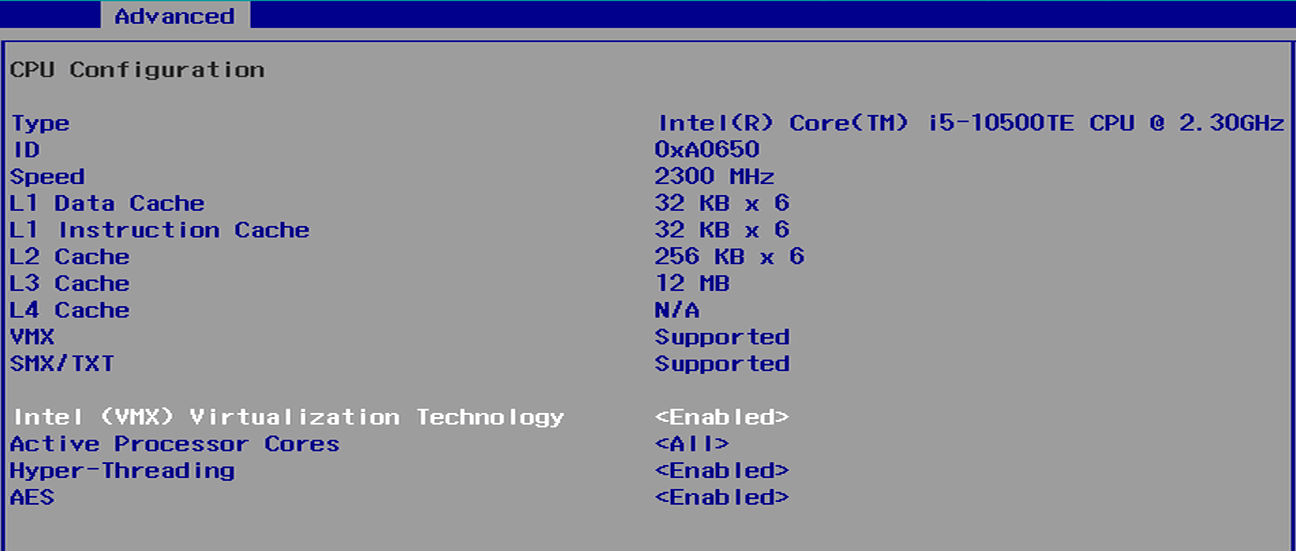
<figure><img src="/files/PLADHZbvMp4ScyGZNnKE" alt=""><figcaption></figcaption></figure>

**Type**

| **Type**        | Information                            |
| --------------- | -------------------------------------- |
| **BIOS Page**   | Advanced Page > CPU Configuration      |
| **Description** | Displays model number of installed CPU |

**ID**

| **Type**        | Information                       |
| --------------- | --------------------------------- |
| **BIOS Page**   | Advanced Page > CPU Configuration |
| **Description** | Displays ID of installed CPU      |

**Speed**

| **Type**        | Information                              |
| --------------- | ---------------------------------------- |
| **BIOS Page**   | Advanced Page > CPU Configuration        |
| **Description** | Displays base frequency of installed CPU |

**L1 Data Cache**

| **Type**        | Information                        |
| --------------- | ---------------------------------- |
| **BIOS Page**   | Advanced Page > CPU Configuration  |
| **Description** | Displays capacity of L1 data cache |

**L1 Instruction Cache**

| **Type**        | Information                               |
| --------------- | ----------------------------------------- |
| **BIOS Page**   | Advanced Page > CPU Configuration         |
| **Description** | Displays capacity of L1 instruction cache |

**L2 Data Cache**

| **Type**        | Information                        |
| --------------- | ---------------------------------- |
| **BIOS Page**   | Advanced Page > CPU Configuration  |
| **Description** | Displays capacity of L2 data cache |

**L3 Data Cache**

| **Type**        | Information                        |
| --------------- | ---------------------------------- |
| **BIOS Page**   | Advanced Page > CPU Configuration  |
| **Description** | Displays capacity of L3 Data Cache |

**L4 Data Cache**

| **Type**        | Information                        |
| --------------- | ---------------------------------- |
| **BIOS Page**   | Advanced Page > CPU Configuration  |
| **Description** | Displays capacity of L4 Data Cache |

**VMX**

| **Type**        | Information                                                                           |
| --------------- | ------------------------------------------------------------------------------------- |
| **BIOS Page**   | Advanced Page > CPU Configuration                                                     |
| **Description** | Displays whether or not Virtual Machine Extensions (VMX) instruction set is supported |

**SMX/TXT**

| **Type**        | Information                                                                                              |
| --------------- | -------------------------------------------------------------------------------------------------------- |
| **BIOS Page**   | Advanced Page > CPU Configuration                                                                        |
| **Description** | Displays whether or not Safer Mode Extensions (SMX) and Trusted Execution Technology (TXT) are supported |

**Intel (VMX) Virtualization Technology**

| **Type**          | Configurable Setting                                                                                                                                               |
| ----------------- | ------------------------------------------------------------------------------------------------------------------------------------------------------------------ |
| **BIOS Page**     | Advanced Page > CPU Configuration                                                                                                                                  |
| **Description**   | Enables or Disables Intel Virtual Machine Extensions (VMX). When enabled, a VMM can utilize the additional hardware capabilities provided by Vanderpool Technology |
| **Default Value** | Enabled                                                                                                                                                            |

**Active Processor Cores**

| **Type**        | Configurable Setting                                     |
| --------------- | -------------------------------------------------------- |
| **BIOS Page**   | Advanced Page > CPU Configuration                        |
| **Description** | Sets number of cores to enable in each processor package |

**Hyper-Threading**

| **Type**          | Configurable Setting                |
| ----------------- | ----------------------------------- |
| **BIOS Page**     | Advanced Page > CPU Configuration   |
| **Description**   | Enables or Disables Hyper-Threading |
| **Default Value** | Enabled                             |

**AES**

| **Type**          | Configurable Setting                                                   |
| ----------------- | ---------------------------------------------------------------------- |
| **BIOS Page**     | Advanced Page > CPU Configuration                                      |
| **Description**   | Enables or Disables Advanced Encryption Standard (AES) instruction set |
| **Default Value** | Enabled                                                                |

### 3.6 - Power & Performance <a href="#uh3nynadjth4" id="uh3nynadjth4"></a>

![](/files/8eAHRGYW6T1xkcgjZeok)

**Boot Performance Mode**

| **Type**            | Configurable Setting                                                             |
| ------------------- | -------------------------------------------------------------------------------- |
| **BIOS Page**       | Advanced Page > Power & Performance                                              |
| **Description**     | Sets the performance state that the BIOS will set starting from the reset vector |
| **Possible Values** | Max Non-Turbo Performance, Max Battery, Turbo Performance                        |
| **Default Value**   | Max Non-Turbo Performance                                                        |

**Intel(R) SpeedStep(tm)**

| **Type**          | Configurable Setting                                               |
| ----------------- | ------------------------------------------------------------------ |
| **BIOS Page**     | Advanced Page > Power & Performance                                |
| **Description**   | Enables or Disables support for more than two CPU frequency ranges |
| **Default Value** | Enabled                                                            |

**Intel(R) Speed Shift Technology**

| **Type**          | Configurable Setting                                                                                                                              |
| ----------------- | ------------------------------------------------------------------------------------------------------------------------------------------------- |
| **BIOS Page**     | Advanced Page > Power & Performance                                                                                                               |
| **Description**   | Enables or Disables Intel(R) Speed Shift Technology support. Enabling will expose the CPPC v2 interface to allow for hardware controlled P-states |
| **Default Value** | Enabled                                                                                                                                           |

**Turbo Mode**

| **Type**          | Configurable Setting                                                                                                 |
| ----------------- | -------------------------------------------------------------------------------------------------------------------- |
| **BIOS Page**     | Advanced Page > Power & Performance                                                                                  |
| **Description**   | Enables or Disables processor Turbo Mode (requires Intel SpeedStep or Intel Speed Shift to be supported and enabled) |
| **Default Value** | Enabled                                                                                                              |

### 3.7 - Memory Configuration <a href="#lshpme42bca4" id="lshpme42bca4"></a>

![](/files/en5O2SjBRuWl1EKrHFWP)

**HOB Buffer Size**

| **Type**            | Configurable Setting                              |
| ------------------- | ------------------------------------------------- |
| **BIOS Page**       | Advanced Page > Memory Configuration              |
| **Description**     | Sets HOB buffer size                              |
| **Possible Values** | Auto, 1B, 1KB, Max (assuming 63KB total HOB size) |
| **Default Value**   | Auto                                              |

**ECC Support**

| **Type**          | Configurable Setting                                           |
| ----------------- | -------------------------------------------------------------- |
| **BIOS Page**     | Advanced Page > Memory Configuration                           |
| **Description**   | Enables or Disables Error-Correcting Code memory (ECC) support |
| **Default Value** | Enabled                                                        |

**Max TOLUD**

| **Type**            | Configurable Setting                                                                                                                                  |
| ------------------- | ----------------------------------------------------------------------------------------------------------------------------------------------------- |
| **BIOS Page**       | Advanced Page > Memory Configuration                                                                                                                  |
| **Description**     | Sets maximum value of TOLUD. Dynamic assignment would adjust TOLUD automatically based on the largest MMIO length of the installed graphic controller |
| **Possible Values** | Dynamic, 1, 1.25, 1.5, 1.75, 2, 2.25, 2.5, 2.75, 3, 3.25, 3.5 (GB)                                                                                    |
| **Default Value**   | Dynamic                                                                                                                                               |

### 3.8 - System Agent (SA) Configuration <a href="#id-41eyul550vm4" id="id-41eyul550vm4"></a>

![](/files/HGDJNEXS9tfloKcOQ5Oj)

**SA PCIe Code Version**

| **Type**        | Information                                     |
| --------------- | ----------------------------------------------- |
| **BIOS Page**   | Advanced Page > System Agent (SA) Configuration |
| **Description** | Displays SA PCIe Code Version                   |

**VT-d**

| **Type**        | Information                                                                            |
| --------------- | -------------------------------------------------------------------------------------- |
| **BIOS Page**   | Advanced Page > System Agent (SA) Configuration                                        |
| **Description** | Displays whether or not Virtualization Technology for Directed I/O (VT-d) is supported |

**Graphics Configuration**

| **Type**        | Sub-Menu                                                        |
| --------------- | --------------------------------------------------------------- |
| **BIOS Page**   | Advanced Page > System Agent (SA) Configuration                 |
| **Description** | Opens Graphics Configuration sub-menu (see section 3.8.1 below) |

**Stop Grant Configuration**

| **Type**            | Configurable Setting                                 |
| ------------------- | ---------------------------------------------------- |
| **BIOS Page**       | Advanced Page > System Agent (SA) Configuration      |
| **Description**     | Sets stop grant configuration to automatic or manual |
| **Possible Values** | Auto, Manual                                         |
| **Default Value**   | Auto                                                 |

**PCIe Spread Spectrum Clocking**

| **Type**          | Configurable Setting                                                                  |
| ----------------- | ------------------------------------------------------------------------------------- |
| **BIOS Page**     | Advanced Page > System Agent (SA) Configuration                                       |
| **Description**   | Enables or Disables PCI Express Spread Spectrum Clocking (SSC) for compliance testing |
| **Default Value** | Enabled                                                                               |

**VT-d**

| **Type**          | Configurable Setting                                                             |
| ----------------- | -------------------------------------------------------------------------------- |
| **BIOS Page**     | Advanced Page > System Agent (SA) Configuration                                  |
| **Description**   | Enables or Disables Virtualization Technology for Directed I/O (VT-d) capability |
| **Default Value** | Enabled                                                                          |

**CHAP Device (B0:D7:F0)**

| **Type**          | Configurable Setting                            |
| ----------------- | ----------------------------------------------- |
| **BIOS Page**     | Advanced Page > System Agent (SA) Configuration |
| **Description**   | Enables or Disables SA CHAP Device              |
| **Default Value** | Disabled                                        |

**Thermal Device (B0:D4:F0)**

| **Type**          | Configurable Setting                            |
| ----------------- | ----------------------------------------------- |
| **BIOS Page**     | Advanced Page > System Agent (SA) Configuration |
| **Description**   | Enables or Disables SA Thermal Device           |
| **Default Value** | Disabled                                        |

**GNA Device (B0:D8:F0)**

| **Type**          | Configurable Setting                            |
| ----------------- | ----------------------------------------------- |
| **BIOS Page**     | Advanced Page > System Agent (SA) Configuration |
| **Description**   | Enables or Disables SA GNA Device               |
| **Default Value** | Disabled                                        |

**CRID Support**

| **Type**          | Configurable Setting                                                          |
| ----------------- | ----------------------------------------------------------------------------- |
| **BIOS Page**     | Advanced Page > System Agent (SA) Configuration                               |
| **Description**   | Enables or Disables CRID control for Intel Stabled IT Platform Program (SIPP) |
| **Default Value** | Disabled                                                                      |

**Above 4GB MMIO BIOS assignment**

| **Type**          | Configurable Setting                                                                                                                   |
| ----------------- | -------------------------------------------------------------------------------------------------------------------------------------- |
| **BIOS Page**     | Advanced Page > System Agent (SA) Configuration                                                                                        |
| **Description**   | Enables or Disables above 4GB MemoryMappedIO (MMIO) BIOS assignment. This is enabled automatically when Aperture Size is set to 2048MB |
| **Default Value** | Disabled                                                                                                                               |

**X2APIC Opt Out**

| **Type**          | Configurable Setting                            |
| ----------------- | ----------------------------------------------- |
| **BIOS Page**     | Advanced Page > System Agent (SA) Configuration |
| **Description**   | Enables or Disables X2APIC\_OPT\_OUT bit        |
| **Default Value** | Disabled                                        |

**IPU Device (B0:D5:F0)**

| **Type**        | Configurable Setting                                       |
| --------------- | ---------------------------------------------------------- |
| **BIOS Page**   | Advanced Page > System Agent (SA) Configuration            |
| **Description** | Enables or Disables SA IPU Device. Default value: Disabled |

#### Graphics Configuration <a href="#vnu9aq7ghp9l" id="vnu9aq7ghp9l"></a>

![](/files/lx3vFfYkdYoqaYwSP2oo)

**Skip Scanning of External Gfx Card**

| **Type**          | Configurable Setting                                                                                      |
| ----------------- | --------------------------------------------------------------------------------------------------------- |
| **BIOS Page**     | Advanced Page > System Agent (SA) Configuration > Graphics Configuration                                  |
| **Description**   | Sets whether or not the system will skip scanning for external GPUs on all PEG and PCH PCIe ports on boot |
| **Default Value** | Disabled (system will scan for external GPUs on boot)                                                     |

**Primary Display**

| **Type**            | Configurable Setting                                                                                                     |
| ------------------- | ------------------------------------------------------------------------------------------------------------------------ |
| **BIOS Page**       | Advanced Page > System Agent (SA) Configuration > Graphics Configuration                                                 |
| **Description**     | Sets which iGFX/PEG/PCI graphics device should be used for the primary display output. Select SG for Switchable Graphics |
| **Possible Values** | Auto, IGFX, PEG, PCI, SG                                                                                                 |
| **Default Value**   | Auto                                                                                                                     |

**Internal Graphics**

| **Type**            | Configurable Setting                                                                                              |
| ------------------- | ----------------------------------------------------------------------------------------------------------------- |
| **BIOS Page**       | Advanced Page > System Agent (SA) Configuration > Graphics Configuration                                          |
| **Description**     | Enables or Disables Integrated Graphics (iGFX). Auto mode will enable or disable based on graphics settings above |
| **Possible Values** | Auto, Enabled, Disabled                                                                                           |
| **Default Value**   | Auto                                                                                                              |

**GTT Size**

| **Type**            | Configurable Setting                                                     |
| ------------------- | ------------------------------------------------------------------------ |
| **BIOS Page**       | Advanced Page > System Agent (SA) Configuration > Graphics Configuration |
| **Description**     | Sets size of the Graphics Translation Table (GTT)                        |
| **Possible Values** | 2MB, 4MB, 8MB                                                            |
| **Default Value**   | 8MB                                                                      |

**Aperture Size**

| **Type**            | Configurable Setting                                                                                                                                                         |
| ------------------- | ---------------------------------------------------------------------------------------------------------------------------------------------------------------------------- |
| **BIOS Page**       | Advanced Page > System Agent (SA) Configuration > Graphics Configuration                                                                                                     |
| **Description**     | Sets the Graphics Aperture Size. The Above 4GB MMIO BIOS assignment is automatically enabled when selecting 2048MB aperture. To use this feature, please disable CSM support |
| **Possible Values** | 128MB, 256MB, 512MB, 1024MB, 2048MB                                                                                                                                          |
| **Default Value**   | 256MB                                                                                                                                                                        |

**DVMT Pre-Allocated**

| **Type**            | Configurable Setting                                                                            |
| ------------------- | ----------------------------------------------------------------------------------------------- |
| **BIOS Page**       | Advanced Page > System Agent (SA) Configuration > Graphics Configuration                        |
| **Description**     | Sets DVMT 5.0 Pre-Allocated (Fixed) graphics memory size used by the Integrated Graphics (iGFX) |
| **Possible Values** | 0, 64, 4, 8, 12, 16, 20, 24, 28, 32/F7, 36, 40, 44, 48, 52, 56, 60 (M)                          |
| **Default Value**   | 32M                                                                                             |

**DVMT Total Gfx Mem**

| **Type**            | Configurable Setting                                                             |
| ------------------- | -------------------------------------------------------------------------------- |
| **BIOS Page**       | Advanced Page > System Agent (SA) Configuration > Graphics Configuration         |
| **Description**     | Select DVMT 5.0 Total Graphic Memory size used by the Integrated Graphics (iGFX) |
| **Possible Values** | 256M, 128M                                                                       |
| **Default Value**   | 256M                                                                             |

### 3.9 - PCH-IO Configuration <a href="#eoizk2wuzq9a" id="eoizk2wuzq9a"></a>

![](/files/V3oBrQqdG2IkDDHKQtZ4)

**PCI Express Configuration**

| **Type**        | Sub-Menu                                                               |
| --------------- | ---------------------------------------------------------------------- |
| **BIOS Page**   | Advanced Page > PCH-IO Configuration                                   |
| **Description** | Opens the PCI Express Configuration sub-menu (see section 3.9.1 below) |

**SATA and RST Configuration**

| **Type**        | Sub-Menu                                                                       |
| --------------- | ------------------------------------------------------------------------------ |
| **BIOS Page**   | Advanced Page > PCH-IO Configuration                                           |
| **Description** | Opens the SATA Device Options Configuration sub-menu (see section 3.9.2 below) |

**HD Audio**

| **Type**        | Sub-Menu                                                                      |
| --------------- | ----------------------------------------------------------------------------- |
| **BIOS Page**   | Advanced Page > PCH-IO Configuration                                          |
| **Description** | Opens the HD Audio Subsystem Configuration sub-menu (see section 3.9.3 below) |

**PCH LAN Controller**

| **Type**          | Configurable Setting                                    |
| ----------------- | ------------------------------------------------------- |
| **BIOS Page**     | Advanced Page > PCH-IO Configuration                    |
| **Description**   | Enables or Disables UEFI initialization of onboard NICs |
| **Default Value** | Enabled                                                 |

**Wake on LAN Enable**

| **Type**          | Configurable Setting                                                                       |
| ----------------- | ------------------------------------------------------------------------------------------ |
| **BIOS Page**     | Advanced Page > PCH-IO Configuration                                                       |
| **Description**   | Enables or Disables the ability of onboard NICs to wake the system from non-DeepSx states. |
| **Default Value** | Enabled                                                                                    |

**SLP\_LAN# Low on DC Power**

| **Type**          | Configurable Setting                          |
| ----------------- | --------------------------------------------- |
| **BIOS Page**     | Advanced Page > PCH-IO Configuration          |
| **Description**   | Enables or Disables SLP\_LAN# Low on DC Power |
| **Default Value** | Enabled                                       |

**EFI Network**

| **Type**            | Configurable Setting                                                        |
| ------------------- | --------------------------------------------------------------------------- |
| **BIOS Page**       | Advanced Page > PCH-IO Configuration                                        |
| **Description**     | Enables or Disables EFI Network support for onboard NICs and/or WiFi module |
| **Possible Values** | Disabled, Onboard NIC, WiFi, Onboard NIC & WiFi                             |
| **Default Value**   | Disabled                                                                    |

**Wake on WLAN and BT Enable**

| **Type**          | Configurable Setting                                                                     |
| ----------------- | ---------------------------------------------------------------------------------------- |
| **BIOS Page**     | Advanced Page > PCH-IO Configuration                                                     |
| **Description**   | Enables or Disables ability of PCI Express Wireless LAN and Bluetooth to wake the system |
| **Default Value** | Disabled                                                                                 |

**PXE ROM**

| **Type**          | Configurable Setting                         |
| ----------------- | -------------------------------------------- |
| **BIOS Page**     | Advanced Page > PCH-IO Configuration         |
| **Description**   | Enables or Disables PXE Option ROM execution |
| **Default Value** | Disabled                                     |

**Auto Power-On**

| **Type**            | Configurable Setting                                                                                                                                            |
| ------------------- | --------------------------------------------------------------------------------------------------------------------------------------------------------------- |
| **BIOS Page**       | Advanced Page > PCH-IO Configuration                                                                                                                            |
| **Description**     | Sets resume state when the system is restored after a mechanical power-off (ACPI G3 state)                                                                      |
| **Possible Values** | <p>Enabled (System will boot directly as soon as power is applied)</p><p>Disabled (System will remain in power-off state until the power button is pressed)</p> |
| **Default Value**   | Disabled                                                                                                                                                        |

#### PCI Express Configuration <a href="#lgoeulrnvioc" id="lgoeulrnvioc"></a>

![](/files/CRHCCmARii5vV0YlWKMP)

**PCI Express Clock Gating**

| **Type**          | Configurable Setting                         |
| ----------------- | -------------------------------------------- |
| **BIOS Page**     | Advanced Page > PCH-IO Configuration         |
| **Description**   | Enables or Disables PCI Express Clock Gating |
| **Default Value** | Enabled                                      |

**PCI Express Root Port \<n>**

| **Type**        | Information                                                      |
| --------------- | ---------------------------------------------------------------- |
| **BIOS Page**   | Advanced Page > PCH-IO Configuration > PCI Express Configuration |
| **Description** | Displays configuration of specified PCI Express Root Port        |

**►PCI Express Root Port \<n>**

| **Type**        | Sub-Menu                                                                                                 |
| --------------- | -------------------------------------------------------------------------------------------------------- |
| **BIOS Page**   | Advanced Page > PCH-IO Configuration > PCI Express Configuration                                         |
| **Description** | Opens the PCI Express Root Port configuration sub-menu for the selected port (see section 3.9.1.1 below) |

**PCI Express Root Port Settings**

![](/files/1z3vBamb0LtfqF3cDWSV)

**PCI Express Root Port**

| **Type**          | Configurable Setting                                                                              |
| ----------------- | ------------------------------------------------------------------------------------------------- |
| **BIOS Page**     | Advanced Page > PCH-IO Configuration > PCI Express Configuration > PCI Express Root Port Settings |
| **Description**   | Enables or disables the selected PCI Express Root Port                                            |
| **Default Value** | Enabled                                                                                           |

**ASPM**

| **Type**            | Configurable Setting                                                                              |
| ------------------- | ------------------------------------------------------------------------------------------------- |
| **BIOS Page**       | Advanced Page > PCH-IO Configuration > PCI Express Configuration > PCI Express Root Port Settings |
| **Description**     | Sets the PCI Express Active State Power Management mode                                           |
| **Possible Values** | Auto, Disabled, L0s, L1, L0sL1                                                                    |
| **Default Value**   | Auto                                                                                              |

**PCIE Speed**

| **Type**            | Configurable Setting                                                                              |
| ------------------- | ------------------------------------------------------------------------------------------------- |
| **BIOS Page**       | Advanced Page > PCH-IO Configuration > PCI Express Configuration > PCI Express Root Port Settings |
| **Description**     | Sets the PCIe Speed of the selected port                                                          |
| **Possible Values** | Auto, Gen1, Gen2, Gen3                                                                            |
| **Default Value**   | Auto                                                                                              |

**Detect Timeout**

| **Type**          | Configurable Setting                                                                                                                                                               |
| ----------------- | ---------------------------------------------------------------------------------------------------------------------------------------------------------------------------------- |
| **BIOS Page**     | Advanced Page > PCH-IO Configuration > PCI Express Configuration > PCI Express Root Port Settings                                                                                  |
| **Description**   | Sets the number of milliseconds reference code will wait for the link to exit detect state for enabled ports before assuming there is no device and potentially disabling the port |
| **Default Value** | 0                                                                                                                                                                                  |

#### SATA and RST Configuration <a href="#rv2hul4p1bau" id="rv2hul4p1bau"></a>

![](/files/wsIj6ZjBkcd4UWZm50Iv)

**SATA Controllers**

| **Type**          | Configurable Setting                                              |
| ----------------- | ----------------------------------------------------------------- |
| **BIOS Page**     | Advanced Page > PCH-IO Configuration > SATA and RST Configuration |
| **Description**   | Enables or Disables the SATA controller and all SATA devices      |
| **Default Value** | Enabled                                                           |

**SATA Mode Selection**

| **Type**            | Configurable Setting                                                                                                                                                                                                                                                                                                                       |
| ------------------- | ------------------------------------------------------------------------------------------------------------------------------------------------------------------------------------------------------------------------------------------------------------------------------------------------------------------------------------------ |
| **BIOS Page**       | Advanced Page > PCH-IO Configuration > SATA and RST Configuration                                                                                                                                                                                                                                                                          |
| **Description**     | <p>Sets the mode of operation of the SATA controller. Setting this to Intel RST Premium With Intel Optane System Acceleration will enabled integrated firmware RAID (see chapter 7 for details)</p><p><strong>Note:</strong> Setting this to Intel RST Premium will prevent the Linux kernel from properly interacting with SATA disks</p> |
| **Possible Values** | AHCI, Intel RST Premium With Intel Optane System Acceleration                                                                                                                                                                                                                                                                              |
| **Default Value**   | AHCI                                                                                                                                                                                                                                                                                                                                       |

**Serial ATA Port \<n>**

| **Type**        | Information                                                                                                     |
| --------------- | --------------------------------------------------------------------------------------------------------------- |
| **BIOS Page**   | Advanced Page > PCH-IO Configuration > SATA and RST Configuration                                               |
| **Description** | Displays the model number of the installed device using the specified port, or “Empty” if no device is detected |

**Software Preserve**

| **Type**        | Information                                                                  |
| --------------- | ---------------------------------------------------------------------------- |
| **BIOS Page**   | Advanced Page > PCH-IO Configuration > SATA and RST Configuration            |
| **Description** | Displays whether or not Software Preserve is supported on the specified port |

**Port \<n>**

| **Type**          | Configurable Setting                                              |
| ----------------- | ----------------------------------------------------------------- |
| **BIOS Page**     | Advanced Page > PCH-IO Configuration > SATA and RST Configuration |
| **Description**   | Enables or Disables the specified SATA Port                       |
| **Default Value** | Enabled                                                           |

**Hot Plug**

| **Type**          | Configurable Setting                                              |
| ----------------- | ----------------------------------------------------------------- |
| **BIOS Page**     | Advanced Page > PCH-IO Configuration > SATA and RST Configuration |
| **Description**   | Enables or Disables SATA Hot Plug support for the specified port  |
| **Default Value** | Disabled                                                          |

**Configured as eSATA**

| **Type**        | Information                                                       |
| --------------- | ----------------------------------------------------------------- |
| **BIOS Page**   | Advanced Page > PCH-IO Configuration > SATA and RST Configuration |
| **Description** | Displays whether or not the specified port is configured as eSATA |

**External**

| **Type**          | Configurable Setting                                              |
| ----------------- | ----------------------------------------------------------------- |
| **BIOS Page**     | Advanced Page > PCH-IO Configuration > SATA and RST Configuration |
| **Description**   | Sets whether or not the specified port is external                |
| **Default Value** | Disabled                                                          |

**Spin Up Device**

| **Type**          | Configurable Setting                                                                                                                                                        |
| ----------------- | --------------------------------------------------------------------------------------------------------------------------------------------------------------------------- |
| **BIOS Page**     | Advanced Page > PCH-IO Configuration > SATA and RST Configuration                                                                                                           |
| **Description**   | Enables or Disables Staggered Spin Up. If enabled for any port, Staggered Spin Up will be performed and only the drives which have this option enabled will spin up at boot |
| **Default Value** | Disabled                                                                                                                                                                    |

**SATA Device Type**

| **Type**            | Configurable Setting                                                                                                                               |
| ------------------- | -------------------------------------------------------------------------------------------------------------------------------------------------- |
| **BIOS Page**       | Advanced Page > PCH-IO Configuration > SATA and RST Configuration                                                                                  |
| **Description**     | Sets the type of disk is connected to the specified SATA port. Certain configuration settings are only applied when this is set to Hard Disk Drive |
| **Possible Values** | Hard Disk Drive, Solid State Drive                                                                                                                 |
| **Default Value**   | Hard Disk Drive                                                                                                                                    |

**Topology**

| **Type**            | Configurable Setting                                              |
| ------------------- | ----------------------------------------------------------------- |
| **BIOS Page**       | Advanced Page > PCH-IO Configuration > SATA and RST Configuration |
| **Description**     | Sets the SATA topology type of the installed device               |
| **Possible Values** | Unknown, ISATA, Direct Connect, Flex, M2                          |
| **Default Value**   | Unknown                                                           |

#### HD Audio <a href="#pjx4rm631gal" id="pjx4rm631gal"></a>

![](/files/L5PktodDsHqixOZYF3K0)

**HD Audio**

| **Type**            | Configurable Setting                                                                                       |
| ------------------- | ---------------------------------------------------------------------------------------------------------- |
| **BIOS Page**       | Advanced Page > PCH-IO Configuration > HD Audio                                                            |
| **Description**     | <p>Enables or Disables the integrated HD Audio device</p><p>Default value: Enabled</p>                     |
| **Possible Values** | <p>Disabled (HDA will be unconditionally disabled)</p><p>Enabled (HDA will be unconditionally enabled)</p> |
| **Default Value**   | Enabled                                                                                                    |

### 3.10 - PCH-FW Configuration <a href="#zi895f9j0lgh" id="zi895f9j0lgh"></a>

![](/files/tqcBjGapr4nhz2givm0w)

**ME Firmware Version**

| **Type**        | Information                                 |
| --------------- | ------------------------------------------- |
| **BIOS Page**   | Advanced Page > PCH-FW Configuration        |
| **Description** | Displays Management Engine firmware version |

**ME Firmware Mode**

| **Type**        | Information                              |
| --------------- | ---------------------------------------- |
| **BIOS Page**   | Advanced Page > PCH-FW Configuration     |
| **Description** | Displays Management Engine firmware mode |

**ME Firmware SKU**

| **Type**        | Information                             |
| --------------- | --------------------------------------- |
| **BIOS Page**   | Advanced Page > PCH-FW Configuration    |
| **Description** | Displays Management Engine firmware SKU |

**ME Firmware Status 1**

| **Type**        | Information                                  |
| --------------- | -------------------------------------------- |
| **BIOS Page**   | Advanced Page > PCH-FW Configuration         |
| **Description** | Displays Management Engine firmware status 1 |

**ME Firmware Status 2**

| **Type**        | Information                                  |
| --------------- | -------------------------------------------- |
| **BIOS Page**   | Advanced Page > PCH-FW Configuration         |
| **Description** | Displays Management Engine firmware status 2 |

**ME State**

| **Type**            | Configurable Setting                                                                                                                  |
| ------------------- | ------------------------------------------------------------------------------------------------------------------------------------- |
| **BIOS Page**       | Advanced Page > PCH-FW Configuration                                                                                                  |
| **Description**     | When Disabled ME will be put into ME Temporarily Disabled Mode. Default value: Enabled                                                |
| **Possible Values** | <p>Enabled (Management Engine will act normally)</p><p>Disabled (Management Engine will be put into ME Temporarily Disabled Mode)</p> |
| **Default Value**   | Enabled                                                                                                                               |

**Manageability Features State**

| **Type**          | Configurable Setting                                                                                                                                                                                                           |
| ----------------- | ------------------------------------------------------------------------------------------------------------------------------------------------------------------------------------------------------------------------------ |
| **BIOS Page**     | Advanced Page > PCH-FW Configuration                                                                                                                                                                                           |
| **Description**   | <p>Enables or Disables Intel Manageability features</p><p><strong>Note:</strong> This option disables/enables Manageability Features support in FW. Platform must be in an unprovisioned state before disabling ME support</p> |
| **Default Value** | Enabled                                                                                                                                                                                                                        |

**AMT BIOS Features**

| **Type**          | Configurable Setting                                                                                                                                                                                                                                 |
| ----------------- | ---------------------------------------------------------------------------------------------------------------------------------------------------------------------------------------------------------------------------------------------------- |
| **BIOS Page**     | Advanced Page > PCH-FW Configuration                                                                                                                                                                                                                 |
| **Description**   | <p>Enables or Disables Active Management Technology (AMT) BIOS Features. Disabling this prevents the user from accessing the MEBx configuration</p><p><strong>Note:</strong> This option does not disable Manageability Features in the firmware</p> |
| **Default Value** | Enabled                                                                                                                                                                                                                                              |

**AMT Configuration**

| **Type**        | Sub-Menu                                                                                             |
| --------------- | ---------------------------------------------------------------------------------------------------- |
| **BIOS Page**   | Advanced Page > PCH-FW Configuration                                                                 |
| **Description** | Opens the Intel Active Management Technology (AMT) configuration sub-menu (see section 3.10.1 below) |

**ME Unconfig on RTC Clear**

| **Type**            | Configurable Setting                                                                                                   |
| ------------------- | ---------------------------------------------------------------------------------------------------------------------- |
| **BIOS Page**       | Advanced Page > PCH-FW Configuration                                                                                   |
| **Description**     | Enables or Disables clearing of Management Engine configuration on CMOS clear                                          |
| **Possible Values** | <p>Enabled (ME settings will be cleared on CMOS clear)</p><p>Disabled (ME settings will be retained on CMOS clear)</p> |
| **Default Values**  | Enabled                                                                                                                |

**Comms Hub Support**

| **Type**          | Configurable Setting                      |
| ----------------- | ----------------------------------------- |
| **BIOS Page**     | Advanced Page > PCH-FW Configuration      |
| **Description**   | Enables or Disables support for Comms Hub |
| **Default Value** | Disabled                                  |

**JHI Support**

| **Type**          | Configurable Setting                                       |
| ----------------- | ---------------------------------------------------------- |
| **BIOS Page**     | Advanced Page > PCH-FW Configuration                       |
| **Description**   | Enables or Disables Intel DAL Host Interface Service (JHI) |
| **Default Value** | Disabled                                                   |

**Core BIOS Done Message**

| **Type**          | Configurable Setting                                   |
| ----------------- | ------------------------------------------------------ |
| **BIOS Page**     | Advanced Page > PCH-FW Configuration                   |
| **Description**   | Enable or Disable sending Core BIOS Done Message to ME |
| **Default Value** | Enabled                                                |

**Firmware Update Configuration**

| **Type**        | Sub-Menu                                                                                      |
| --------------- | --------------------------------------------------------------------------------------------- |
| **BIOS Page**   | Advanced Page > PCH-FW Configuration                                                          |
| **Description** | Opens the Management Engine Firmware Update configuration sub-menu (see section 3.10.2 below) |

**PTT Configuration**

| **Type**        | Sub-Menu                                                                                    |
| --------------- | ------------------------------------------------------------------------------------------- |
| **BIOS Page**   | Advanced Page > PCH-FW Configuration                                                        |
| **Description** | Opens the Platform Trust Technology (PTT) configuration sub-menu (see section 3.10.3 below) |

#### AMT Configuration <a href="#wd0103zefd6y" id="wd0103zefd6y"></a>

![](/files/3PgEPGwIj7aNNkh4ig0h)

**ASF Support**

| **Type**          | Configurable Setting                                     |
| ----------------- | -------------------------------------------------------- |
| **BIOS Page**     | Advanced Page > PCH-FW Configuration > AMT Configuration |
| **Description**   | Enables or Disables Alert Standard Format support        |
| **Default Value** | Enabled                                                  |

**USB Provisioning of AMT**

| **Type**          | Configurable Setting                                                    |
| ----------------- | ----------------------------------------------------------------------- |
| **BIOS Page**     | Advanced Page > PCH-FW Configuration > AMT Configuration                |
| **Description**   | Enables or Disables Active Management Technology (AMT) USB Provisioning |
| **Default Value** | Disabled                                                                |

**CIRA Configuration**

| **Type**        | Sub-Menu                                                                                                 |
| --------------- | -------------------------------------------------------------------------------------------------------- |
| **BIOS Page**   | Advanced Page > PCH-FW Configuration > AMT Configuration                                                 |
| **Description** | Opens the Client Initiated Remote Assistance (CIRA\_ configuration sub-menu (see section 3.10.1.1 below) |

**ASF Configuration**

| **Type**        | Sub-Menu                                                                                  |
| --------------- | ----------------------------------------------------------------------------------------- |
| **BIOS Page**   | Advanced Page > PCH-FW Configuration > AMT Configuration                                  |
| **Description** | Opens the Alert Standard Format (ASF) configuration sub-menu (see section 3.10.1.2 below) |

**Secure Erase Configuration**

| **Type**        | Sub-Menu                                                                   |
| --------------- | -------------------------------------------------------------------------- |
| **BIOS Page**   | Advanced Page > PCH-FW Configuration > AMT Configuration                   |
| **Description** | Opens the Secure Erase configuration sub-menu (see section 3.10.1.3 below) |

**MEBx Resolution Settings**

| **Type**        | Sub-Menu                                                                                              |
| --------------- | ----------------------------------------------------------------------------------------------------- |
| **BIOS Page**   | Advanced Page > PCH-FW Configuration > AMT Configuration                                              |
| **Description** | Opens the Management Engine BIOS Extension (MEBx) configuration sub-menu (see section 3.10.1.4 below) |

**CIRA Configuration**

**Activate Remote Assistance Process**

| **Type**          | Configurable Setting                                                          |
| ----------------- | ----------------------------------------------------------------------------- |
| **BIOS Page**     | Advanced Page > PCH-FW Configuration > AMT Configuration > CIRA Configuration |
| **Description**   | Enables or Disables the Client Initiated Remote Assistance boot process       |
| **Default Value** | \[ ] (disabled)                                                               |

**CIRA Timeout**

| **Type**            | Configurable Setting                                                                                                                                                                                         |
| ------------------- | ------------------------------------------------------------------------------------------------------------------------------------------------------------------------------------------------------------ |
| **BIOS Page**       | Advanced Page > PCH-FW Configuration > AMT Configuration > CIRA Configuration                                                                                                                                |
| **Description**     | <p>Sets the timeout for the CIRA remote assistance connection to be established</p><p><strong>Note:</strong> This setting is only available if the Activate Remote Assistance Process setting is enabled</p> |
| **Possible Values** | 0 to 255 (0 for default timeout of 60 seconds, 255 for no timeout)                                                                                                                                           |
| **Default Value**   | 0                                                                                                                                                                                                            |

**ASF Configuration**

**PET Progress**

| **Type**          | Configurable Setting                                                         |
| ----------------- | ---------------------------------------------------------------------------- |
| **BIOS Page**     | Advanced Page > PCH-FW Configuration > AMT Configuration > ASF Configuration |
| **Description**   | Enables or Disables the ability to receive Platform Event Trap (PET) events  |
| **Default Value** | Enabled                                                                      |

**WatchDog**

| **Type**          | Configurable Setting                                                         |
| ----------------- | ---------------------------------------------------------------------------- |
| **BIOS Page**     | Advanced Page > PCH-FW Configuration > AMT Configuration > ASF Configuration |
| **Description**   | Enables or Disables the Watchdog Timer                                       |
| **Default Value** | Disabled                                                                     |

**OS Timer**

| **Type**          | Configurable Setting                                                                                                                                                                 |
| ----------------- | ------------------------------------------------------------------------------------------------------------------------------------------------------------------------------------ |
| **BIOS Page**     | Advanced Page > PCH-FW Configuration > AMT Configuration > ASF Configuration                                                                                                         |
| **Description**   | <p>Sets the WatchDog Timer duration in seconds so that an OS can interact with it</p><p><strong>Note:</strong> This setting is only available if the WatchDog setting is enabled</p> |
| **Default Value** | 0                                                                                                                                                                                    |

**BIOS Timer**

| **Type**          | Configurable Setting                                                                                                                                                                                                                          |
| ----------------- | --------------------------------------------------------------------------------------------------------------------------------------------------------------------------------------------------------------------------------------------- |
| **BIOS Page**     | Advanced Page > PCH-FW Configuration > AMT Configuration > ASF Configuration                                                                                                                                                                  |
| **Description**   | <p>Sets the WatchDog Timer duration in seconds at the BIOS level. This timer will reset the system if it fails to POST within the duration</p><p><strong>Note:</strong> This setting is only available if the WatchDog setting is enabled</p> |
| **Default Value** | 0                                                                                                                                                                                                                                             |

**ASF Sensors Table**

| **Type**          | Configurable Setting                                                         |
| ----------------- | ---------------------------------------------------------------------------- |
| **BIOS Page**     | Advanced Page > PCH-FW Configuration > AMT Configuration > ASF Configuration |
| **Description**   | Enables or Disables adding the ASF Sensor Table to the ASF ACPI Table        |
| **Default Value** | Disabled                                                                     |

**Secure Erase Configuration**

**Secure Erase Mode**

| **Type**            | Configurable Setting                                                                                                                         |
| ------------------- | -------------------------------------------------------------------------------------------------------------------------------------------- |
| **BIOS Page**       | Advanced Page > PCH-FW Configuration > AMT Configuration > Secure Erase Configuration                                                        |
| **Description**     | Sets the behavior of the Secure Erase module                                                                                                 |
| **Possible Values** | <p>- Simulated (performs the Secure Erase process without erasing disks)</p><p>- Real (performs the Secure Erase process, erasing disks)</p> |
| **Default Value**   | Simulated                                                                                                                                    |

**Force Secure Erase**

| **Type**          | Configurable Setting                                                                  |
| ----------------- | ------------------------------------------------------------------------------------- |
| **BIOS Page**     | Advanced Page > PCH-FW Configuration > AMT Configuration > Secure Erase Configuration |
| **Description**   | Enables or Disables forcing the Secure Erase process to occur on next boot            |
| **Default Value** | Disabled                                                                              |

**MEBx Resolution Settings**

**Non-UI Mode Resolution**

| **Type**            | Configurable Setting                                                                |
| ------------------- | ----------------------------------------------------------------------------------- |
| **BIOS Page**       | Advanced Page > PCH-FW Configuration > AMT Configuration > MEBx Resolution Settings |
| **Description**     | Sets the resolution for the non-UI text-based MEBx mode                             |
| **Possible Values** | Auto, 80x25, 100x31                                                                 |
| **Default Value**   | Auto                                                                                |

**UI Mode Resolution**

| **Type**            | Configurable Setting                                                                |
| ------------------- | ----------------------------------------------------------------------------------- |
| **BIOS Page**       | Advanced Page > PCH-FW Configuration > AMT Configuration > MEBx Resolution Settings |
| **Description**     | Sets the resolution for the UI text-based MEBx mode                                 |
| **Possible Values** | Auto, 80x25, 100x31                                                                 |
| **Default Value**   | Auto                                                                                |

**Graphics Mode Resolution**

| **Type**            | Configurable Setting                                                                |
| ------------------- | ----------------------------------------------------------------------------------- |
| **BIOS Page**       | Advanced Page > PCH-FW Configuration > AMT Configuration > MEBx Resolution Settings |
| **Description**     | Sets the resolution for the Graphical MEBx mode                                     |
| **Possible Values** | Auto, 640x480, 800x600, 1024x768                                                    |
| **Default Value**   | Auto                                                                                |

#### Firmware Update Configuration <a href="#qzrh8hrfdo5o" id="qzrh8hrfdo5o"></a>

<figure><img src="/files/JumEWNfhIX4oZEoumPP5" alt=""><figcaption></figcaption></figure>

**ME Firmware Re-Flash**

| **Type**          | Configurable Setting                                                   |
| ----------------- | ---------------------------------------------------------------------- |
| **BIOS Page**     | Advanced Page > PCH-FW Configuration > Firmware Update Configuration   |
| **Description**   | Enables or Disables Management Engine Firmware Image Re-Flash function |
| **Default Value** | Disabled                                                               |

#### PTT Configuration <a href="#v4n4xula4w1w" id="v4n4xula4w1w"></a>

**PTT Capability / State**

| **Type**        | Information                                                            |
| --------------- | ---------------------------------------------------------------------- |
| **BIOS Page**   | Advanced Page > PCH-FW Configuration > PTT Configuration               |
| **Description** | Displays Platform Trust Technology (PTT) Capability / Enablement State |

### 3.11 - Thermal Configuration <a href="#mkns8c8c47ue" id="mkns8c8c47ue"></a>

**Automatic Thermal Reporting**

| **Type**            | Configurable Setting                                                                                                                                         |
| ------------------- | ------------------------------------------------------------------------------------------------------------------------------------------------------------ |
| **BIOS Page**       | Advanced Page > Thermal Configuration                                                                                                                        |
| **Description**     | Enables or Disables automatic configuration of \_CRT, \_PSV and \_AC0 based on values recommended in BWG’s Thermal Reporting for Thermal Management settings |
| **Possible Values** | <p>Enabled (automatic configuration)</p><p>Disabled (manual configuration)</p>                                                                               |
| **Default Value**   | Disabled                                                                                                                                                     |

**Critical Trip Point**

| **Type**            | Configurable Setting                                                                                                                                                                                     |
| ------------------- | -------------------------------------------------------------------------------------------------------------------------------------------------------------------------------------------------------- |
| **BIOS Page**       | Advanced Page > Thermal Configuration                                                                                                                                                                    |
| **Description**     | <p>Sets the temperature value of the ACPI Critical Trip Point (the point at which the system will shut off.)</p><p><strong>Note:</strong> 119C is the Plan Of Record (POR) for all Intel processors.</p> |
| **Possible Values** | 15, 23, 31, 39, 47, 55, 63, 71, 79, 87, 95, 100, 103, 111, 119, 127 (C)                                                                                                                                  |
| **Default Value**   | 119 C (POR)                                                                                                                                                                                              |

**Active Trip Point 0**

| **Type**            | Configurable Setting                                                                                                                               |
| ------------------- | -------------------------------------------------------------------------------------------------------------------------------------------------- |
| **BIOS Page**       | Advanced Page > Thermal Configuration                                                                                                              |
| **Description**     | Sets the temperature value of the ACPI Active Trip Point 0 (the point at which the OS will set the processor fan to Active Trip Point 0 Fan Speed) |
| **Possible Values** | 15, 23, 31, 39, 47, 55, 63, 71, 79, 87, 95, 100, 111, 127 (C)                                                                                      |
| **Default Value**   | 71 C                                                                                                                                               |

**Active Trip Point 0 Fan Speed**

| **Type**            | Configurable Setting                                                                                                                          |
| ------------------- | --------------------------------------------------------------------------------------------------------------------------------------------- |
| **BIOS Page**       | Advanced Page > Thermal Configuration                                                                                                         |
| **Description**     | Sets Active Trip Point 0 Fan Speed percentage (the percentage of maximum speed at which the fan will run when Active Trip Point 0 is crossed) |
| **Possible Values** | 0 to 100                                                                                                                                      |
| **Default Value**   | 100                                                                                                                                           |

**Active Trip Point 1**

| **Type**            | Configurable Setting                                                                                                                               |
| ------------------- | -------------------------------------------------------------------------------------------------------------------------------------------------- |
| **BIOS Page**       | Advanced Page > Thermal Configuration                                                                                                              |
| **Description**     | Sets the temperature value of the ACPI Active Trip Point 1 (the point at which the OS will set the processor fan to Active Trip Point 1 Fan Speed) |
| **Possible Values** | 15, 23, 31, 39, 47, 55, 63, 71, 79, 87, 95, 100, 111, 127 (C)                                                                                      |
| **Default Value**   | 55 C                                                                                                                                               |

**Active Trip Point 1 Fan Speed**

| **Type**            | Configurable Setting                                                                                                                          |
| ------------------- | --------------------------------------------------------------------------------------------------------------------------------------------- |
| **BIOS Page**       | Advanced Page > Thermal Configuration                                                                                                         |
| **Description**     | Sets Active Trip Point 1 Fan Speed percentage (the percentage of maximum speed at which the fan will run when Active Trip Point 1 is crossed) |
| **Possible Values** | 0 to 100                                                                                                                                      |
| **Default Value**   | 75                                                                                                                                            |

**Passive Trip Point**

| **Type**            | Configurable Setting                                                                                                                |
| ------------------- | ----------------------------------------------------------------------------------------------------------------------------------- |
| **BIOS Page**       | Advanced Page > Thermal Configuration                                                                                               |
| **Description**     | Sets the temperature value of the ACPI Passive Trip Point (the point in which the OS will begin throttling the processor frequency) |
| **Possible Values** | 15, 23, 31, 39, 47, 55, 63, 71, 79, 87, 100, 103, 111, 119 (POR), 127 (C)                                                           |
| **Default Value**   | 95 C                                                                                                                                |

**Passive TC1 Value**

| **Type**            | Configurable Setting                                    |
| ------------------- | ------------------------------------------------------- |
| **BIOS Page**       | Advanced Page > Thermal Configuration                   |
| **Description**     | Sets the TC1 value for the ACPI Passive Cooling Formula |
| **Possible Values** | 1 to 16                                                 |
| **Default Value**   | 1                                                       |

**Passive TC2 Value**

| **Type**            | Configurable Setting                                    |
| ------------------- | ------------------------------------------------------- |
| **BIOS Page**       | Advanced Page > Thermal Configuration                   |
| **Description**     | Sets the TC2 value for the ACPI Passive Cooling Formula |
| **Possible Values** | 1 to 16                                                 |
| **Default Value**   | 5                                                       |

**Passive TSP Value**

| **Type**            | Configurable Setting                                                                                                                                                              |
| ------------------- | --------------------------------------------------------------------------------------------------------------------------------------------------------------------------------- |
| **BIOS Page**       | Advanced Page > Thermal Configuration                                                                                                                                             |
| **Description**     | Sets the TSP value for the ACPI Passive Cooling Formula. This value represents how often (in tenths of a second) the OS will read the temperature when passive cooling is enabled |
| **Possible Values** | 2 to 32                                                                                                                                                                           |
| **Default Value**   | 10                                                                                                                                                                                |

**Active Trip Points**

| **Type**          | Configurable Setting                   |
| ----------------- | -------------------------------------- |
| **BIOS Page**     | Advanced Page > Thermal Configuration  |
| **Description**   | Enables or Disables Active Trip Points |
| **Default Value** | Enabled                                |

**Passive Trip Points**

| **Type**          | Configurable Setting                    |
| ----------------- | --------------------------------------- |
| **BIOS Page**     | Advanced Page > Thermal Configuration   |
| **Description**   | Enables or Disables Passive Trip Points |
| **Default Value** | Disabled                                |

**Critical Trip Points**

| **Type**          | Configurable Setting                     |
| ----------------- | ---------------------------------------- |
| **BIOS Page**     | Advanced Page > Thermal Configuration    |
| **Description**   | Enables or Disables Critical Trip Points |
| **Default Value** | Enabled                                  |

**Active Trip Points**

| **Type**          | Configurable Setting                   |
| ----------------- | -------------------------------------- |
| **BIOS Page**     | Advanced Page > Thermal Configuration  |
| **Description**   | Enables or Disables Active Trip Points |
| **Default Value** | Enabled                                |

**PCH Temp Read**

| **Type**          | Configurable Setting                           |
| ----------------- | ---------------------------------------------- |
| **BIOS Page**     | Advanced Page > Thermal Configuration          |
| **Description**   | Enables or Disables reading of PCH temperature |
| **Default Value** | \[X] (enabled)                                 |

**CPU Energy Read**

| **Type**          | Configurable Setting                          |
| ----------------- | --------------------------------------------- |
| **BIOS Page**     | Advanced Page > Thermal Configuration         |
| **Description**   | Enables or Disables reading of CPU power draw |
| **Default Value** | \[X] (enabled)                                |

**CPU Temp Read**

| **Type**          | Configurable Setting                            |
| ----------------- | ----------------------------------------------- |
| **BIOS Page**     | Advanced Page > Thermal Configuration           |
| **Description**   | Enables or Disables reading of CPU temperatures |
| **Default Value** | \[X] (enabled)                                  |

**Alert Enable Lock**

| **Type**          | Configurable Setting                                     |
| ----------------- | -------------------------------------------------------- |
| **BIOS Page**     | Advanced Page > Thermal Configuration                    |
| **Description**   | Enables or Disables locking of all Alert Enable settings |
| **Default Value** | Disabled                                                 |

**CPU Temp**

| **Type**          | Configurable Setting                                                                   |
| ----------------- | -------------------------------------------------------------------------------------- |
| **BIOS Page**     | Advanced Page > Thermal Configuration                                                  |
| **Description**   | Sets the Fail Safe temperature that the embedded controller will use if the OS is hung |
| **Default Value** | 75                                                                                     |

**CPU Fan Speed**

| **Type**            | Configurable Setting                                                       |
| ------------------- | -------------------------------------------------------------------------- |
| **BIOS Page**       | Advanced Page > Thermal Configuration                                      |
| **Description**     | Sets the fan speed that the embedded controller will use if the OS is hung |
| **Possible Values** | 0-100%                                                                     |
| **Default Value**   | 65%                                                                        |

### 3.12 - SIO NCT5524D <a href="#pmz0n8ozivz" id="pmz0n8ozivz"></a>

**UART Port 1 Configuration**

| **Type**        | Sub-Menu                                                                       |
| --------------- | ------------------------------------------------------------------------------ |
| **BIOS Page**   | Advanced Page > SIO NCT5524D Chip                                              |
| **Description** | Opens the UART Port 1 (COM1) configuration sub-menu (see section 3.12.1 below) |

**UART Port 2 Configuration**

| **Type**        | Sub-Menu                                                                       |
| --------------- | ------------------------------------------------------------------------------ |
| **BIOS Page**   | Advanced Page > SIO NCT5524D Chip                                              |
| **Description** | Opens the UART Port 2 (COM2) configuration sub-menu (see section 3.12.1 below) |

**Fan Control**

| **Type**        | Sub-Menu                                                                |
| --------------- | ----------------------------------------------------------------------- |
| **BIOS Page**   | Advanced Page > SIO NCT5524D Chip                                       |
| **Description** | Opens the Fan Control configuration sub-menu (see section 3.12.2 below) |

**Hardware Monitor**

| **Type**        | Sub-Menu                                                                                             |
| --------------- | ---------------------------------------------------------------------------------------------------- |
| **BIOS Page**   | Advanced Page > SIO NCT5524D Chip                                                                    |
| **Description** | Opens the Hardware Monitor sub-menu to display hardware monitoring values (see section 3.12.6 below) |

#### UART Port 1/2 Configuration <a href="#mnfzu1fmy8q8" id="mnfzu1fmy8q8"></a>

**UART Port \<n>**

| **Type**          | Configurable Setting                                          |
| ----------------- | ------------------------------------------------------------- |
| **BIOS Page**     | Advanced Page > SIO NCT5524D Chip > UART Port X Configuration |
| **Description**   | Enables or Disables selected COM port                         |
| **Default Value** | Enabled                                                       |

**Power Over Cable**

| **Type**        | Configurable Setting                                          |
| --------------- | ------------------------------------------------------------- |
| **BIOS Page**   | Advanced Page > SIO NCT5524D Chip > UART Port X Configuration |
| **Description** | Enables or Disables DC power on pin 9 of selected COM port    |

**Mode Select**

| **Type**            | Configurable Setting                                                                                                                                                                                                                                                                                                                                                                                                                                                                                          |
| ------------------- | ------------------------------------------------------------------------------------------------------------------------------------------------------------------------------------------------------------------------------------------------------------------------------------------------------------------------------------------------------------------------------------------------------------------------------------------------------------------------------------------------------------- |
| **BIOS Page**       | Advanced Page > SIO NCT5524D Chip > UART Port X Configuration                                                                                                                                                                                                                                                                                                                                                                                                                                                 |
| **Description**     | Sets the communication protocol of the selected COM port                                                                                                                                                                                                                                                                                                                                                                                                                                                      |
| **Possible Values** | <p>- Pure RS-232</p><p>- RS-422 Full Duplex</p><p>- RS-485 Half Duplex (TX ENABLE Low Active)</p><p>- RS-422 Full Duplex (with termination resistor and bias resistor)</p><p>- Pure RS-232 (co-exists with RS485)</p><p>- RS-485 Half Duplex (with termination resistor and bias resistor)</p><p>- Low Power Shutdown\*</p><p>\*This option puts the transceiver into a low-power mode, deactivating the serial communications to minimize power draw. When selected, the serial ports will not be usable</p> |
| **Default Value**   | Pure RS-232                                                                                                                                                                                                                                                                                                                                                                                                                                                                                                   |

#### Fan Control <a href="#iijcf1vw5ucd" id="iijcf1vw5ucd"></a>

**CPUFANIN**

| **Type**        | Information                                |
| --------------- | ------------------------------------------ |
| **BIOS Page**   | Advanced Page > SIO NCT5524D > Fan Control |
| **Description** | Displays current CPU Fan RPM               |

**CPUTIN**

| **Type**        | Information                                |
| --------------- | ------------------------------------------ |
| **BIOS Page**   | Advanced Page > SIO NCT5524D > Fan Control |
| **Description** | Displays current CPU package temperature   |

**Mode**

| **Type**            | Configurable Setting                                                                                                                                                            |
| ------------------- | ------------------------------------------------------------------------------------------------------------------------------------------------------------------------------- |
| **BIOS Page**       | Advanced Page > SIO NCT5524D > Fan Control                                                                                                                                      |
| **Description**     | Sets fan control mode. Certain modes will add or remove settings that only pertain to that mode; see sections 3.12.2.1 through 3.12.2.3 for mode-specific configuration options |
| **Possible Values** | Manual, Thermal Cruise, Speed Cruise, Smart Fan IV                                                                                                                              |
| **Default Value**   | Smart Fan IV                                                                                                                                                                    |

**PWM/DC Output**

| **Type**            | Configurable Setting                       |
| ------------------- | ------------------------------------------ |
| **BIOS Page**       | Advanced Page > SIO NCT5524D > Fan Control |
| **Description**     | Sets the type of fan control signal        |
| **Possible Values** | PWM Duty Cycle (%), DC Voltage (%)         |
| **Default Value**   | PWM Duty Cycle (%)                         |

**Output Buffer Type**

| **Type**            | Configurable Setting                                                                                                                                                      |
| ------------------- | ------------------------------------------------------------------------------------------------------------------------------------------------------------------------- |
| **BIOS Page**       | Advanced Page > SIO NCT5524D > Fan Control                                                                                                                                |
| **Description**     | <p>Sets the characteristics of the output buffer</p><p><strong>Note:</strong> This setting is only available if the PWM/DC Output option is set to PWM Duty Cycle (%)</p> |
| **Possible Values** | Open-Drain, Push-Pull                                                                                                                                                     |
| **Default Value**   | Open-Drain                                                                                                                                                                |

**PWM Duty Cycle (%)**

| **Type**            | Configurable Setting                                                                                                                                                                      |
| ------------------- | ----------------------------------------------------------------------------------------------------------------------------------------------------------------------------------------- |
| **BIOS Page**       | Advanced Page > SIO NCT5524D > Fan Control                                                                                                                                                |
| **Description**     | <p>Sets the duty cycle percentage for the fan control PWM signal</p><p><strong>Note:</strong> This setting is only available if the PWM/DC Output option is set to PWM Duty Cycle (%)</p> |
| **Possible Values** | 0 to 100                                                                                                                                                                                  |
| **Default Value**   | 50                                                                                                                                                                                        |

**PWM Duty Cycle (%)**

| **Type**            | Configurable Setting                                                                                                                                                                                                   |
| ------------------- | ---------------------------------------------------------------------------------------------------------------------------------------------------------------------------------------------------------------------- |
| **BIOS Page**       | Advanced Page > SIO NCT5524D > Fan Control (with Mode option set to Manual)                                                                                                                                            |
| **Description**     | <p>Sets the DC voltage percentage for the fan control signal</p><p><strong>Note:</strong> This setting is only available if the Mode option is set to Manual and the PWM/DC Output option is set to DC Voltage (%)</p> |
| **Possible Values** | 0 to 100                                                                                                                                                                                                               |
| **Default Value**   | 50                                                                                                                                                                                                                     |

**Fan Control (Thermal Cruise Mode)**

**The following settings are only available if the Mode option above is set to Thermal Cruise.**

Target Temperature (°C)

| **Type**          | Configurable Setting                                                                            |
| ----------------- | ----------------------------------------------------------------------------------------------- |
| **BIOS Page**     | Advanced Page > SIO NCT5524D > Fan Control (with Mode option set to Thermal Cruise)             |
| **Description**   | Sets the target CPU temperature in degrees Celsius that the fan control will adjust to maintain |
| **Default Value** | 0                                                                                               |

**Tolerance (°C)**

| **Type**          | Configurable Setting                                                                   |
| ----------------- | -------------------------------------------------------------------------------------- |
| **BIOS Page**     | Advanced Page > SIO NCT5524D > Fan Control (with Mode option set to Thermal Cruise)    |
| **Description**   | Sets the temperature tolerance in degrees Celsius for the Target Temperature set above |
| **Default Value** | 0                                                                                      |

**Fan Control (Speed Cruise Mode)**

**Target Fan Speed**

| **Type**          | Configurable Setting                                                              |
| ----------------- | --------------------------------------------------------------------------------- |
| **BIOS Page**     | Advanced Page > SIO NCT5524D > Fan Control (with Mode option set to Speed Cruise) |
| **Description**   | Sets the target fan speed that the fan control will adjust to maintain            |
| **Default Value** | 0                                                                                 |

**Tolerance**

| **Type**          | Configurable Setting                                                                |
| ----------------- | ----------------------------------------------------------------------------------- |
| **BIOS Page**     | Advanced Page > SIO NCT5524D > Fan Control (with Mode option set to Thermal Cruise) |
| **Description**   | Sets the tolerance for the target fan speed set above                               |
| **Default Value** | 0                                                                                   |

**Fan Control (Smart Fan IV Mode)**

**Boundary 0 (°C)**

| **Type**          | Configurable Setting                                                                                  |
| ----------------- | ----------------------------------------------------------------------------------------------------- |
| **BIOS Page**     | Advanced Page > SIO NCT5524D Chip > Fan Control (with Mode option set to Smart Fan IV)                |
| **Description**   | Sets the temperature at which the fan speed will be set to the value specified in the Output 0 option |
| **Default Value** | 30                                                                                                    |

**Output 0 (%)**

| **Type**            | Configurable Setting                                                                                                       |
| ------------------- | -------------------------------------------------------------------------------------------------------------------------- |
| **BIOS Page**       | Advanced Page > SIO NCT5524D Chip > Fan Control (with Mode option set to Smart Fan IV)                                     |
| **Description**     | Sets the fan speed percentage that will be used when the temperature hits the threshold specified in the Boundary 0 option |
| **Possible Values** | 0 to 100                                                                                                                   |
| **Default Value**   | 25                                                                                                                         |

**Boundary 1 (°C)**

| **Type**          | Configurable Setting                                                                                                     |
| ----------------- | ------------------------------------------------------------------------------------------------------------------------ |
| **BIOS Page**     | Advanced Page > SIO NCT5524D Chip > Fan Control (with Mode option set to Smart Fan IV)                                   |
| **Description**   | Sets the temperature in degrees Celsius at which the fan speed will be set to the value specified in the Output 1 option |
| **Default Value** | 40                                                                                                                       |

**Output 1 (%)**

| **Type**            | Configurable Setting                                                                                                       |
| ------------------- | -------------------------------------------------------------------------------------------------------------------------- |
| **BIOS Page**       | Advanced Page > SIO NCT5524D Chip > Fan Control (with Mode option set to Smart Fan IV)                                     |
| **Description**     | Sets the fan speed percentage that will be used when the temperature hits the threshold specified in the Boundary 1 option |
| **Possible Values** | 0 to 100                                                                                                                   |
| **Default Value**   | 50                                                                                                                         |

**Boundary 2 (°C)**

| **Type**          | Configurable Setting                                                                                                     |
| ----------------- | ------------------------------------------------------------------------------------------------------------------------ |
| **BIOS Page**     | Advanced Page > SIO NCT5524D Chip > Fan Control (with Mode option set to Smart Fan IV)                                   |
| **Description**   | Sets the temperature in degrees Celsius at which the fan speed will be set to the value specified in the Output 2 option |
| **Default Value** | 50                                                                                                                       |

**Output 2 (%)**

| **Type**            | Configurable Setting                                                                                                       |
| ------------------- | -------------------------------------------------------------------------------------------------------------------------- |
| **BIOS Page**       | Advanced Page > SIO NCT5524D Chip > Fan Control (with Mode option set to Smart Fan IV)                                     |
| **Description**     | Sets the fan speed percentage that will be used when the temperature hits the threshold specified in the Boundary 2 option |
| **Possible Values** | 0 to 100                                                                                                                   |
| **Default Value**   | 75                                                                                                                         |

**Boundary 3 (°C)**

| **Type**          | Configurable Setting                                                                                                     |
| ----------------- | ------------------------------------------------------------------------------------------------------------------------ |
| **BIOS Page**     | Advanced Page > SIO NCT5524D Chip > Fan Control (with Mode option set to Smart Fan IV)                                   |
| **Description**   | Sets the temperature in degrees Celsius at which the fan speed will be set to the value specified in the Output 3 option |
| **Default Value** | 60                                                                                                                       |

**Output 3 (%)**

| **Type**            | Configurable Setting                                                                                                       |
| ------------------- | -------------------------------------------------------------------------------------------------------------------------- |
| **BIOS Page**       | Advanced Page > SIO NCT5524D Chip > Fan Control (with Mode option set to Smart Fan IV)                                     |
| **Description**     | Sets the fan speed percentage that will be used when the temperature hits the threshold specified in the Boundary 3 option |
| **Possible Values** | 0 to 100                                                                                                                   |
| **Default Value**   | 100                                                                                                                        |

#### Hardware Monitor <a href="#vczwl8nilf0k" id="vczwl8nilf0k"></a>

**Refresh Cycle**

| **Type**            | Configurable Setting                                             |
| ------------------- | ---------------------------------------------------------------- |
| **BIOS Page**       | Advanced Page > SIO NCT5524D Chip > Hardware Monitor             |
| **Description**     | Sets the interval in seconds at which the monitor updates values |
| **Possible Values** | 0 to 15 (setting to 0 stops the monitor from updating values)    |
| **Default Value**   | 1                                                                |

### 4 - Security Page <a href="#t777ry1felov" id="t777ry1felov"></a>

**Current TPM Device**

| **Type**        | Information                 |
| --------------- | --------------------------- |
| **BIOS Page**   | Security Page               |
| **Description** | Displays current TPM device |

**TPM State**

| **Type**        | Information                |
| --------------- | -------------------------- |
| **BIOS Page**   | Security Page              |
| **Description** | Displays current TPM state |

**TPM Active PCR Hash Algorithm**

| **Type**        | Information                        |
| --------------- | ---------------------------------- |
| **BIOS Page**   | Security Page                      |
| **Description** | Displays active PCR hash algorithm |

**TPM Hardware Supported Hash Algorithm**

| **Type**        | Information                                |
| --------------- | ------------------------------------------ |
| **BIOS Page**   | Security Page                              |
| **Description** | Displays hardware supported hash algorithm |

**BIOS Supported Hash Algorithm**

| **Type**        | Information                            |
| --------------- | -------------------------------------- |
| **BIOS Page**   | Security Page                          |
| **Description** | Displays BIOS supported hash algorithm |

**TrEE Protocol Version**

| **Type**            | Configurable Setting                                                                      |
| ------------------- | ----------------------------------------------------------------------------------------- |
| **BIOS Page**       | Security Page                                                                             |
| **Description**     | Sets the TrEE Protocol Version: 1.0 or 1.1. Possible values: 1.1, 1.0. Default value: 1.1 |
| **Possible Values** | 1.1, 1.0                                                                                  |
| **Default Value**   | 1.1                                                                                       |

**TPM Availability**

| **Type**            | Configurable Setting                   |
| ------------------- | -------------------------------------- |
| **BIOS Page**       | Security Page                          |
| **Description**     | Enables or Disables the TPM hardware   |
| **Possible Values** | Available (enabled), Hidden (disabled) |
| **Default Value**   | Available                              |

**TPM Operation**

| **Type**            | Configurable Setting                                                                                                                                                                                                                                                                                                                                                                                                                                                                                             |
| ------------------- | ---------------------------------------------------------------------------------------------------------------------------------------------------------------------------------------------------------------------------------------------------------------------------------------------------------------------------------------------------------------------------------------------------------------------------------------------------------------------------------------------------------------- |
| **BIOS Page**       | Security Page                                                                                                                                                                                                                                                                                                                                                                                                                                                                                                    |
| **Description**     | Sets the TPM2 operation state                                                                                                                                                                                                                                                                                                                                                                                                                                                                                    |
| **Possible Values** | <p>- No Operation</p><p>- Enable</p><p>- SetPCRBanks(Algorithm)</p><p>- LogAllDigests</p><p>- SetPPRequiredForClear\_True</p><p>- SetPPRequiredForClear\_False</p><p>- SetPPRequiredForTurnOn\_False</p><p>- SetPPRequiredForTurnOn\_True</p><p>- SetPPRequiredForTurnOff\_False</p><p>- SetPPRequiredForTurnOff\_True</p><p>- SetPPRequiredForChangePCRs\_False</p><p>- SetPPRequriedForChangePCRs\_True</p><p>- SetPPRequiredForChangeEPS\_False</p><p>- SetPPRequiredForChangeEPS\_True</p><p>- ChangeEPS</p> |
| **Default Value**   | No Operation                                                                                                                                                                                                                                                                                                                                                                                                                                                                                                     |

**Clear TPM**

| **Type**          | Configurable Setting                                                                 |
| ----------------- | ------------------------------------------------------------------------------------ |
| **BIOS Page**     | Security Page                                                                        |
| **Description**   | Enables or Disables clearing TPM user data such as passwords, certificates, and keys |
| **Default Value** | \[ ] (disabled)                                                                      |

**Set Supervisor Password**

| **Type**        | Configurable Setting                                                                                                               |
| --------------- | ---------------------------------------------------------------------------------------------------------------------------------- |
| **BIOS Page**   | Security Page                                                                                                                      |
| **Description** | <p>Sets or Changes the supervisor password</p><p><strong>Note:</strong> The password must be more than one character in length</p> |

### 5 - Boot Page <a href="#yqzpavkl4919" id="yqzpavkl4919"></a>

**Boot Type**

| **Type**            | Configurable Setting                             |
| ------------------- | ------------------------------------------------ |
| **BIOS Page**       | Boot Page                                        |
| **Description**     | Sets the boot mode                               |
| **Possible Values** | UEFI Boot Type, Legacy Boot Type, Dual Boot Type |
| **Default Value**   | UEFI Boot Type                                   |

**Network Stack**

| **Type**          | Configurable Setting                                                                          |
| ----------------- | --------------------------------------------------------------------------------------------- |
| **BIOS Page**     | Boot Page                                                                                     |
| **Description**   | <p>Enables or Disables the onboard NICs before UEFI handoff</p><p>Default value: Disabled</p> |
| **Default Value** | Disabled                                                                                      |

**PXE Boot Capability**

| **Type**            | Configurable Setting                                                                                                   |
| ------------------- | ---------------------------------------------------------------------------------------------------------------------- |
| **BIOS Page**       | Boot Page                                                                                                              |
| **Description**     | <p>Sets the PXE Boot mode</p><p><strong>Note:</strong> This setting is unavailable unless Network Stack is Enabled</p> |
| **Possible Values** | <p>- Disabled</p><p>- UEFI: IPv4</p><p>- UEFI: IPv6</p><p>- UEFI: IPv4/IPv6</p>                                        |
| **Default Value**   | Disabled                                                                                                               |

**Add Boot Options**

| **Type**            | Configurable Setting                                                                                                                                                                                                 |
| ------------------- | -------------------------------------------------------------------------------------------------------------------------------------------------------------------------------------------------------------------- |
| **BIOS Page**       | Boot Page                                                                                                                                                                                                            |
| **Description**     | Sets which device in the boot order list the system will attempt to boot first and the direction it will move through the list (see section 5.1 below)                                                               |
| **Possible Values** | <p>- Auto (boot order is not configurable, uses the system default)</p><p>- First (system moves through the boot order list top to bottom)</p><p>- Last (system moves through the boot order list bottom to top)</p> |
| **Default Value**   | Auto                                                                                                                                                                                                                 |

**USB Boot**

| **Type**          | Configurable Setting                         |
| ----------------- | -------------------------------------------- |
| **BIOS Page**     | Boot Page                                    |
| **Description**   | Enables or Disables booting from USB devices |
| **Default Value** | Enabled                                      |

**UEFI OS Fast Boot**

| **Type**          | Configurable Setting                                                                                                                        |
| ----------------- | ------------------------------------------------------------------------------------------------------------------------------------------- |
| **BIOS Page**     | Boot Page                                                                                                                                   |
| **Description**   | Enables or Disables Fast Boot mode. When enabled, the BIOS will not initialize the keyboard during boot or watch for the BIOS menu keypress |
| **Default Value** | Disabled                                                                                                                                    |

**EFI**

| **Type**        | Sub-Menu                                                  |
| --------------- | --------------------------------------------------------- |
| **BIOS Page**   | Boot Page                                                 |
| **Description** | Opens the EFI Boot Order sub-menu (see section 5.1 below) |

### 5.1 - EFI <a href="#isrwfcop99th" id="isrwfcop99th"></a>

**Note:** The EFI boot order configuration in this menu can only be changed if the Add Boot Options option above is set to First or Last.

In this menu, you set which devices the system can boot to, as well as change the order in which it attempts to boot. Highlight a boot device and press Enter to enable or disable booting to it. Use the F5 and F6 keys to move the boot device up and down the list.

### 6 - Exit Page <a href="#q8z4faij3cum" id="q8z4faij3cum"></a>

**Exit Saving Changes**

| **Type**        | Exit Mode                                        |
| --------------- | ------------------------------------------------ |
| **BIOS Page**   | Exit Page                                        |
| **Description** | Saves your changes and exits the BIOS setup menu |

**Save Change Without Exit**

| **Type**        | Exit Mode                                                 |
| --------------- | --------------------------------------------------------- |
| **BIOS Page**   | Exit Page                                                 |
| **Description** | Saves your changes, but does not exit the BIOS setup menu |

**Exit Discarding Changes**

| **Type**        | Selectable                                            |
| --------------- | ----------------------------------------------------- |
| **BIOS Page**   | Exit Page                                             |
| **Description** | Exits the BIOS setup menu without saving your changes |

**Load Optimal Defaults**

| **Type**        | Selectable                                    |
| --------------- | --------------------------------------------- |
| **BIOS Page**   | Exit Page                                     |
| **Description** | Loads the firmware’s optimal default settings |

**Load Custom Defaults**

| **Type**        | Selectable                                   |
| --------------- | -------------------------------------------- |
| **BIOS Page**   | Exit Page                                    |
| **Description** | Loads user-specified set of default settings |

**Save Custom Defaults**

| **Type**        | Selectable                                   |
| --------------- | -------------------------------------------- |
| **BIOS Page**   | Exit Page                                    |
| **Description** | Saves current settings as user-specified set |

**Discard Changes**

| **Type**        | Selectable                                                  |
| --------------- | ----------------------------------------------------------- |
| **BIOS Page**   | Exit Page                                                   |
| **Description** | Discards all changes, but does not exit the BIOS setup menu |

### 7 - RAID Configuration <a href="#q6506xjjjfwg" id="q6506xjjjfwg"></a>

### 7.1 - RAID Overview <a href="#o20nlql0w6je" id="o20nlql0w6je"></a>

RAID (Redundant Array of Independent Disks) is a technology used to stitch multiple storage drives together into a single volume for a variety of purposes. The Intel Q470 chipset on the Helix platform features Intel Rapid Storage Technology (RST), an integrated firmware-level RAID utility for SATA disks. Intel RST on Comet Lake chipsets is only supported in Windows; Linux users will need to use a dedicated hardware RAID solution or a software-level RAID utility such as mdadm.

Because the RAID volumes are maintained at the firmware level, the disks in an array do not need to match perfectly. However, the timing parameters of all disks in a certain array, such as write speed, will be limited by the chipset to the lowest value among those disks.

On the Helix platform, the M.2 B-Key, M.2 M-Key, and both cabled SATA connectors can be configured in RAID arrays.

Different types of RAID arrays are referred to as “levels”. Intel RST on the Helix platform supports four RAID levels:

**RAID 0 (Striped):** In a RAID 0 array, data written to the volume is split between two or more disks. Each disk’s storage space is divided into blocks, the size of which can be set by the user. When writing data to the volume, the SATA controller will rotate block-by-block between the disks. This methodology can provide noticeable improvements to read and write speeds; however, if one disk in a RAID 0 array fails, the data on the entire volume will be lost.

**RAID 1 (Mirrored):** In a RAID 1 array, the SATA controller mirrors all data between two or more disks. The primary benefit of this methodology is that if a drive in the array is disconnected or fails altogether, the volume will continue to function as normal. If an OS is installed on the volume, it will not be interrupted by a failing drive. A drive can then be reconnected or replaced, at which time the SATA controller will rebuild the volume (note that the rebuild process can take several hours or even days for larger volumes). This RAID configuration has no noticeable effect on write speeds but typically improves read speeds, as the system can read from multiple disks simultaneously.

**RAID 5 (Striped with Parity):** A RAID 5 array functions similarly to a RAID 0 array in that it stripes data across multiple disks; however, for each set of blocks, it also writes a block of parity data that can be used to recover a block on another disk if it loses that data. Thus, you can achieve some of the performance gains of a RAID 0 array while being able to withstand a single disk failure. This methodology requires at least three disks.

**RAID 10 (Striped and Mirrored):** A RAID 10 array combines two RAID 1 arrays in a RAID 0 array. This allows you to achieve the performance gains of a RAID 0 array while still maintaining the fault tolerance of a RAID 1 array. Data is striped between the two RAID 1 volumes, which are able to withstand and rebuild after a failed disk. This methodology requires at least four disks. This RAID level is also sometimes referred to as RAID 1+0.

**Recovery:** Intel Rapid Recovery Technology creates a special RAID 1 array where instead of two equivalent disks, one disk is designated the “primary” and the other the “secondary”. Data is written to the primary drive, then copied to the secondary drive as a backup. This allows you to decide if you would like the mirroring to occur continuously or only on request; in addition, the time it takes to rebuild the array after a disk failure is decreased. However, the read speed improvements of a typical RAID 1 array are not seen here, as the SATA controller will typically only read from the primary drive.

**Note:** Creating a new RAID array will erase all filesystems and data on all the disks used.

### 7.2 - Creating and Managing RAID Volumes with Intel RST <a href="#i1ebdd6cd83l" id="i1ebdd6cd83l"></a>

### 7.2.1 - Device Management Menu <a href="#bela2b44qjlc" id="bela2b44qjlc"></a>

From the main menu, select “Device Management”. You will be greeted with the Device Manager options pictured below. Select “Intel(R) Rapid Storage Technology” to continue.

**Note:** The Intel(R) Rapid Storage Technology menu will only appear if you have set the SATA Mode Selection option to Intel RST Premium With Intel Optane System Acceleration. This option is located in the main BIOS setup under Advanced > PCH-IO Configuration > SATA And RST Configuration.&#x20;

#### 7.2.2 - Intel(R) Rapid Storage Technology Menu <a href="#jw198i7irobp" id="jw198i7irobp"></a>

This menu will list all existing RAID arrays, as well as all SATA disks that are not currently in an array. Select “Create RAID Volume” to continue.

#### 7.2.3 - Creating a New RAID Array <a href="#id-55rjq7zc4u5n" id="id-55rjq7zc4u5n"></a>

The following menu will give you the option to specify the name of your RAID volume, the RAID level of the configuration, and which disks will become part of the array. Begin by specifying the name of the volume if desired and selecting a RAID Level.

Then, select which SATA disks will be used to create the array. Note that any disks being used in a different RAID array will not be selectable. If you are creating an array with the RAID level “Recovery”, you will need to select which drive is the primary (M) and which is the secondary (R).

For RAID 0, 5, and 10 configurations, you can specify the strip size if desired. The strip size options vary depending on the RAID level of the configuration. In addition, you can set the capacity of the volume if you would like it smaller than the maximum available. If you are creating a “Recovery” array, you can also select if the slave drive is synchronized with the master continuously or only on request.

Select “Create Volume” to return to the Device Manager menu. You should now see your new volume listed in the menu; hit F10 to save your new settings and Escape to return to the main BIOS menu.

Your RAID array is now created and ready for use.

### 8 - BIOS Updates <a href="#s1uns1o2kkff" id="s1uns1o2kkff"></a>

The latest BIOS updates are available within Software & Firmware section of the HX500 / HX600 Product Documentation space.

Revision History

| Revision History                         | Date       |
| ---------------------------------------- | ---------- |
| First release of HX500/HX600 BIOS Manual | 07/16/2020 |
| Add link to BIOS Updates support page    | 12/15/2020 |


---

# Agent Instructions: Querying This Documentation

If you need additional information that is not directly available in this page, you can query the documentation dynamically by asking a question.

Perform an HTTP GET request on the current page URL with the `ask` query parameter:

```
GET https://support.onlogic.com/product-documentation/industrial-products/helix-hx500-series/hx500-hx600-hx610/hx500-hx600-bios-manual.md?ask=<question>
```

The question should be specific, self-contained, and written in natural language.
The response will contain a direct answer to the question and relevant excerpts and sources from the documentation.

Use this mechanism when the answer is not explicitly present in the current page, you need clarification or additional context, or you want to retrieve related documentation sections.
