# HX520 / K520

## <mark style="color:blue;">1- Product Overview</mark>

### <mark style="color:blue;">1.1- Introduction</mark>

The Helix and Karbon 520 Series computers harness the advanced power and integrated edge AI capabilities of Intel® Core™ Ultra processors, delivering highly scalable performance in a fanless, robust design. Engineered for the evolved edge, these systems offer versatile connectivity, including ModBay™ expansion, and robust reliability within their  0°C to 50°C and -40º to 70ºC operating temperature ranges, to meet the demands of diverse industrial applications. Comprehensive features like cable retention and remote management capabilities (including Intel vPro®) ensure streamlined deployment and long-term operational efficiency.<br>

<figure><img src="https://3062424488-files.gitbook.io/~/files/v0/b/gitbook-x-prod.appspot.com/o/spaces%2FlLHqs7kbNoKOFTwGOfH6%2Fuploads%2FibvXE9WaDeKh2mLVmrOd%2FScreenshot%202025-08-20%20144424.png?alt=media&#x26;token=4282e8c4-9121-44f7-b5b1-58fe1f0035f5" alt=""><figcaption><p>HX521 Industrial Computer</p></figcaption></figure>

For more information on accessories and additional features, visit the following product pages:

* <https://www.onlogic.com/store/computers/industrial/fanless/helix-500/>&#x20;
* [https://www.onlogic.com/store/computers/rugged/karbon-520](https://www.onlogic.com/store/computers/rugged/karbon-500/)

### <mark style="color:blue;">1.2- Safety</mark>

<details>

<summary><mark style="color:blue;">Safey Precautions, Safeguards &#x26; Information</mark></summary>

<mark style="color:red;">Do not open and modify the device! The device complies with various national and international Safety, EMC and Environmental requirements per various standards.</mark>

<mark style="color:red;">Modification of the device may void certifications, warranty and/or cause possible injury to the user.</mark>

<mark style="color:blue;">Safe use and installation instructions</mark>

1. Care must be taken handling the device to prevent injury to self or possibility of damaging\
   the unit.
2. Read the entire manual before using the product.
3. Install the device securely per user manual instructions.
4. VESA mounting device should use 4x M4x0.7mm L=10mm screws to VESA arm or mount to threaded holes on rear of chassis. Screws should be a minimum length of 6mm. Add 1mm of screw length for every mm of additional thickness of plate or bracket beyond 1.5mm.
5. ![](https://lh7-rt.googleusercontent.com/docsz/AD_4nXfEaKcGJp4L5HGCIXr7NL-gO_Kob2YAwK6S_pDCEJOgdp8e2uasDQ88mbPO8P6a0_FSj3OW9X7yTJDEhhfihV5h1wNb_yJHXKcjYSQOzX9RaMqz8UIdkk0udYz9Fb576Xam744_vg?key=qarTJCrK6PTKE6S-maChQOL0)<mark style="color:red;">Caution, Hot Surface! It is normal for the unit to heat up and be hot to touch. Do not touch the heatsink area or back enclosure during operation and up to 30 minutes after shutdown allowing the unit to cool down.</mark>&#x20;
6. Ambient operating temperature must be between 0 to 50°C (HX520 Series) or -40ºC to 70ºC (K520 Series) with a non-condensing relative humidity of 5-95%.
7. The device can be stored at temperatures between -40 °C to 85 °C.  Note: Unit must be stabilized within operating temperature before use, for a minimum of 3 hours.
8. Keep the device away from liquids and flammable materials. Not to be installed in a hazardous environment.
9. Allow adequate space around all sides of the device for proper cooling and to not exceed its maximum operating temperature limit. If the device is mounted to a vertical surface then the recommended device orientation is such that heatsink fins allow air to rise unobstructed.&#x20;
10. ![](https://lh7-rt.googleusercontent.com/docsz/AD_4nXfMyEMqQQGsnY9MXhDhgN1IsJfiSwQE5ZPIUfaXuWSvM3uJypLfL89G3uKR_ol-avl2G2kUzmSCBn4F8rAqhseCNs6_aHwpyw6wLfrXnE1tcR8bHOjv0J9cotghFxjJr87nGgasWA?key=qarTJCrK6PTKE6S-maChQOL0)<mark style="color:red;">Caution, Risk of Electric Shock!</mark> The unit is powered by low voltage DC (Direct Current) only! Do not connect AC (Alternating Current) into the device!
11. To power the device use only UL ITE Listed external power supplies with DC output of 12-24VDC (HX520 Series) or 12-48VDC (K520 Series), see specs for details.
12. When installing the device only use shielded network cables.
13. The installer should be experienced in aftermarket installation and familiar with general practices for installing electronics.
14. Service and repair of the device must be done by qualified skilled service personnel. This includes, but is not limited to replacement of the CMOS battery. The replacement CMOS battery must be UL recognized and meet the same minimum requirements as the original.&#x20;
15. Proper disposal of the CMOS battery must comply with local governance.
16. The radio device is not intended for emergency service use.
17. To protect against excessive RF exposure, maintain at least 20cm from any user and the RF antennas.  Only use provided dual band PIFA antennas with 2dBi/2dBi gain (2.4, 5Ghz, and 6 Ghz) for Wifi/BT.
18. This equipment is not suitable for use in locations where children are likely to be present.

![](https://lh7-rt.googleusercontent.com/docsz/AD_4nXfMyEMqQQGsnY9MXhDhgN1IsJfiSwQE5ZPIUfaXuWSvM3uJypLfL89G3uKR_ol-avl2G2kUzmSCBn4F8rAqhseCNs6_aHwpyw6wLfrXnE1tcR8bHOjv0J9cotghFxjJr87nGgasWA?key=qarTJCrK6PTKE6S-maChQOL0)<mark style="color:red;">**WARNING**</mark>: There is danger of explosion if the CMOS battery is replaced incorrectly. Disposal of battery into fire or a hot oven, or mechanically crushing or cutting of a battery can result in an explosion.

<br>

</details>

<details>

<summary><mark style="color:blue;">Précautions de sécurité, sauvegardes et informations</mark></summary>

<mark style="color:red;">Ne pas ouvrir et modifier l'appareil ! L'appareil est conforme à diverses exigences nationales et internationales en matière de sécurité, de CEM et d'environnement selon diverses normes.</mark>

<mark style="color:red;">La modification de l'appareil peut annuler les certifications, la garantie et/ou causer des blessures à l'utilisateur.</mark>

<mark style="color:blue;">**Instructions d'utilisation et d'installation en toute sécurité**</mark>

1. Des précautions doivent être prises lors de la manipulation de l'appareil pour éviter de se blesser ou d'endommager l'appareil.
2. Lisez l'intégralité du manuel avant d'utiliser le produit.
3. Installez l'appareil en toute sécurité selon les instructions du manuel de l'utilisateur..
4. Le dispositif de montage VESA doit utiliser 4 vis M4x0,7 mm L = 10 mm sur le bras VESA ou être monté sur des trous filetés à l'arrière du châssis. Les vis doivent avoir une longueur minimale de 6 mm. Ajoutez 1 mm de longueur de vis pour chaque mm d'épaisseur supplémentaire de plaque ou de support au-delà de 1,5 mm.
5. ![](https://lh7-rt.googleusercontent.com/docsz/AD_4nXfEaKcGJp4L5HGCIXr7NL-gO_Kob2YAwK6S_pDCEJOgdp8e2uasDQ88mbPO8P6a0_FSj3OW9X7yTJDEhhfihV5h1wNb_yJHXKcjYSQOzX9RaMqz8UIdkk0udYz9Fb576Xam744_vg?key=qarTJCrK6PTKE6S-maChQOL0)<mark style="color:red;">Attention, surface chaude! Il est normal pour les unités de se réchauffer et de devenir chaude au toucher. Évitez de toucher les surfaces de dissipation de chaleur ou le boîtier pendant l’utilisation ou jusqu’à 30 minutes après l’arrêt pour permettre à l’unité de se refroidir.</mark>
6. La température ambiante de fonctionnement doit être comprise entre 0 et 50 °C (série HX520) ou entre -40 °C et 70 °C (série K520) avec une humidité relative sans condensation de 5 à 95 %.
7. L'appareil peut être stocké à des températures comprises entre -40 °C et 85 °C. Remarque : L'unité doit être stabilisée à la température de fonctionnement avant utilisation, minimum 3 heures.
8. Gardez l'appareil à l'écart des liquides et des matériaux inflammables. Ne pas installer dans un environnement dangereux.&#x20;
9. Prévoyez un espace suffisant autour de tous les côtés de l'appareil pour un refroidissement correct et pour ne pas dépasser sa limite de température de fonctionnement maximale. Si l'appareil est installé sur une surface verticale, l'orientation recommandée de l'appareil est telle que les ailettes du dissipateur thermique permettent à l'air de monter sans obstruction. Des orientations alternatives peuvent entraîner une plage de températures de fonctionnement réduite.
10. ![](https://lh7-rt.googleusercontent.com/docsz/AD_4nXcbKm3mCFEoRbv6StmlTtBKjBKxaJcWTG9RRsOJVKGkt34f1AKbnZvtGavJMYrGAl-ifzW8sgYdKAk3kBo7hEVHCG-tEDisDNxhQKSwvn8PDmLqovrbb0q9lBsHQHfNrGjsBLhM4A?key=qarTJCrK6PTKE6S-maChQOL0)<mark style="color:red;">Avertissement! Risque de choc électrique !</mark> L'unité est alimentée uniquement par une basse tension CC (courant continu) ! Ne connectez pas le courant alternatif (courant alternatif) à l'appareil !
11. Pour alimenter l'appareil, utilisez uniquement des blocs d'alimentation externes homologués UL ITE avec une sortie CC de 12 à 24 V CC (série HX520) ou 12 à 48 V CC (série K520), voir les spécifications pour plus de détails.
12. Installez l'appareil uniquement avec des câbles réseau blindés.
13. L'installateur doit avoir de l'expérience dans l'installation du marché secondaire et être familiarisé avec les pratiques générales d'installation de l'électronique.
14. L'entretien et la réparation de l'appareil doivent être effectués par un personnel d'entretien qualifié et qualifié. Cela inclut, mais sans s'y limiter, le remplacement de la batterie CMOS. La batterie CMOS de remplacement doit être reconnue UL et d'un type similaire à l'original.&#x20;
15. L'élimination appropriée de la batterie CMOS doit être conforme à la gouvernance locale
16. L'appareil radio n'est pas destiné aux services d'urgence..
17. Pour vous protéger contre une exposition RF excessive, maintenez au moins 20 cm de tout utilisateur et des antennes RF. Utilisez uniquement les antennes PIFA double bande fournies avec un gain de 2 dBi/2 dBi (2,4, 5 Ghz, et 6 Ghz) pour le Wifi/BT.
18. Cet équipement n'est pas adapté à une utilisation dans des endroits où des enfants sont susceptibles d'être présents.

![](https://lh7-rt.googleusercontent.com/docsz/AD_4nXcbKm3mCFEoRbv6StmlTtBKjBKxaJcWTG9RRsOJVKGkt34f1AKbnZvtGavJMYrGAl-ifzW8sgYdKAk3kBo7hEVHCG-tEDisDNxhQKSwvn8PDmLqovrbb0q9lBsHQHfNrGjsBLhM4A?key=qarTJCrK6PTKE6S-maChQOL0) AVERTISSEMENT : Il existe un risque d'explosion si la pile CMOS n'est pas remplacée correctement. L'élimination de la batterie dans le feu ou dans un four chaud, ou l'écrasement ou le découpage mécanique d'une batterie peut entraîner une explosion.\ <br>

</details>

<details>

<summary><mark style="color:blue;">安全預防措施、保障措施和訊息</mark></summary>

<mark style="color:red;">請勿開啟和修改該設備！該設備符合各種國家和國際安全、電磁相容和環境要求。</mark>

<mark style="color:red;">修改設備可能會使認證、保固失效和/或對使用者造成傷害。</mark>

\ <mark style="color:blue;">安全使用和安裝說明</mark>

1. 操作設備時必須小心，以防止傷害自己或損壞設備。
2. 使用產品前請閱讀完整手冊。
3. 請依照使用手冊說明安全地安裝設備。
4. VESA 安裝設備應使用 4 個 M4x0.7 毫米 L=10 毫米螺絲固定 VESA 支架或將其安裝到機殼背面的螺紋孔中。螺絲長度至少應為 6 毫米。板或支架厚度每超過 1.5 毫米，螺絲長度每增加 1 毫米。

VESA 安裝設備應使用 4x M4x0.7mm L=10mm 螺絲固定在 VESA 臂上或安裝到底盤後部的螺紋孔中。螺絲的長度至少應為 6 毫米。板或支架的厚度每超過 1.5 毫米，螺絲長度每增加一毫米，螺絲長度增加 1 毫米。

5. ![](https://lh7-rt.googleusercontent.com/docsz/AD_4nXfEaKcGJp4L5HGCIXr7NL-gO_Kob2YAwK6S_pDCEJOgdp8e2uasDQ88mbPO8P6a0_FSj3OW9X7yTJDEhhfihV5h1wNb_yJHXKcjYSQOzX9RaMqz8UIdkk0udYz9Fb576Xam744_vg?key=qarTJCrK6PTKE6S-maChQOL0)<mark style="color:red;">小心，表面高溫！設備發熱且摸起來很燙是正常現象。在運作期間以及關機後 30 分鐘內請勿觸摸散熱器區域或後部外殼，以便設備冷卻。</mark>
6. 環境工作溫度必須介於 0 至 50°C（HX520 系列）或 -40ºC 至 70ºC（K520 系列）之間，且無凝結相對濕度為 5-95%。
7. 該設備可儲存在-40°C至85°C的溫度下。注意：設備在使用前必須穩定在工作溫度範圍內，至少3小時。
8. 請將設備遠離液體和易燃材料。切勿安裝在危險環境中。
9. 設備四周應留出足夠的空間，以確保設備正常散熱，且不超過其最高工作溫度限值。如果設備安裝在垂直表面，建議將設備朝向設定為使散熱片能夠讓空氣順暢上升。
10. ![](https://lh7-rt.googleusercontent.com/docsz/AD_4nXfMyEMqQQGsnY9MXhDhgN1IsJfiSwQE5ZPIUfaXuWSvM3uJypLfL89G3uKR_ol-avl2G2kUzmSCBn4F8rAqhseCNs6_aHwpyw6wLfrXnE1tcR8bHOjv0J9cotghFxjJr87nGgasWA?key=qarTJCrK6PTKE6S-maChQOL0)<mark style="color:red;">小心，有觸電危險！</mark> 本設備僅由低電壓直流電 (DC) 供電！請勿將交流電 (AC) 接入本設備！
11. To power the device use only UL ITE Listed external power supplies with DC output of 12-24VDC (HX520 Series) or 12-48VDC (K520 Series), see specs for details.
12. <br>
13. 僅使用屏蔽網路線安裝此設備。
14. 安裝人員應具有售後安裝經驗並熟悉安裝電子設備的一般做法。
15. 設備的維護和維修必須由合格的熟練維修人員進行。這包括但不限於更換 CMOS 電池。更換的 CMOS 電池必須經過 UL 認證，且符合原廠電池相同的最低要求。
16. CMOS 電池的正確處理必須符合當地的管理規定。
17. 無線電設備不適用於緊急服務用途。
18. 為防止過度射頻暴露，請與使用者和射頻天線保持至少 20 公分的距離。 Wifi/藍牙連線請僅使用提供的增益為 2dBi/2dBi（2.4、5GHz 和 6GHz）的雙頻 PIFA 天線。
19. 本設備不適合在可能有兒童的地方使用。

![](https://lh7-rt.googleusercontent.com/docsz/AD_4nXcbKm3mCFEoRbv6StmlTtBKjBKxaJcWTG9RRsOJVKGkt34f1AKbnZvtGavJMYrGAl-ifzW8sgYdKAk3kBo7hEVHCG-tEDisDNxhQKSwvn8PDmLqovrbb0q9lBsHQHfNrGjsBLhM4A?key=qarTJCrK6PTKE6S-maChQOL0)如果 CMOS 電池更換不正確，則可能有爆炸的危險。將電池投入火中或熱爐中，或以機械方式擠壓或切割電池可能會導致爆炸。

<br>

</details>

警告:為避免電磁干擾，本產品不應安裝或使用於住宅環境

Warning: To avoid electromagnetic interference, this product should not be installed or used in a residential environment

### <mark style="color:blue;">1.3- Box Contents & Accessories</mark>

Any included or additional accessories, such as mounting brackets, power supplies, or antennas, are located in the accessory box at the bottom of the system box. All drivers and product guides can be found on the product's dedicated webpage.

### <mark style="color:blue;">1.4- Product Specifications</mark>

| Feature                     | HX520 Series                                                                                                                                                                                                                                                             | K520 Series                                                                                                                                                                                                                                                              |
| --------------------------- | ------------------------------------------------------------------------------------------------------------------------------------------------------------------------------------------------------------------------------------------------------------------------ | ------------------------------------------------------------------------------------------------------------------------------------------------------------------------------------------------------------------------------------------------------------------------ |
| **Variants**                | <p>HX521 - Base System</p><p>HX522 - SATA/HotSwap Expansion</p><p>HX523 - ModBay Expansion</p><p>HX524 - PCIe Expansion</p><p>HX525 - MXM Expansion</p>                                                                                                                  | <p>K521 - Base System</p><p>K522 - SATA/HotSwap Expansion</p><p>K523 - ModBay Expansion</p><p>K524 - PCIe Expansion</p><p>K525 - MXM Expansion</p>                                                                                                                       |
| **Processor**               | <p>MTL-H Core Ultra 5 125H</p><p>MTL-H Core Ultra 5 135H</p><p>MTL-H Core Ultra 7 165H</p><p>ARL-H Core Ultra 5 225H</p><p>ARL-H Core Ultra 7 265H</p>                                                                                                                   | <p>MTL-H Core Ultra 5 125H</p><p>MTL-H Core Ultra 5 135H</p><p>MTL-H Core Ultra 7 165H</p><p>ARL-H Core Ultra 5 225H</p><p>ARL-H Core Ultra 7 265H</p>                                                                                                                   |
| **Memory**                  | 2x DDR5 5600 SO DIMM Up to 96GB Total                                                                                                                                                                                                                                    | 2x DDR5 5600 SO DIMM Up to 96GB Total                                                                                                                                                                                                                                    |
| **Integrated Graphics**     | <p>Intel UHD Graphics</p><p>Intel Arc (Dual Channel Memory Required)</p>                                                                                                                                                                                                 | <p>Intel UHD Graphics</p><p>Intel Arc (Dual Channel Memory Required)</p>                                                                                                                                                                                                 |
| **Front I/O**               | <p>1x Power Button</p><p>1x Factory Reset Switch</p><p>1x 3.5mm Audio Jack</p><p>6x USB 3.2 Gen 2 (Type A)</p><p>2x Thunderbolt 4, USB Type C (40 Gb/s)</p><p>4x 2.5Gb LAN</p>                                                                                           | <p>1x Power Button</p><p>1x Factory Reset Switch</p><p>1x 3.5mm Audio Jack</p><p>6x USB 3.2 Gen 2 (Type A)</p><p>2x USB4, USB Type C (40 Gb/s)</p><p>4x 2.5Gb LAN</p>                                                                                                    |
| **Top I/O**                 | <p>1x 4 pin Terminal Block Power</p><p>1x 3ff SIM Slot (Mapped to M.2 B-Key)</p><p>5x Antenna Mounting Holes</p><p>1x Grounding Lug</p>                                                                                                                                  | <p>1x 5 pin Terminal Block Power</p><p>1x 3ff SIM Slot (Mapped to M.2 B-Key)</p><p>5x Antenna Mounting Holes</p><p>1x Grounding Lug</p>                                                                                                                                  |
| **Bottom I/O**              | <p>1x Remote Switch</p><p>2x DisplayPort 2.1 UHBR20</p><p>2x Dual COM (RS-232, RS-485, RS-422)</p><p>1x Fan Hat Connector</p>                                                                                                                                            | <p>1x Remote Switch</p><p>2x DisplayPort 2.1 UHBR20</p><p>2x Dual COM (RS-232, RS-485, RS-422)</p><p>1x Fan Hat Connector</p>                                                                                                                                            |
| **Expansion & Storage**     | <p>1x M.2 M-Key 2280/2260 (PCIe Gen4 x4)</p><p>1x M.2 E-Key 2230 (WiFi), PCIe Gen4 x1, USB2.0)</p><p>1x M.2 B-Key 3042/3052/2280 (PCIe Gen4 x2, USB2.0 or PCIe Gen4 x1, USB3.2 Gen 1 or SATA III, USB3.2 Gen 1)</p><p>1x PCIe Gen5 x16 mechanical/x8 electrical FHHL</p> | <p>1x M.2 M-Key 2280/2260 (PCIe Gen4 x4)</p><p>1x M.2 E-Key 2230 (WiFi), PCIe Gen4 x1, USB2.0)</p><p>1x M.2 B-Key 3042/3052/2280 (PCIe Gen4 x2, USB2.0 or PCIe Gen4 x1, USB3.2 Gen 1 or SATA III, USB3.2 Gen 1)</p><p>1x PCIe Gen5 x16 mechanical/x8 electrical FHHL</p> |
| **Special Features**        | 1x Kensington Lock                                                                                                                                                                                                                                                       | 1x Kensington Lock                                                                                                                                                                                                                                                       |
| **Optional Add-On Modules** | <p>1x 8 Pin Isolated CAN</p><p>1x 20 Pin Isolated DIO</p>                                                                                                                                                                                                                | <p>1x 8 Pin Isolated CAN</p><p>1x 20 Pin Isolated DIO</p>                                                                                                                                                                                                                |
| **Operating Systems**       | <p>Windows 11 IoT Enterprise LTSC2024</p><p>Windows 11 Pro (Pending Intel Enablement)</p><p>Ubuntu 24.04 Desktop/Server</p><p>Red Hat Enterprise Linux 9.6+/ Red Hat Enterprise Linux 10.0+ (HX520 Series)</p>                                                           | <p>Windows 11 IoT Enterprise LTSC2024</p><p>Windows 11 Pro (Pending Intel Enablement)</p><p>Ubuntu 24.04 Desktop/Server</p><p>Red Hat Enterprise Linux 9.6+/ Red Hat Enterprise Linux 10.0+ (K520 Series)</p>                                                            |
| **LAN Controllers**         | <p>4x I226-V (Core Ultra 5 125H/225H)<br></p><p>3x I226-V, 1x I226-LM (Core Ultra 7 165H/265H & Core Ultra 5 135H/235H)</p>                                                                                                                                              | 4x I226-IT                                                                                                                                                                                                                                                               |
| **Antenna Holes**           | 6x Antenna holes                                                                                                                                                                                                                                                         | 6x Antenna holes                                                                                                                                                                                                                                                         |
| **Voltage Input**           | <p>Rated Input 12-24VDC HX521</p><p>Rated Input 12-24VDC HX522</p><p>Rated Input 19-24VDC HX523/4/5</p>                                                                                                                                                                  | <p>Rated Input 12-48VDC K521</p><p>Rated Input 12-48VDC K522</p><p>Rated Input 19-48VDC K523/4/5</p>                                                                                                                                                                     |
| **Dimensions**              | <p>HX521: 50.8mm x 177 mm x 225mm</p><p>HX522/523/524/525: 108mm x 177mm x 225mm</p>                                                                                                                                                                                     | <p>K521: 50.8mm x 177 mm x 225mm</p><p>K522/523/524/525: 108mm x 177mm x 225mm</p>                                                                                                                                                                                       |
| **Mounting**                | <p>DIN</p><p>VESA</p><p>In-Line VESA</p><p>Wall</p>                                                                                                                                                                                                                      | <p>DIN</p><p>VESA</p><p>In-Line VESA</p><p>Wall</p>                                                                                                                                                                                                                      |
| **Operating Temperature**   | 0°C to 50°C                                                                                                                                                                                                                                                              | -40°C to 70°C                                                                                                                                                                                                                                                            |
| **Storage Temperature**     | -40°C to 85°C                                                                                                                                                                                                                                                            | -40°C to 85°C                                                                                                                                                                                                                                                            |
| **Operating Humidity**      | 5% to 95% Non-Condensing                                                                                                                                                                                                                                                 | 5% to 95% Non-Condensing                                                                                                                                                                                                                                                 |

| Category                                                                                                                                                                                                                                                   | Certification / Standard                                                                                     |
| ---------------------------------------------------------------------------------------------------------------------------------------------------------------------------------------------------------------------------------------------------------- | ------------------------------------------------------------------------------------------------------------ |
| <img src="https://3062424488-files.gitbook.io/~/files/v0/b/gitbook-x-prod.appspot.com/o/spaces%2FlLHqs7kbNoKOFTwGOfH6%2Fuploads%2FeDpAkRieITJgkUwAqGKv%2Fimage.png?alt=media&#x26;token=c1753a97-30eb-439b-8b20-b568970364b0" alt="" data-size="original"> | <p>UL/IEC CB Scheme 62368-1 Product Safety</p><p>EU Low Voltage Directive 2014/35/EU</p>                     |
| <img src="https://3062424488-files.gitbook.io/~/files/v0/b/gitbook-x-prod.appspot.com/o/spaces%2FlLHqs7kbNoKOFTwGOfH6%2Fuploads%2FLlVAUmlJpxblmJocsP9e%2Fimage.png?alt=media&#x26;token=1eb21e2a-a71e-4215-9b50-867006cafb4f" alt="" data-size="original"> | FCC 47 CFR Part 15 Subpart B (Class A)                                                                       |
| <img src="https://3062424488-files.gitbook.io/~/files/v0/b/gitbook-x-prod.appspot.com/o/spaces%2FlLHqs7kbNoKOFTwGOfH6%2Fuploads%2FGwseJkynlPnkgIaUaT5L%2Fimage.png?alt=media&#x26;token=a2e02376-bb1e-45f9-8061-97a5f3a6ea2c" alt="" data-size="original"> | <p>EN 55032</p><p>CISPR 32/EN 55035</p><p>CISPR 35/EN 55035</p><p>Radio Equipment Directive (2014/53/EU)</p> |
| <img src="https://3062424488-files.gitbook.io/~/files/v0/b/gitbook-x-prod.appspot.com/o/spaces%2FlLHqs7kbNoKOFTwGOfH6%2Fuploads%2FzNpgM7YNHUmIH6pkZ9L3%2Fimage.png?alt=media&#x26;token=15e4373c-c724-466a-8dc2-39f763342c37" alt="" data-size="original"> | RoHS Directive (2011/65/EU, (EU)2015/863)                                                                    |
| <img src="https://3062424488-files.gitbook.io/~/files/v0/b/gitbook-x-prod.appspot.com/o/spaces%2FlLHqs7kbNoKOFTwGOfH6%2Fuploads%2FFAjSNT5Tif2x1GWqiNua%2Fimage.png?alt=media&#x26;token=b0c5cc39-9b56-4003-ae22-b3f1f9d82f2a" alt="" data-size="original"> | WEEE Directive (2012/19/EU)                                                                                  |
| <img src="https://3062424488-files.gitbook.io/~/files/v0/b/gitbook-x-prod.appspot.com/o/spaces%2FlLHqs7kbNoKOFTwGOfH6%2Fuploads%2FGyRhm0yWI6s7kpjb3Dfr%2Fimage.png?alt=media&#x26;token=5ec3c618-d78e-40c7-98c8-fbcf8910163e" alt="" data-size="original"> | IEC60601-1-2, 4th ed.                                                                                        |
| <img src="https://3062424488-files.gitbook.io/~/files/v0/b/gitbook-x-prod.appspot.com/o/spaces%2FlLHqs7kbNoKOFTwGOfH6%2Fuploads%2F6qxlQGu8C5BO5lO42Pz0%2Fimage.png?alt=media&#x26;token=f386e6f7-c99a-45e7-ad9f-c7621871bbbb" alt="" data-size="original"> | EN 60945, 4th ed.                                                                                            |

## <mark style="color:blue;">2- Technical Specifications</mark>

### <mark style="color:blue;">2.0- External Features</mark>

#### <mark style="color:blue;">Front I/O (HX521)</mark>

<figure><img src="https://3062424488-files.gitbook.io/~/files/v0/b/gitbook-x-prod.appspot.com/o/spaces%2FlLHqs7kbNoKOFTwGOfH6%2Fuploads%2FVH7LF8lNXnuGkmYwvm1I%2FHX521%20FRONT%20PLATE.png?alt=media&#x26;token=51c4e63e-34b8-4518-9c13-bd8fedb134a5" alt=""><figcaption></figcaption></figure>

#### <mark style="color:blue;">Front I/O (K521)</mark>

<figure><img src="https://3062424488-files.gitbook.io/~/files/v0/b/gitbook-x-prod.appspot.com/o/spaces%2FlLHqs7kbNoKOFTwGOfH6%2Fuploads%2Fvy31rataMmv9gBPv1Ut4%2FK521%20FRONT%20PLATE.png?alt=media&#x26;token=1bdbcffd-6cb8-45ac-a7cc-728bf5fad862" alt=""><figcaption></figcaption></figure>

#### <mark style="color:blue;">Front I/O (HX522 / K522 Only)</mark>

<figure><img src="https://3062424488-files.gitbook.io/~/files/v0/b/gitbook-x-prod.appspot.com/o/spaces%2FlLHqs7kbNoKOFTwGOfH6%2Fuploads%2FK3tPmpI5eNDA7QOCg0OD%2FHX522%20FRONT%20PLATE.png?alt=media&#x26;token=17f42836-edda-49c2-9f46-aae87ce2f8ad" alt=""><figcaption></figcaption></figure>

#### <mark style="color:blue;">Front I/O (HX523 / K523 Only)</mark>

<figure><img src="https://3062424488-files.gitbook.io/~/files/v0/b/gitbook-x-prod.appspot.com/o/spaces%2FlLHqs7kbNoKOFTwGOfH6%2Fuploads%2FFbgOmaSZlJTfUKhy1CS5%2FHX523%20FRONT%20PLATE.png?alt=media&#x26;token=63b78d16-1d29-41ce-a147-7019961e83db" alt=""><figcaption></figcaption></figure>

#### <mark style="color:blue;">Top I/O</mark>

#### &#x20;<mark style="color:blue;">Top I/O (HX521 / K521 Only)</mark>

<figure><img src="https://3062424488-files.gitbook.io/~/files/v0/b/gitbook-x-prod.appspot.com/o/spaces%2FlLHqs7kbNoKOFTwGOfH6%2Fuploads%2FcTpefxCHw4NlYM18QEQR%2Fimage.png?alt=media&#x26;token=c681446a-284c-4145-b205-89a889bcb6bc" alt=""><figcaption></figcaption></figure>

#### <mark style="color:blue;">Top I/O (HX525 / K525 Only)</mark>

<figure><img src="https://3062424488-files.gitbook.io/~/files/v0/b/gitbook-x-prod.appspot.com/o/spaces%2FlLHqs7kbNoKOFTwGOfH6%2Fuploads%2FyvwffvgRt1MY7sBgNPui%2Fimage.png?alt=media&#x26;token=ca9603f5-e899-4d29-8d57-739eff87ae2f" alt=""><figcaption></figcaption></figure>

#### <mark style="color:blue;">Bottom I/O</mark>

<figure><img src="https://3062424488-files.gitbook.io/~/files/v0/b/gitbook-x-prod.appspot.com/o/spaces%2FlLHqs7kbNoKOFTwGOfH6%2Fuploads%2FLIn0Aq9ppNL1YhQtW1Hc%2Fimage.png?alt=media&#x26;token=a85423f3-dde4-4696-889b-bc44d5db7327" alt=""><figcaption></figcaption></figure>

### <mark style="color:blue;">2.1- I/O Definitions</mark>

#### <mark style="color:blue;">Serial Ports</mark>

<figure><img src="https://3062424488-files.gitbook.io/~/files/v0/b/gitbook-x-prod.appspot.com/o/spaces%2FlLHqs7kbNoKOFTwGOfH6%2Fuploads%2FWaBiOuBcx1olkLwo2lXm%2Fimage.png?alt=media&#x26;token=69415150-9f53-47c9-957a-414fdb01ce63" alt=""><figcaption></figcaption></figure>

**Note**: Pin 6 and 12 are motherboard GND pins.

#### <mark style="color:blue;">Remote Switch</mark>

<figure><img src="https://3062424488-files.gitbook.io/~/files/v0/b/gitbook-x-prod.appspot.com/o/spaces%2FlLHqs7kbNoKOFTwGOfH6%2Fuploads%2FEma5A0UKamspytDcIVL4%2Fimage.png?alt=media&#x26;token=41d513c0-e2dc-4cd4-af8f-84cc97e24e2c" alt=""><figcaption></figcaption></figure>

**Note**: Pin 2 or the "-" label is the motherboard GND pin.

#### <mark style="color:blue;">External Fan</mark>

<figure><img src="https://3062424488-files.gitbook.io/~/files/v0/b/gitbook-x-prod.appspot.com/o/spaces%2FlLHqs7kbNoKOFTwGOfH6%2Fuploads%2Fxq8raME3kjer2RdoYjk8%2Fimage.png?alt=media&#x26;token=ae0f0b6c-e443-46ec-af70-9548bb89fe99" alt=""><figcaption></figcaption></figure>

#### <mark style="color:blue;">Terminal Block Power (HX520 Series)</mark>

<figure><img src="https://3062424488-files.gitbook.io/~/files/v0/b/gitbook-x-prod.appspot.com/o/spaces%2FlLHqs7kbNoKOFTwGOfH6%2Fuploads%2FfD1fgK5c4kzomT7VcACC%2Fimage.png?alt=media&#x26;token=bb28ecbf-7e28-46bf-ac3f-32fe8616f55a" alt=""><figcaption></figcaption></figure>

#### <mark style="color:blue;">Terminal Block Power (K520 Series)</mark>

<figure><img src="https://3062424488-files.gitbook.io/~/files/v0/b/gitbook-x-prod.appspot.com/o/spaces%2FlLHqs7kbNoKOFTwGOfH6%2Fuploads%2Fwa7Ru5rNsJ53nUQvZUCA%2Fimage.png?alt=media&#x26;token=5240c679-ace0-40cb-8c82-c6127ffa6190" alt=""><figcaption></figcaption></figure>

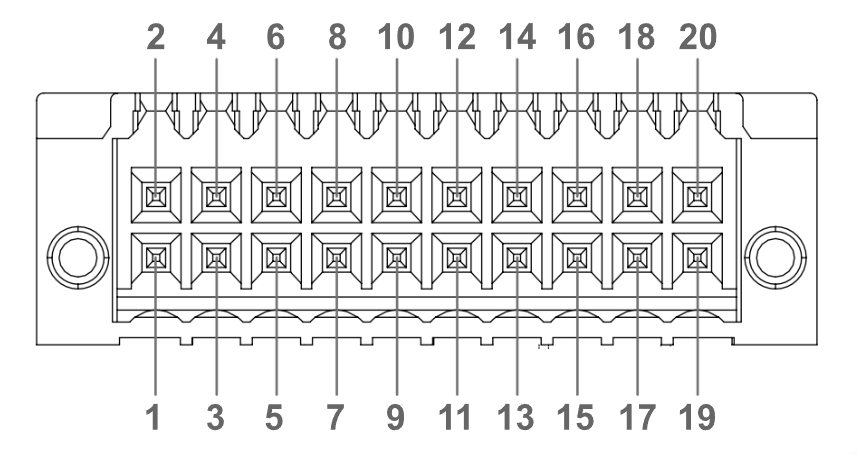
#### <mark style="color:blue;">Optional Isolated DIO Expansion</mark>

<figure><img src="https://3062424488-files.gitbook.io/~/files/v0/b/gitbook-x-prod.appspot.com/o/spaces%2FlLHqs7kbNoKOFTwGOfH6%2Fuploads%2FEpfYaDDKRzRJdkLwsNoF%2FScreenshot%202026-03-24%20142700.png?alt=media&#x26;token=e545f581-10e8-4463-9135-fa3ad311bdfd" alt="" width="563"><figcaption></figcaption></figure>

| Pin | Definition | Pin | Definition |
| --- | ---------- | --- | ---------- |
| 1   | ISO\_GND\* | 2   | INTRUSION  |
| 3   | OUT\_7     | 4   | IN\_7      |
| 5   | OUT\_6     | 6   | IN\_6      |
| 7   | OUT\_5     | 8   | IN\_5      |
| 9   | OUT\_4     | 10  | IN\_4      |
| 11  | OUT\_3     | 12  | IN\_3      |
| 13  | OUT\_2     | 14  | IN\_2      |
| 15  | OUT\_1     | 16  | IN\_1      |
| 17  | OUT\_0     | 18  | IN\_0      |
| 19  | V\_DIO+    | 20  | ISO\_GND\* |

**\*Note**: Pin 1 and pin 20 are isolated DIO ground pins, which are different from the motherboard GND. It is not recommended to connect them directly to the motherboard GND unless your application requires it.

{% hint style="info" %}
Additional information can be found in the [hx520-k520-mcu-manual](https://support.onlogic.com/product-documentation/industrial-products/helix-hx500-series/hx520-k520/hx520-k520-mcu-manual "mention")
{% endhint %}

#### <mark style="color:blue;">Optional Isolated CAN Expansion</mark>

<figure><img src="https://3062424488-files.gitbook.io/~/files/v0/b/gitbook-x-prod.appspot.com/o/spaces%2FlLHqs7kbNoKOFTwGOfH6%2Fuploads%2FMo4iPm8sB9v39YiN0ILm%2Fimage.png?alt=media&#x26;token=84059dec-1060-49d0-b1e9-155ae0eb670d" alt=""><figcaption></figcaption></figure>

**Notes**:

1. The CAN H pins are labeled "+" on the system.
2. The CAN L pins are labeled "-" on the system.
3. The ISO GND pins are labeled with the GND symbol on the system, however both are independent isolated grounds. It is not recommended to connect them together if both CAN bus channels are not on the same network.

{% hint style="info" %}
Additional information can be found in the [hx520-k520-mcu-manual](https://support.onlogic.com/product-documentation/industrial-products/helix-hx500-series/hx520-k520/hx520-k520-mcu-manual "mention")
{% endhint %}

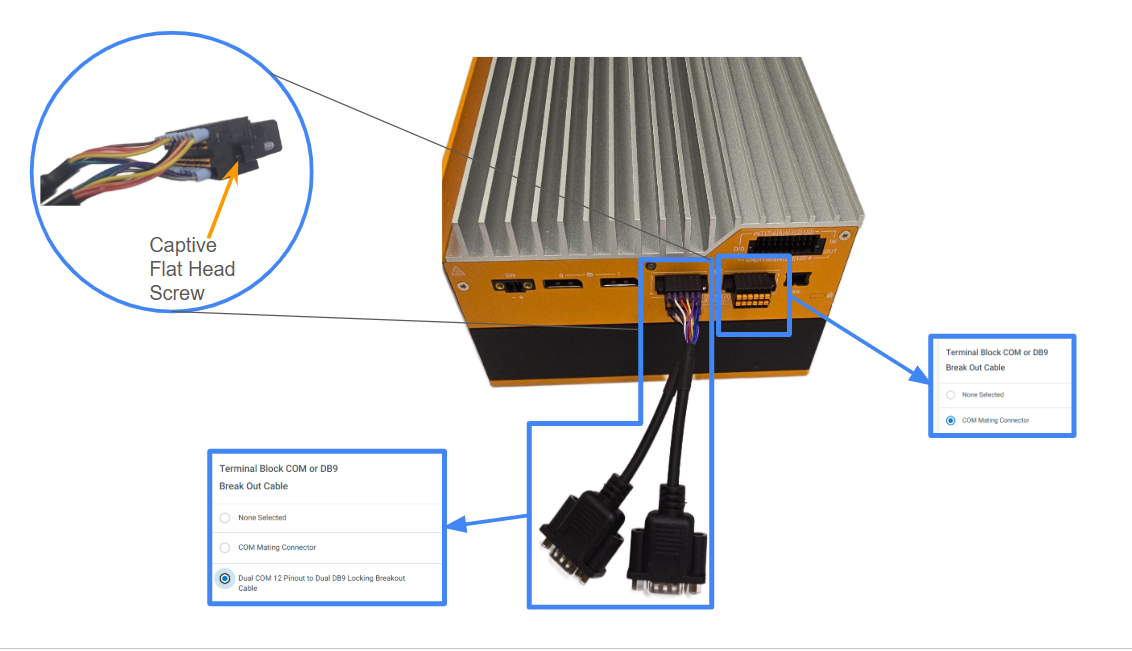
#### <mark style="color:blue;">Optional 2x DB9 Serial Breakout Cable</mark>

The CBDT122 serial breakout cable converts an HX520/K520 serial connector to two DB9 connectors.&#x20;

<figure><img src="https://3062424488-files.gitbook.io/~/files/v0/b/gitbook-x-prod.appspot.com/o/spaces%2FlLHqs7kbNoKOFTwGOfH6%2Fuploads%2FVw5ePNnpGXVBz7jYindB%2Fimage.png?alt=media&#x26;token=4dbc4c29-93fb-4c6c-87df-efc27c73f1d0" alt=""><figcaption></figcaption></figure>

This image shows the difference between the 2x DB9 Breakout Cable and the standard COM Mating Connector:

<figure><img src="https://3062424488-files.gitbook.io/~/files/v0/b/gitbook-x-prod.appspot.com/o/spaces%2FlLHqs7kbNoKOFTwGOfH6%2Fuploads%2FMG8UZfmWptdGFHzsqCh5%2Fimage.png?alt=media&#x26;token=615a585e-36c1-4115-9289-f23e672000e7" alt=""><figcaption></figcaption></figure>

#### <mark style="color:blue;">LEDs</mark>

#### <mark style="color:blue;">Status LEDs</mark>

<figure><img src="https://3062424488-files.gitbook.io/~/files/v0/b/gitbook-x-prod.appspot.com/o/spaces%2FlLHqs7kbNoKOFTwGOfH6%2Fuploads%2F5sWeu3fEB8ZuWTyPihdI%2Fimage.png?alt=media&#x26;token=eeac1f85-525e-4174-b23e-aff1f5aaddcf" alt=""><figcaption></figcaption></figure>

<mark style="color:blue;">**Power LED Definition**</mark>

* **Off**: Power off.
* **Slow Blink (1/3Hz)**: Low/Standby Power State.
* **On**: Power On/Normal Power State.
* **Fast blink (25Hz)**: GPU Power Brake Active.

<mark style="color:blue;">**Drive Activity LED**</mark>

* **Blinking**: Read/Write activity on m.2 storage device.

<mark style="color:blue;">**Error LED Definition**</mark>

* **Slow Blinking (0.5Hz)**: Boot Issue (no boot device found).
* **Fast Blinking (4Hz)**: Voltage fault.
* **Solid**: Memory Fault or no DIMMs installed.

#### <mark style="color:blue;">Status LEDs (HX522/K522 Only)</mark>

<figure><img src="https://3062424488-files.gitbook.io/~/files/v0/b/gitbook-x-prod.appspot.com/o/spaces%2FlLHqs7kbNoKOFTwGOfH6%2Fuploads%2FzsmTQyiE41MXMkylFjiU%2Fimage.png?alt=media&#x26;token=4d918e18-4893-4129-be7b-3c72d963dc67" alt=""><figcaption></figcaption></figure>

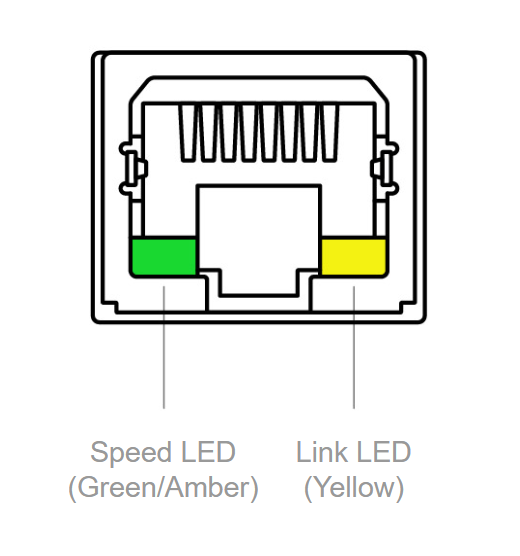
#### <mark style="color:blue;">Network Activity LEDs</mark>

<figure><img src="https://3062424488-files.gitbook.io/~/files/v0/b/gitbook-x-prod.appspot.com/o/spaces%2FlLHqs7kbNoKOFTwGOfH6%2Fuploads%2F1RHQFt8lR0Ppj5TFSwm4%2Fimage.png?alt=media&#x26;token=2fff6923-425c-4166-904d-291aa1a312d3" alt="" width="260"><figcaption></figcaption></figure>

<table><thead><tr><th width="104.5">LED</th><th width="145.5">Color</th><th width="122">State</th><th>Condition</th></tr></thead><tbody><tr><td>Link</td><td>-</td><td>Off</td><td>LAN Link not established</td></tr><tr><td>Link</td><td>Yellow</td><td>On</td><td>LAN Link established</td></tr><tr><td>Link</td><td>Yellow</td><td>Blinking</td><td>LAN activity occurring</td></tr><tr><td>Speed</td><td>-</td><td>Off</td><td>100 or 10Mb/s data rate</td></tr><tr><td>Speed</td><td>Amber / Orange</td><td>On</td><td>1000 Mb/s data rate</td></tr><tr><td>Speed</td><td>Green</td><td>On</td><td>2500 Mb/s data rate </td></tr></tbody></table>

#### <mark style="color:blue;">USB Ports (Type A)</mark>

The Helix and Karbon 520 Series have six USB 3.2 Gen 2 Type A ports (10 Gbps, 5V @ 900mA). Optional ModBay cards can add up to eight more USB 3.2 Gen2 Ports.&#x20;

#### <mark style="color:blue;">Thunderbolt 4 (USB-C) (HX520 Series Only)</mark>

The Helix 520 Series has two Thunderbolt Gen 4 compliant ports (40 Gbps). Maximum 5V\@3A/port or <5V@4.5A> total for 2 ports. Single port maximum power is 15W and 2 ports maximum power is 22.5W.

#### <mark style="color:blue;">USB 4 (USB-C) (K520 Series Only)</mark>

The Karbon 520 Series has two USB 4 ports (40 Gbps). Maximum 5V\@3A/port or <5V@4.5A> total for 2 ports. Single port maximum power is 15W and 2 ports maximum power is 22.5W.

#### <mark style="color:blue;">DisplayPort</mark>

The Helix and Karbon 520 Series have two full-size DisplayPorts, both supporting DP 2.1 up to UHBR20. Please refer to Intel documentation for additional Core Ultra Series 1 and Core Ultra Series 2 display output specifications: <https://ark.intel.com/>.

#### <mark style="color:blue;">SIM Cards</mark>

The Helix and Karbon 520 Series have one 3FF Micro-SIM card slot on the top panel that works with 4G LTE and 5G cellular modems. The SIM card is mapped to the M.2 B-key slot. The SIM slot is push-push; push to insert and push to remove.

#### <mark style="color:blue;">Factory Reset</mark>&#x20;

The Helix and Karbon 520 Series  allow the enablement of a factory reset switch accessible through the front I/O face of the system that, when depressed, resets system BIOS settings back to factory defaults or custom set values.

#### <mark style="color:blue;">LAN 4 (vPRO) - i226-LM / i226-IT</mark>

The Intel i226 LAN Port on the Helix 520 (i226-LM) and Karbon 520 (i226-IT) Series support up to 2.5Gbps link speeds over standard shielded CAT5e or CAT6 cables. The connector is the industry standard RJ45 connector. This port also features Intel’s vPro® technology enabling remote out-of-band management and security features (supported on motherboards with Intel Core Ultra 5 135H and Intel Core Ultra 7 165h/265H Processors). The LAN link state is shown by the two LEDs on the port. The description of LED activity is shown in section 6.4.3 above.&#x20;

For instructions on enabling vPro/AMT on the Helix 520 and Karbon 520 Series of systems, refer to the [HX520/K520 Series BIOS Manual](https://support.onlogic.com/product-documentation/industrial-products/helix-hx500-series/hx520-k520/hx520-k520-bios-manual).

#### <mark style="color:blue;">Expansion Port Pinouts</mark>

#### <mark style="color:blue;">M.2 B-key Pinout</mark>

<figure><img src="https://3062424488-files.gitbook.io/~/files/v0/b/gitbook-x-prod.appspot.com/o/spaces%2FlLHqs7kbNoKOFTwGOfH6%2Fuploads%2FjXcCjMFTqIZ3mcDhTbU0%2Fimage.png?alt=media&#x26;token=39695eda-c0d3-46b8-b626-636a247e6a8b" alt=""><figcaption></figcaption></figure>

#### <mark style="color:blue;">M.2 M-key Pinout</mark>

<figure><img src="https://3062424488-files.gitbook.io/~/files/v0/b/gitbook-x-prod.appspot.com/o/spaces%2FlLHqs7kbNoKOFTwGOfH6%2Fuploads%2FBnMXYYVJ35tuslq5yggY%2Fimage.png?alt=media&#x26;token=a75f42a5-da61-4ad5-aa24-fb99576f91b9" alt=""><figcaption></figcaption></figure>

#### <mark style="color:blue;">M.2 E-key Pinout</mark>

<figure><img src="https://3062424488-files.gitbook.io/~/files/v0/b/gitbook-x-prod.appspot.com/o/spaces%2FlLHqs7kbNoKOFTwGOfH6%2Fuploads%2FvdkIm1LlQZX9lX1eMAcK%2Fimage.png?alt=media&#x26;token=e6737630-e66f-465f-b015-f5773407cb19" alt=""><figcaption></figcaption></figure>

### <mark style="color:blue;">2.2- Motherboard Connectors</mark>

<mark style="color:blue;">Motherboard Features</mark>

<figure><img src="https://3062424488-files.gitbook.io/~/files/v0/b/gitbook-x-prod.appspot.com/o/spaces%2FlLHqs7kbNoKOFTwGOfH6%2Fuploads%2Fgq1lDslAbqhNW6OrrYP1%2Fimage.png?alt=media&#x26;token=c9ca30e0-7a7d-498d-aacc-2aa77ad98c23" alt=""><figcaption></figcaption></figure>

| Item | Description                                                                                           |
| ---- | ----------------------------------------------------------------------------------------------------- |
| A    | Power Button                                                                                          |
| B    | Audio Jack                                                                                            |
| C    | USB 3.2 Gen 2 Type-A ports (6x)                                                                       |
| D    | <p>Thunderbolt 4 (USB-C) (2x)    \*HX520 Series)</p><p>USB 4 (40Gb/s) (USB-C)(2x)  \*K520 Series)</p> |
| E    | CMOS Battery                                                                                          |
| F    | 2.5 GbE LAN ports (4x)                                                                                |
| G    | Remote Switch                                                                                         |
| H    | DisplayPorts (2x)                                                                                     |
| J    | COM RS-232/422/485 ports (2x)                                                                         |
| K    | External fan header                                                                                   |
| L    | PCIe Aux power and fan control header                                                                 |
| M    | DDR5 SO-DIMM slots (2x)                                                                               |
| N    | PCIe Gen 5.0 (x16 Physical/x8 Electrical)                                                             |
| P    | 4-pin Power Input                                                                                     |
| Q    | M.2 E-Key PCIe Gen4 x1 / USB 2.0                                                                      |
| R    | M.2 B-Key PCIe Gen4 x2, USB 2.0 / PCIe Gen4 x1, USB 3.2 Gen 1 / SATA Gen3 x1, USB 3.2 Gen 1           |
| S    | M.2 M-Key PCIe Gen4 x4                                                                                |

<mark style="color:orange;">**Please Note:**</mark> There is a difference in labeling of front USB C ports between the HX520 series and K520 series. The HX520 series carries a Thunderbolt 4 logo while the K520 Series carries a USB 4 logo.

#### <mark style="color:blue;">M.2 2260/2280 M-key</mark>

This slot supports PCIe Gen 4 x4 and is designed for NVMe or storage drives. A full pinout table for this expansion slot is provided in the [Expansion Port Pinouts](#expansion-port-pinouts).

#### <mark style="color:blue;">M.2 3042/3052/2280 B-key</mark>

This expansion slot is capable of supporting PCIe Gen 4 x2, SATA III, USB 3.2 Gen 2, USB 2.0, and one SIM card input from the external I/O. This slot is designed to support various expansion cards such as SATA storage drives and 4G LTE or 5G cellular cards. A full pinout table for this expansion slot is provided in the [Expansion Port Pinouts](#expansion-port-pinouts).

|               B-Key Configuration Option              |
| :---------------------------------------------------: |
|               PCIe GEN4 x2 lane + USB2.0              |
| PCIe GEN4 x1 Lane + USB3.2 Gen1 (inclusive of USB2.0) |
| SATA GEN3 x1 Lane + USB3.2 GEN1 (inclusive of USB2.0) |
|           USB3.2 GEN1 (inclusive of USB2.0)           |

#### <mark style="color:blue;">M.2 2230 E-key</mark>

This slot supports PCIe Gen 4 x1 and USB 2.0 signals and is designed for M.2 2230 Wi-Fi expansion cards.

#### <mark style="color:blue;">PCIe Gen 5.0 Connector (x16 Physical/x8 Electrical)</mark>

The systems have one PCIe x16 connector on the motherboard. It is used with OnLogic risers for various PCIe configurations in models HX/K522/3/4/5.

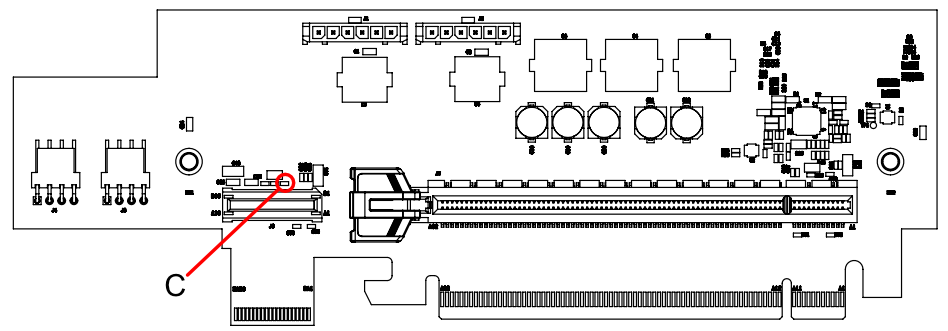
#### <mark style="color:blue;">PCIe x16 (x16 Physical/x8 Electrical) for HX/K523/4/5</mark>

This riser supports a dual slot, full height, half length PCIe Gen 5 (x16 Physical/ x8 Electrical)\
expansion card in the HX524. There are two fan headers on the riser as well to support the fan in the\
chassis.

#### <mark style="color:blue;">DDR5 SO-DIMM Slots</mark>

The Helix 520 series supports up to two DDR5 SO-DIMM slots rated up to 5600MTUs (MTL) and\
6400MTUs (ARL).

### <mark style="color:blue;">2.3- Power Management</mark>

#### <mark style="color:blue;">Power Consumption</mark>

The power consumption of the Helix 520 Series was measured for various system configurations, workloads, and power states at a 24V system input voltage. Tests were conducted using Furmark and Burnintest v9.0 to stress system components. These tests were performed with Intel Turbo Boost Enabled. The build configurations and power consumption are listed in the tables below. The power consumption listed below is the average power draw over a 5 minute window from the test start. This includes a brief period of PL2 power levels (Intel turbo Boost) where the power consumption is elevated. The highest power consumption seen during the period of turbo PL2 is shown at the bottom of each table. The data collected is similarly representative of systems in the Karbon 520 series.

<figure><img src="https://3062424488-files.gitbook.io/~/files/v0/b/gitbook-x-prod.appspot.com/o/spaces%2FlLHqs7kbNoKOFTwGOfH6%2Fuploads%2FshbGoEXCl4YZfQ004WFR%2Fimage.png?alt=media&#x26;token=8a6327ea-3072-4baa-ad30-c0d31a0796f4" alt=""><figcaption></figcaption></figure>

The power consumption for each system configuration is recorded below.

<figure><img src="https://3062424488-files.gitbook.io/~/files/v0/b/gitbook-x-prod.appspot.com/o/spaces%2FlLHqs7kbNoKOFTwGOfH6%2Fuploads%2FNdJEWz4ts3DBcWaD7Syz%2Fimage.png?alt=media&#x26;token=6f54f500-a0a3-4058-b6df-1a9a3b2bb795" alt=""><figcaption></figcaption></figure>

<figure><img src="https://3062424488-files.gitbook.io/~/files/v0/b/gitbook-x-prod.appspot.com/o/spaces%2FlLHqs7kbNoKOFTwGOfH6%2Fuploads%2FksPJRoHmoILIaCph4hVa%2Fimage.png?alt=media&#x26;token=93bed0e3-2f4b-43df-9d0e-cd6a997c3b05" alt=""><figcaption></figcaption></figure>

<figure><img src="https://3062424488-files.gitbook.io/~/files/v0/b/gitbook-x-prod.appspot.com/o/spaces%2FlLHqs7kbNoKOFTwGOfH6%2Fuploads%2FNOOAUbdkHxgHV798HhQt%2Fimage.png?alt=media&#x26;token=0a0360a5-261c-4a06-a9da-1b2cecf9f7ee" alt=""><figcaption></figcaption></figure>

<figure><img src="https://3062424488-files.gitbook.io/~/files/v0/b/gitbook-x-prod.appspot.com/o/spaces%2FlLHqs7kbNoKOFTwGOfH6%2Fuploads%2FkHtl4bRs5T2l54cyQm5W%2Fimage.png?alt=media&#x26;token=e0d4f605-73a1-445c-a062-d180b82f6b33" alt=""><figcaption></figcaption></figure>

<figure><img src="https://3062424488-files.gitbook.io/~/files/v0/b/gitbook-x-prod.appspot.com/o/spaces%2FlLHqs7kbNoKOFTwGOfH6%2Fuploads%2F8uV3wFs90tWXs71O461k%2Fimage.png?alt=media&#x26;token=f7662b5f-76d4-4015-8d70-ec72285e544f" alt=""><figcaption></figcaption></figure>

<figure><img src="https://3062424488-files.gitbook.io/~/files/v0/b/gitbook-x-prod.appspot.com/o/spaces%2FlLHqs7kbNoKOFTwGOfH6%2Fuploads%2FLULts6jWHIt1KCeIT5jI%2Fimage.png?alt=media&#x26;token=087b1867-3fcf-43c3-8cbc-3dcd48ecffbc" alt=""><figcaption></figcaption></figure>

#### <mark style="color:blue;">**Wake-Up Events**</mark>

The Helix and Karbon 520 Series support multiple power states. The wake-up events can be configured in the MCU and BIOS. This section describes the power management functions you can perform and gives information on protection circuitry for power adapters.

| Wake-Up Event                | From ACPI State                 | Comments                                                         |
| ---------------------------- | ------------------------------- | ---------------------------------------------------------------- |
| **Power Button**             | Ultra-low power (PG3), S5, S3\* |                                                                  |
| **LAN**                      | S5, S4, S3\*                    | Must be enabled in BIOS\[cite: 324].                             |
| **USB Type C / Thunderbolt** | S5, S4, S3\*                    | Only supported with Thunderbolt vPro Docking system\[cite: 324]. |
| **USB Type A**               | S3\*                            |                                                                  |

*\*Only supports legacy S3*

#### <mark style="color:blue;">**Protection Circuitry**</mark>

The DC voltage levels specified are the absolute maximum allowable values for the system to function safely. The protection circuitry allows for brief transient voltages above these levels.

| Parameter                        | HX520 Series | K520 Series |
| -------------------------------- | ------------ | ----------- |
| **Nominal operating voltage**    | 12-24V       | 12-48V      |
| **Maximum safe DC voltage**      | 28.8V        | 57.6V       |
| **Minimum safe reverse voltage** | -24V         | -48V        |

#### <mark style="color:blue;">**GPU Power Brake**</mark>

When an external GPU card is installed, the MCU will start monitoring the input voltage. The GPU power brake will be asserted when the input voltage is less than 15.6V to avoid excessive current draw from the power source in order to protect the power cable and input connector from damage. This GPU power brake will be de-asserted when the input voltage is higher than 17.1V.

Assertion of the GPU Power Brake is necessary at low voltages where high power draw from CPU, GPU, and platform devices would result in high input currents that may exceed ratings of the power connectors. The GPU brake will limit GPU power power at these voltages until input voltage is returned to safe levels.

When the power brake is activated, the power LED blinks at 25 Hz.

### <mark style="color:blue;">2.4- Add-in Modules</mark>

#### <mark style="color:blue;">ModBay Expansion</mark>

#### ModBay 4x LAN Expansion

The 4x LAN Expansion (MODBAY-4LAN02) adds additional RJ45 GbE LAN ports to the HX523 and K523. This ModBay uses dedicated Intel I210-IT network controllers for each port which support speeds up to 1 Gbps.&#x20;

Operating Temperature: HX523  0ºC to 50°C\
Operating Temperature: K523   -40ºC to 70ºC

#### ModBay 4x PoE Expansion

The 4x PoE Expansion (MODBAY-4POE01) adds RJ45 GbE PoE LAN ports to the HX523 and K523. Each port supports up to 1 Gbps and PoE output. PoE power budget depends on system power input.

Operating Temperature: HX523  0ºC to 50°C\
Operating Temperature: K523   -40ºC to 70ºC

#### ModBay 3x M12 LAN Expansion

The 3x M12 LAN Expansion (MODBAY-M12LAN01) adds additional M12 X-coded GbE LAN ports to the HX523 and K523. This ModBay uses dedicated Intel I210-IT network controllers for each port which support speeds up to 1 Gbps.

Supported cables:

* CABLE-M12-RJ45-5M (5 Meter X-coded M12 to RJ45)
* CABLE-M12-RJ45-10M (10 Meter X-coded M12 to RJ45)

Operating Temperature: HX523  0ºC to 50°C\
Operating Temperature: K523   -40ºC to 70ºC

#### ModBay 3x M12 PoE Expansion

The 3x M12 PoE Expansion (MODBAY-M12POE01) adds additional M12 X-coded GbE PoE LAN ports to the HX523. This ModBay uses dedicated Intel I210-IT network controllers for each port which support speeds up to 1 Gbps. Additionally, each port supports PoE output. The power budget for PoE is dependent on the voltage of the system power input. Refer to Appendix C for PoE power budgets.

Supported cables:

* CABLE-M12-RJ45-5M (5 Meter X-Coded RJ45 to M12)
* CABLE-M12-RJ45-10M (10 Meter X-Coded RJ45 to M12)

Operating Temperature: HX523  0ºC to 50°C\
Operating Temperature: K523   -40ºC to 70ºC

#### ModBay 2x 10Gb LAN Expansion

The 2x 10Gb LAN Expansion (MODBAY-10GLAN01) adds RJ45 10 GbE LAN ports to the HX523. This ModBay uses a single X550 network controller which supports individual port speeds up to 10 Gbps and a maximum combined speed up to 15 Gbps across both ports.&#x20;

Operating Temperature: HX523  0ºC to 40°C\
Operating Temperature: K523   -40ºC to 40ºC

#### ModBay 4x USB3 Expansion

The 4x USB3 Expansion (MODBAY-04USB-02) adds additional USB 3.2 Gen 2 Type-A ports to the HX523. This ModBay uses two USB controllers which support individual port speeds up to 10 Gbps and a maximum combined speed up to \~26 Gbps across all ports. The controllers are the PCI11400 (PCIe Gen 3 x2 to 2x USB 3.2 Gen 2) and the USB7206i (1x USB 3.2 Gen 2 to 2x USB 3.2 Gen 2). Each port is rated to 5V @ 900mA of power delivery per USB-IF specification. These ports can only wake in sleep and are not active in Hibernate system states.

Operating Temperature: HX523  0ºC to 50°C\
Operating Temperature: K523   -40ºC to 70ºC

#### <mark style="color:blue;">PoE Power Budget</mark>

The nominal power budget for all PoE ports on the Helix 520 and Karbon 520 Series is provided below. These values are provided for room temperature operating conditions. Please contact OnLogic for specific derating information for your installation.

| Input Voltage | ModBay 1 Power Budget | ModBay 2 Power Budget | Notes            |
| ------------- | --------------------- | --------------------- | ---------------- |
| **12V**       | 30W                   | N/A                   | Vadc             |
| **24V**       | 60W                   | 60W                   |                  |
| **48V**       | 90W                   | 90W                   | K520 Series Only |

### <mark style="color:blue;">2.5- System Thermals</mark>

#### <mark style="color:blue;">Motherboard Temperature Sensor Locations</mark>

<figure><img src="https://3062424488-files.gitbook.io/~/files/v0/b/gitbook-x-prod.appspot.com/o/spaces%2FlLHqs7kbNoKOFTwGOfH6%2Fuploads%2FrZ8vxo2vgBHFbfNxFr3K%2Fimage.png?alt=media&#x26;token=3f4b52f8-6433-4eb7-85f7-e4f56a5899f8" alt=""><figcaption></figcaption></figure>

<figure><img src="https://lh7-rt.googleusercontent.com/docsz/AD_4nXfO3XuvoOdmzWW0yupiVs-Fzefh70oOQZ8M5FjQB4Ze-QDQWE-63IB_CSEAO-7ZZjLHEu7eDtIqFfED05pk3YQ25ETFO7VuGLo0Rer4oM1GkssD7tqsxPGicvRKLBEcmoU8eo6cpw?key=qarTJCrK6PTKE6S-maChQOL0" alt=""><figcaption></figcaption></figure>

<figure><img src="https://3062424488-files.gitbook.io/~/files/v0/b/gitbook-x-prod.appspot.com/o/spaces%2FlLHqs7kbNoKOFTwGOfH6%2Fuploads%2F8qCv4UbSXcg6KGWsGLpg%2FHX52x_riser.png?alt=media&#x26;token=e7f35d56-5d78-4143-a748-17fea3b95ee2" alt=""><figcaption></figcaption></figure>

#### <mark style="color:blue;">System Thermal Results (HX520)</mark>

**Testing Conditions**

* Temperature Range: 0ºC to 50ºC
* Step size:  5ºC / 10ºC
* Stress Levels
  * CPU (100% - Intel PTAT)&#x20;
  * SSD, and RAM (80% - Passmark BiT)&#x20;
  * GPU (100% if applicable - Furmark)

**Results Summary**

<figure><img src="https://3062424488-files.gitbook.io/~/files/v0/b/gitbook-x-prod.appspot.com/o/spaces%2FlLHqs7kbNoKOFTwGOfH6%2Fuploads%2F4ol8yyuU6KsfAeDOTM6g%2Fimage.png?alt=media&#x26;token=2daa4786-c08b-4e4f-828e-f49f6ecd8868" alt=""><figcaption></figcaption></figure>

<figure><img src="https://3062424488-files.gitbook.io/~/files/v0/b/gitbook-x-prod.appspot.com/o/spaces%2FlLHqs7kbNoKOFTwGOfH6%2Fuploads%2FVX3utKsgVe7lGqlLOFNo%2Fimage.png?alt=media&#x26;token=f1e2ba0b-39e7-4ea2-b8b5-a28adbc37abc" alt=""><figcaption></figcaption></figure>

<figure><img src="https://3062424488-files.gitbook.io/~/files/v0/b/gitbook-x-prod.appspot.com/o/spaces%2FlLHqs7kbNoKOFTwGOfH6%2Fuploads%2FVJT9MPxspA5ZJ6nnZSEe%2Fimage.png?alt=media&#x26;token=d4953264-dee0-4404-a919-d65960652ec6" alt=""><figcaption></figcaption></figure>

<figure><img src="https://3062424488-files.gitbook.io/~/files/v0/b/gitbook-x-prod.appspot.com/o/spaces%2FlLHqs7kbNoKOFTwGOfH6%2Fuploads%2FRmmU2CXKhvjb9Y3NPBg0%2Fimage.png?alt=media&#x26;token=89bda9b1-5c16-46da-8021-751de34e9974" alt=""><figcaption></figcaption></figure>

<figure><img src="https://3062424488-files.gitbook.io/~/files/v0/b/gitbook-x-prod.appspot.com/o/spaces%2FlLHqs7kbNoKOFTwGOfH6%2Fuploads%2FTiKHK9GgfQQTgY5Bh65f%2Fimage.png?alt=media&#x26;token=def16dd0-380d-4547-989b-b30f2209adf9" alt=""><figcaption></figcaption></figure>

<figure><img src="https://3062424488-files.gitbook.io/~/files/v0/b/gitbook-x-prod.appspot.com/o/spaces%2FlLHqs7kbNoKOFTwGOfH6%2Fuploads%2FuAOmxMloYOQwKExcPLus%2Fimage.png?alt=media&#x26;token=4b2cd6ef-9542-43ca-bcbb-6dbc2ce7e7a4" alt=""><figcaption></figcaption></figure>

<figure><img src="https://3062424488-files.gitbook.io/~/files/v0/b/gitbook-x-prod.appspot.com/o/spaces%2FlLHqs7kbNoKOFTwGOfH6%2Fuploads%2F36FAWYSzWKdDWdcuQtVV%2Fimage.png?alt=media&#x26;token=b48d5e84-3005-4344-80d6-e0451d1359f7" alt=""><figcaption></figcaption></figure>

#### <mark style="color:blue;">System Thermal Results (K520)</mark>

#### Testing Conditions

* Temperature Range: -40ºC to 70ºC
* Step size:  5ºC / 10ºC / 20ºC
* Stress Levels
  * CPU (100% - Intel PTAT)&#x20;
  * SSD, and RAM (80% - Passmark BiT)&#x20;
  * GPU (100% if applicable - Furmark)

<figure><img src="https://3062424488-files.gitbook.io/~/files/v0/b/gitbook-x-prod.appspot.com/o/spaces%2FlLHqs7kbNoKOFTwGOfH6%2Fuploads%2FNqDVatuW3h2j0pWk7XS2%2Fimage.png?alt=media&#x26;token=012bb724-114b-41b6-8c5f-737659f3b497" alt=""><figcaption></figcaption></figure>

<figure><img src="https://3062424488-files.gitbook.io/~/files/v0/b/gitbook-x-prod.appspot.com/o/spaces%2FlLHqs7kbNoKOFTwGOfH6%2Fuploads%2FApAg7bsloaweRAdXPPvq%2Fimage.png?alt=media&#x26;token=85287772-580d-4d64-9273-0275de88449e" alt=""><figcaption></figcaption></figure>

{% hint style="info" %}
Based on OnLogic testing, a fanhat is not required for system operation across the full specified ambient temperature range - the system will operate without failures. However, especially above 50°C but also generally, and depending on application/use case, a fanhat can provide a beneficial performance bump. The improvement will vary depending on anticipated workload(s) and environment(s), and more specific customer validation is recommended to determine if fanhat use is warranted.
{% endhint %}

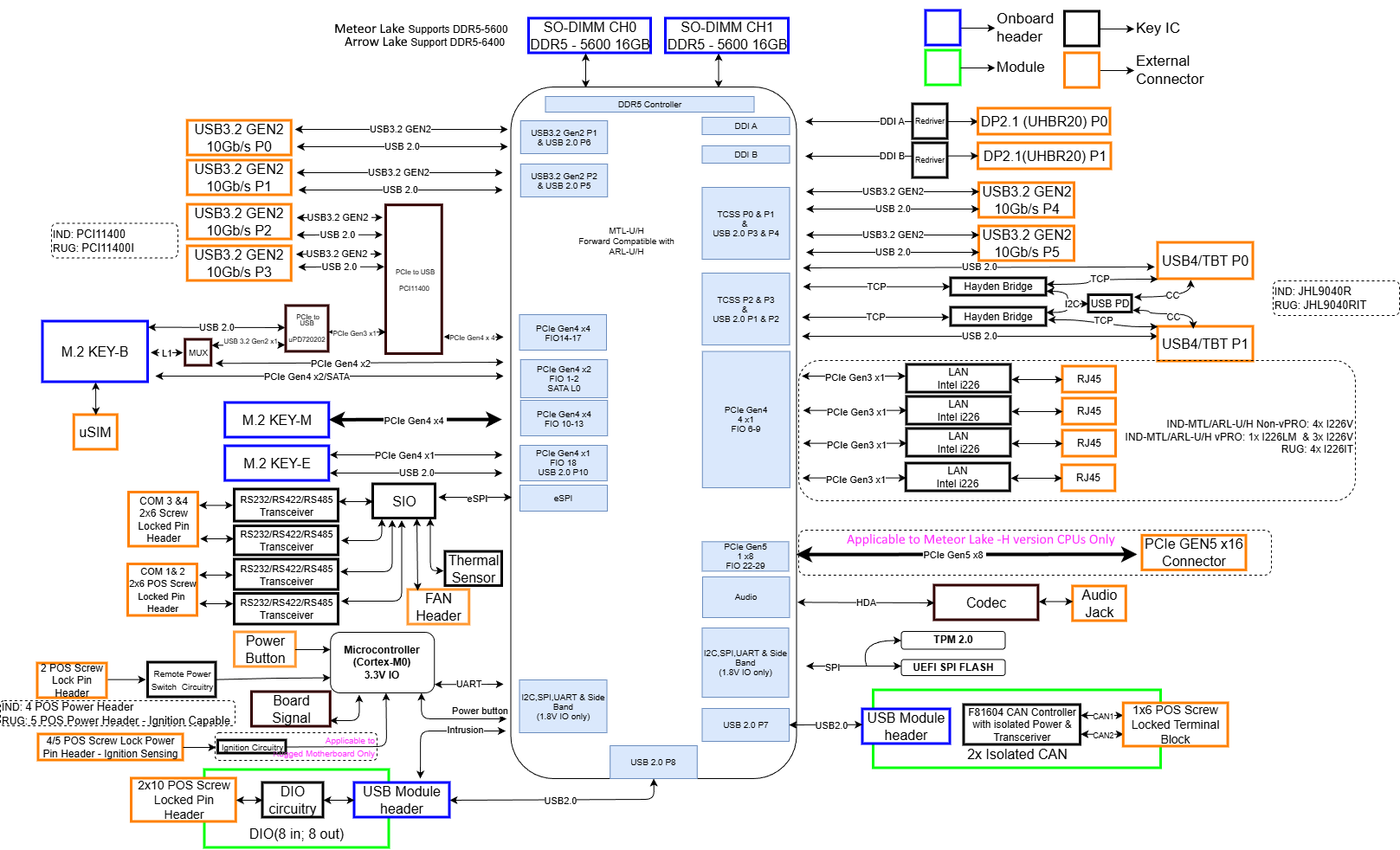
### <mark style="color:blue;">2.7 - Block Diagram</mark>

<figure><img src="https://3062424488-files.gitbook.io/~/files/v0/b/gitbook-x-prod.appspot.com/o/spaces%2FlLHqs7kbNoKOFTwGOfH6%2Fuploads%2FemMcV4wsromuTsNUVrAr%2FHX52x%20System%20Block%20Diagram.png?alt=media&#x26;token=1b516f43-40f1-430b-aa0c-622b1f540ec7" alt=""><figcaption></figcaption></figure>

## <mark style="color:blue;">3- Installation & Mechanical</mark>

### <mark style="color:blue;">3.1- Dimensions</mark>

#### <mark style="color:blue;">**HX521 / K521 System**</mark>

<figure><img src="https://3062424488-files.gitbook.io/~/files/v0/b/gitbook-x-prod.appspot.com/o/spaces%2FlLHqs7kbNoKOFTwGOfH6%2Fuploads%2FdyLGzKiMHWtwRPyxEtdk%2Fimage.png?alt=media&#x26;token=6e4c93d0-f837-4c4e-ba15-ee6436f4ca7d" alt=""><figcaption></figcaption></figure>

#### <mark style="color:blue;">HX522/K522, HX523/K523, HX524/K523, HX525/K525 Expanded Systems</mark>

<figure><img src="https://3062424488-files.gitbook.io/~/files/v0/b/gitbook-x-prod.appspot.com/o/spaces%2FlLHqs7kbNoKOFTwGOfH6%2Fuploads%2FcPVeSCt8Zh2Jejg4bMz7%2Fimage.png?alt=media&#x26;token=dd2d24df-ca1a-4da3-b344-bf8d029451aa" alt=""><figcaption></figcaption></figure>

### <mark style="color:blue;">3.2- Mounting</mark>

#### <mark style="color:blue;">HX521/K521 DIN Clip (MTD103/MTD109)</mark>

<figure><img src="https://3062424488-files.gitbook.io/~/files/v0/b/gitbook-x-prod.appspot.com/o/spaces%2FlLHqs7kbNoKOFTwGOfH6%2Fuploads%2FH5vzBLGz7Z7iWe3zSDi1%2Fimage.png?alt=media&#x26;token=eef4f6a9-2849-4876-a025-65e311224875" alt=""><figcaption></figcaption></figure>

\
**Step 1:** Remove the two screws in the rear of the system.

**Step 2:** Align the two screw holes on the back of the system with the holes in the DIN clip.

**Step 3:** Fasten the din clip with the screws removed in step 1 (M3X0.5 Flathead Screw, 6mm Long) WARNING: Using a screw longer than 6mm may damage the system.&#x20;

**Step 4:** Hook the spring side of the DIN clip onto the DIN rail, then press firmly until the clip snaps over the other side of the rail.&#x20;

#### <mark style="color:blue;">HX522-HX525 / K522-K525 DIN Clip (MTD110)</mark>

<figure><img src="https://3062424488-files.gitbook.io/~/files/v0/b/gitbook-x-prod.appspot.com/o/spaces%2FlLHqs7kbNoKOFTwGOfH6%2Fuploads%2FaxVtAo7ggPsx14DX3jlX%2Fimage.png?alt=media&#x26;token=6be2a365-d6e4-4cfe-ba51-6c0129f3b0ec" alt=""><figcaption></figcaption></figure>

**Step 1:** Remove the four screws in the rear of the system.

**Step 2:** Align the four screw holes on the back of the system with the holes in the DIN clip.

**Step 3:** Fasten the DIN clip with the screws removed in step 1 (M3X0.5 Flathead Screw, 6mm Long) WARNING: Using a screw longer than 6mm may damage the system.&#x20;

**Step 4:** Hook the spring side of the DIN clip onto the DIN rail, then press firmly until the clip snaps over the other side of the rail.&#x20;

#### <mark style="color:blue;">HX522-HX525 / K522-K525 Dual DIN Clip (2x MTD103)</mark>

<figure><img src="https://3062424488-files.gitbook.io/~/files/v0/b/gitbook-x-prod.appspot.com/o/spaces%2FlLHqs7kbNoKOFTwGOfH6%2Fuploads%2FaJA7tmpCU1KecD0vbmiT%2Fimage.png?alt=media&#x26;token=1abcf3a9-0d8a-4033-b99a-22f3fdf6256f" alt=""><figcaption></figcaption></figure>

**Step 1:** Remove the four screws in the rear of the system.

**Step 2:** Align the first 2 screw holes on the back of the system with the holes in the DIN clip.

**Step 3:** Fasten the DIN clip with the screws removed in step 1 (M3X0.5 Flathead Screw, 6mm Long) WARNING: Using a screw longer than 6mm may damage the system.&#x20;

**Step 4:** Repeat steps 2-3 for the second DIN clip. Ensure the second DIN clip is oriented in the same direction as the first DIN clip

**Step 5:** Hook the spring side of the DIN clip onto the DIN rail, then press firmly until the clip snaps over the other side of the rail.&#x20;

#### <mark style="color:blue;">Wall Mount Bracket (MTW101)</mark>

<figure><img src="https://3062424488-files.gitbook.io/~/files/v0/b/gitbook-x-prod.appspot.com/o/spaces%2FlLHqs7kbNoKOFTwGOfH6%2Fuploads%2F9C5XE1Y6fU7X7t5DId3p%2Fimage.png?alt=media&#x26;token=0d396964-7587-4127-9c68-9762e8cef32a" alt=""><figcaption></figcaption></figure>

**Step 1**: Align the four screw holes on the bottom of the system with the respective holes on the mounting brackets.

**Step 2**: Attach wall mounting brackets (MTW101) or DIN mount Bracket (MTD102-K), to the system using the supplied M3 screws (M3X0.5 Flathead Screw, 4mm Long).

**Step 3** (Wall Mount only): Install system to surface  using keyhole slots on wall mount brackets and appropriate hardware for the surface (not provided).

<figure><img src="https://3062424488-files.gitbook.io/~/files/v0/b/gitbook-x-prod.appspot.com/o/spaces%2FlLHqs7kbNoKOFTwGOfH6%2Fuploads%2F7apo7CNV2Oh9uP1Zn07U%2Fimage.png?alt=media&#x26;token=692993ad-f14a-4166-8e70-00425696e399" alt=""><figcaption></figcaption></figure>

**Step 4 (DIN Bracket only):** Align the mounting holes of the din clip bracket to the three mounting holes on the wall mount bracket. Install the 6x M4 screws (M4x0.7 Self Tapping, Philips Head, 6mm Long) to secure the DIN clip.&#x20;

**Step 5 (DIN Bracket only):** Hook the solid side of the DIN clip onto the DIN rail, then press firmly until the clip snaps over the other side of the rail.

#### <mark style="color:blue;">Rubber Feet (MTF100)</mark>

<figure><img src="https://3062424488-files.gitbook.io/~/files/v0/b/gitbook-x-prod.appspot.com/o/spaces%2FlLHqs7kbNoKOFTwGOfH6%2Fuploads%2FTrDNb3iLvqvrtG2h4xTY%2Fimage.png?alt=media&#x26;token=c844dd1d-2aaf-4145-910d-1899dc99fdf3" alt=""><figcaption></figcaption></figure>

**Step 1:** Peel feet from adhesive.

**Step 2:** Align feet with markings on Secondary Heatsink as shown.

#### <mark style="color:blue;">VESA (VMPL-2022)</mark>

<figure><img src="https://3062424488-files.gitbook.io/~/files/v0/b/gitbook-x-prod.appspot.com/o/spaces%2FlLHqs7kbNoKOFTwGOfH6%2Fuploads%2FacgIaWR51HbWELDNFW9n%2Fimage.png?alt=media&#x26;token=7bd26f37-9cb2-4edb-9bf4-18dabe32bb7e" alt=""><figcaption></figcaption></figure>

**Step 1:** Align the four screw holes on the bottom of the system with the respective holes on the VESA bracket.

**Step 2:** Attach VESA Bracket to the system using the supplied M3 screws (M3X0.5 Flathead Screw, 4mm Long) Use a torque of at least 200 N-cm (18 in-lbs) to attach the bracket.

**Step 3:** Install the system to VESA 75 or VESA 100 mounting pattern using provided VESA Mount screws.

#### <mark style="color:blue;">VESA In-Series (VMPL-2024/VMPL-HX52x)</mark>

<figure><img src="https://3062424488-files.gitbook.io/~/files/v0/b/gitbook-x-prod.appspot.com/o/spaces%2FlLHqs7kbNoKOFTwGOfH6%2Fuploads%2FVlzkNyk1KkF5fchOkAsP%2FScreenshot%202025-08-22%20102856.png?alt=media&#x26;token=3b2280b2-003c-44a4-8b67-692b440bc69d" alt=""><figcaption></figcaption></figure>

**Step 1:** Separate the two bracket segments by first removing the M4 screw on either side of the bracket (M4X0.7 Phillips head, 6 mm long). With the screws removed, the bracket segments can be separated by removing the smaller bracket from the hooked tabs on the top edge of the larger bracket.

**Step 2:** Align the screw holes indicated with “1” marking with the bottom holes of the system. Secure the system using the 4x supplied M3 screws (M3X0.5 Flathead Screw, 6mm Long). Use a torque of at least 200 N-cm (18 in-lbs) to attach the bracket.

**Step 3:** Install the large bracket/system assembly to a VESA 75 or VESA 100 mounting pattern on a monitor stand/arm using the provided M4x0.7 8mm length screws. Note the arrow marking on the bracket indicating which side of the bracket should be facing UP.

**Step 4:** Install the remaining smaller bracket to a monitor VESA 75 or VESA 100 mounting pattern using the provided M4x0.7 8mm long screws. Note the arrow marking on the bracket indicating which side of the bracket should be facing UP.

**Step 5:** Install the small bracket/monitor assembly to the large bracket/system assembly on the mounting arm by aligning the hooks/tabs and slot the pieces together. Secure the bracket segments together using the 2x M4 screws removed in Step 1.

### <mark style="color:blue;">3.3- Internal Access</mark>

Properly opening OnLogic systems does not void the warranty in most cases, however, some precautions are necessary to avoid damaging the system.

* Perform this disassembly in an area free of static discharge.
* Disconnect power, video, and any other connections to the system. It should be fully unplugged.
* Ideally, wear a grounding strap. If that is not available, regularly touch a grounded metal surface to discharge your body of static electricity.

All of the different system models in this series begin their disassembly by removing the bottom plate:

|                                                                                                                                                                                                                                                            |                                                                                                                       |
| ---------------------------------------------------------------------------------------------------------------------------------------------------------------------------------------------------------------------------------------------------------- | --------------------------------------------------------------------------------------------------------------------- |
| <img src="https://3062424488-files.gitbook.io/~/files/v0/b/gitbook-x-prod.appspot.com/o/spaces%2FlLHqs7kbNoKOFTwGOfH6%2Fuploads%2FQ6duQtuH9OhQYZxexIno%2Fimage.png?alt=media&#x26;token=fa6b5d1f-6ec1-4f42-92fb-27010a94f5f4" alt="" data-size="original"> | <ul><li>Remove x4 screws from the bottom of the system</li></ul><p></p><p>Note: Remove any/all mounting hardware.</p> |

#### <mark style="color:blue;">HX521</mark>

After removing the bottom plate, you will have access to the motherboard. The motherboard used is the same for all variants in the series. Here is the layout:<br>

<figure><img src="https://3062424488-files.gitbook.io/~/files/v0/b/gitbook-x-prod.appspot.com/o/spaces%2FlLHqs7kbNoKOFTwGOfH6%2Fuploads%2FkBSybtMavwFYaBVALhUl%2FScreenshot%202025-08-22%20133604.png?alt=media&#x26;token=1bab4a2e-5f65-4bd7-b18e-2cd8fb421f69" alt=""><figcaption></figcaption></figure>

#### <mark style="color:blue;">HX522</mark>

|                                                                                                                                                                                                                                                            |                                                                                                                                                                                                        |
| ---------------------------------------------------------------------------------------------------------------------------------------------------------------------------------------------------------------------------------------------------------- | ------------------------------------------------------------------------------------------------------------------------------------------------------------------------------------------------------ |
| <img src="https://3062424488-files.gitbook.io/~/files/v0/b/gitbook-x-prod.appspot.com/o/spaces%2FlLHqs7kbNoKOFTwGOfH6%2Fuploads%2FJbHtHX8meWz6yg0aaHeO%2Fimage.png?alt=media&#x26;token=8dc3e51b-d7da-4093-8c1c-725b145076cf" alt="" data-size="original"> | <ul><li>You will now have access to the hot swap bay section of your system</li><li>Further Disassembly is possible but not recommended. Please contact technical support before continuing.</li></ul> |

#### <mark style="color:blue;">HX523</mark>

|                                                                                                                                                                                                                                                            |                                                                                                                                                                                                        |
| ---------------------------------------------------------------------------------------------------------------------------------------------------------------------------------------------------------------------------------------------------------- | ------------------------------------------------------------------------------------------------------------------------------------------------------------------------------------------------------ |
| <img src="https://3062424488-files.gitbook.io/~/files/v0/b/gitbook-x-prod.appspot.com/o/spaces%2FlLHqs7kbNoKOFTwGOfH6%2Fuploads%2FhWsMQ8wFyQ1ixH8H7VX3%2Fimage.png?alt=media&#x26;token=ea318cc4-50ce-46c3-bc2e-585002943a65" alt="" data-size="original"> | <p></p><ul><li>You will now have access to the modbay section of your system</li><li>Further disassembly is possible but not recommended. Please contact Technical support before continuing</li></ul> |

#### <mark style="color:blue;">**HX524**</mark>

|                                                                                                                                                                                                                                                            |                                                                                                                                                                                                                |
| ---------------------------------------------------------------------------------------------------------------------------------------------------------------------------------------------------------------------------------------------------------- | -------------------------------------------------------------------------------------------------------------------------------------------------------------------------------------------------------------- |
| <img src="https://3062424488-files.gitbook.io/~/files/v0/b/gitbook-x-prod.appspot.com/o/spaces%2FlLHqs7kbNoKOFTwGOfH6%2Fuploads%2FjJQ5t6673Weut57g7vku%2Fimage.png?alt=media&#x26;token=04e9ac85-19f5-42db-affb-fb152487b2f1" alt="" data-size="original"> | <p></p><ul><li>You will now have access to the PCIe expansion section of your system</li><li>Further disassembly is possible but not recommended. Please contact Technical support before continuing</li></ul> |

#### <mark style="color:blue;">**HX525**</mark>

|                                                                                                                                                                                                                                                            |                                                                                                                                                                                                               |
| ---------------------------------------------------------------------------------------------------------------------------------------------------------------------------------------------------------------------------------------------------------- | ------------------------------------------------------------------------------------------------------------------------------------------------------------------------------------------------------------- |
| <img src="https://3062424488-files.gitbook.io/~/files/v0/b/gitbook-x-prod.appspot.com/o/spaces%2FlLHqs7kbNoKOFTwGOfH6%2Fuploads%2FFL9vasBdzPy3KjFbaywz%2Fimage.png?alt=media&#x26;token=283d8597-e99a-443d-9a0e-ace34b643134" alt="" data-size="original"> | <p></p><ul><li>You will now have access to the MXM expansion section of your system</li><li>Further disassembly is possible but not recommended. Please contact Technical support before continuing</li></ul> |

### <mark style="color:blue;">3.4- CAD & Drawings</mark>

[HX520 Series Dimensional Drawings](https://media.onlogic.com/248f8472-1b41-4a43-9f88-4aee598a9ac5/abf1ecee-aa5c-4035-a1c1-9199d428afd8/rdoe9yw5HOLiiU9WtJ1qZj2Xn/yCr78OATFGxv4xqL42fagdidE.pdf?targetFileName=OnLogic-HX520-Spec-Sheet-V1.pdf)

{% file src="<https://3062424488-files.gitbook.io/~/files/v0/b/gitbook-x-prod.appspot.com/o/spaces%2FlLHqs7kbNoKOFTwGOfH6%2Fuploads%2F6spWtoW72NTJWXbLpmyR%2FHX521.zip?alt=media&token=adfaff3a-f079-4a49-a508-66f803f6e253>" %}

{% file src="<https://3062424488-files.gitbook.io/~/files/v0/b/gitbook-x-prod.appspot.com/o/spaces%2FlLHqs7kbNoKOFTwGOfH6%2Fuploads%2Fk0Z74EJsROEmboYOAwTu%2FHX522.zip?alt=media&token=5fc683f2-22f9-448e-908a-2ce23cfe0f6b>" %}

{% file src="<https://3062424488-files.gitbook.io/~/files/v0/b/gitbook-x-prod.appspot.com/o/spaces%2FlLHqs7kbNoKOFTwGOfH6%2Fuploads%2FMpkTwBcJ9u5XDmFWrDtn%2FHX523.zip?alt=media&token=6be0b14f-1868-4ecb-a9e6-6a4a06aeca0b>" %}

{% file src="<https://3062424488-files.gitbook.io/~/files/v0/b/gitbook-x-prod.appspot.com/o/spaces%2FlLHqs7kbNoKOFTwGOfH6%2Fuploads%2FubZH6jXQwxiEZb5YCveL%2FHX524.zip?alt=media&token=8f0bff8a-0671-4edd-9f6e-f342d44154e0>" %}

{% file src="<https://3062424488-files.gitbook.io/~/files/v0/b/gitbook-x-prod.appspot.com/o/spaces%2FlLHqs7kbNoKOFTwGOfH6%2Fuploads%2FqT8nkGFseqy5wYOyLazO%2FHX525.zip?alt=media&token=350a731b-9c61-4648-97bd-5cd80df2b76c>" %}

{% file src="<https://3062424488-files.gitbook.io/~/files/v0/b/gitbook-x-prod.appspot.com/o/spaces%2FlLHqs7kbNoKOFTwGOfH6%2Fuploads%2FXnGzRSIehi9qLsPOBcNa%2FK521.zip?alt=media&token=207f1974-a6bf-46b7-b187-1ff39a0fc67b>" %}

{% file src="<https://3062424488-files.gitbook.io/~/files/v0/b/gitbook-x-prod.appspot.com/o/spaces%2FlLHqs7kbNoKOFTwGOfH6%2Fuploads%2FGI019E5vfeALxpCxA2cf%2FK522.zip?alt=media&token=da6f3846-d187-425b-ad68-3f2448d21470>" %}

{% file src="<https://3062424488-files.gitbook.io/~/files/v0/b/gitbook-x-prod.appspot.com/o/spaces%2FlLHqs7kbNoKOFTwGOfH6%2Fuploads%2FWkEufSAH7d8tQsjPIZMr%2FK523.zip?alt=media&token=a6eceed7-e325-43e1-ab97-b60172645a00>" %}

{% file src="<https://3062424488-files.gitbook.io/~/files/v0/b/gitbook-x-prod.appspot.com/o/spaces%2FlLHqs7kbNoKOFTwGOfH6%2Fuploads%2F8vGfWZc1fsBZjBLDMDto%2FK524.zip?alt=media&token=cbf31e22-602c-4b6f-8e08-72c7c1650dfc>" %}

{% file src="<https://3062424488-files.gitbook.io/~/files/v0/b/gitbook-x-prod.appspot.com/o/spaces%2FlLHqs7kbNoKOFTwGOfH6%2Fuploads%2FSvZ3QiTg1I7MZNvnNRtB%2FK525.zip?alt=media&token=9b368ccd-b476-4c4d-a650-43dde4a58f52>" %}

## <mark style="color:blue;">4- Software & Firmware</mark>

### 4.1- BIOS

#### BIOS Manual

Reference the full [BIOS Manual](https://support.onlogic.com/product-documentation/industrial-products/helix-hx500-series/hx520-k520/hx520-k520-bios-manual) here.

#### BIOS Updates <a href="#bios-updates" id="bios-updates"></a>

| Version      | Link                                                                              |
| ------------ | --------------------------------------------------------------------------------- |
| Z01-0009S102 | [Download](https://static.onlogic.com/resources/bios/HX52X_K52X/Z01-0009S102.zip) |
| Z01-0009S011 | [Download](https://static.onlogic.com/resources/bios/HX52X_K52X/Z01-0009S011.zip) |

### <mark style="color:blue;">4.2- Drivers & Downloads</mark>

**Windows Drivers**

[Windows 11](https://static.onlogic.com/resources/drivers/HX_K52x/HX_K52X_Win11.zip)

[Windows 10](https://static.onlogic.com/resources/drivers/HX_K52x/HX_K52x_Win10.zip)

Please follow this link for a guide on updating your system's drivers:

{% embed url="<https://support.onlogic.com/support-articles/how-tos/operating-systems/windows/update-system-drivers>" %}

**LPMCU Tool**

[Windows](https://static.onlogic.com/resources/firmware/utilities/HX520/LPMCU%20Tool%20-%20HX520/LPMCU_Tool_V0.2.1_Windows_11.zip)

[Ubuntu](https://static.onlogic.com/resources/firmware/utilities/HX520/LPMCU%20Tool%20-%20HX520/LPMCU_Tool_V0.2.1_Ubuntu_24.04.zip)

Reference [LPMCU Update Guide](https://support.onlogic.com/product-documentation/industrial-products/helix-hx500-series/hx520-k520-mcu-manual#aqb85cjeb8kq) here.

**MCU Updates**

| Version | Link                                                                                                              |
| ------- | ----------------------------------------------------------------------------------------------------------------- |
| v9.0.0  | [Download](https://static.onlogic.com/resources/firmware/binaries/HX520/titanium_pwrseq_update_rugged_v9.0.0.bin) |

**DIO Python Package**

[Repository Link - onlogic-m031-manager](https://github.com/onlogic/onlogic-m031-manager)

Download Instructions

1. Download .zip File - For a simple copy of the files, use this direct download link:
   * <https://github.com/onlogic/onlogic-m031-manager/archive/refs/heads/main.zip>
2. Clone with Git - Use a terminal to clone the repository.
   * HTTPS:
     * `git clone https://github.com/onlogic/onlogic-m031-manager.git`
   * SSH:
     * `git clone git@github.com:onlogic/onlogic-m031-manager.git`

**Drivers**

Drivers are available in INF formats, which can be installed via a Windows deployment server, or through the Device Manager. Follow our guide for [Installing via Device Manager here](https://support.onlogic.com/support-articles/how-tos/operating-systems/windows/update-system-drivers).

Windows 11 - [Download](https://static.onlogic.com/resources/drivers/HX_K52x/HX52X_Win11_Drivers.zip)

Please follow this link for a guide on updating your system's drivers:

{% embed url="<https://support.onlogic.com/support-articles/how-tos/operating-systems/windows/update-system-drivers>" %}

### <mark style="color:blue;">4.3- MCU Documentation</mark>

Reference the full [HX520/K520 MCU Manaul](https://support.onlogic.com/product-documentation/industrial-products/helix-hx500-series/hx520-k520/hx520-k520-mcu-manual).

***

## <mark style="color:blue;">5- Support & Compliance</mark>

### <mark style="color:blue;">5.1- Troubleshooting & FAQ</mark>

#### <mark style="color:blue;">FAQs</mark>

<details>

<summary><strong>Why am I not getting any video from the DisplayPort on my MXM GPU?</strong></summary>

The MXM GPU that is installed in the HX525 system only supports an active DisplayPort signal and will not work with passive adapters or signal splitters. You will need to use an active adapter to convert the video signal. These use a chip to boot the conversion performance, which help to eliminate video issues. A video adapter without the additional chip circuitry is a passive adapter, which only work for some conversions and are not supported on the MXM GPU. Generally, DisplayPort adapters will need an active adapter to convert to VGA, DVI, or HDMI connections. Active adapters can be readily found online.

</details>

<details>

<summary><strong>What are the supported operating systems for this system series?</strong></summary>

Here is a list of the operating systems that we have validated and will support on these systems:

* Windows 11 Professional
* Windows 11 IoT Enterprise 2024 LTSC
* Windows 10 IoT Enterprise 2021 LTSC
* Ubuntu 24.04 Desktop LTS64-bit
* Ubuntu 24.04 Server LTS 64-bit
* Ubuntu 22.04 Desktop LTS64-bit
* Ubuntu 22.04 Server LTS 64-bit

</details>

#### <mark style="color:blue;">Clear CMOS</mark>

If the system fails to power on or is unresponsive, clearing the CMOS may help. It will also restore the BIOS to factory defaults.

<figure><img src="https://support.onlogic.com/~gitbook/image?url=https%3A%2F%2F3062424488-files.gitbook.io%2F%7E%2Ffiles%2Fv0%2Fb%2Fgitbook-x-prod.appspot.com%2Fo%2Fspaces%252FlLHqs7kbNoKOFTwGOfH6%252Fuploads%252F2G04XWIqGyUTOLtT0CtE%252Fimage.png%3Falt%3Dmedia%26token%3D3c62467d-b016-4329-a01a-a098dcb01c86&#x26;width=768&#x26;dpr=4&#x26;quality=100&#x26;sign=3012c404&#x26;sv=2" alt="" width="563"><figcaption></figcaption></figure>

* The CMOS reset button on all HX52X systems can be found next to the power button, as indicated here
* To perform the reset, begin by powering off the system
* While holding the reset button, press power button to power the system on
* After 5 seconds, release the button
* The screen will show "System will reboot to reset to default." and will prompt the user to press “ok”
* The system will reset
* The reset to default completes

#### <mark style="color:blue;">Windows Serial Port Number Collisions</mark>

| Category:             | OS Compatibility |
| --------------------- | ---------------- |
| SKU(s) Affected:      | HX520 Series     |
| Revision(s) Affected: | All              |
| Revision Resolved:    | Open             |
| Severity:             | Low              |

**Description**

Some Windows installation methods may result in serial port number collisions.&#x20;

The Helix 520 Series systems implement three serial port types - PCH UART, SIO COM, and USB VCOM. Depending on the order of driver installation, Windows may assign duplicate serial port numbers (in the format COM\[n]).

**Resolution**

Serial port numbers can be changed from the Windows Device Manager after driver installation, or drivers can be injected via enterprise deployment methods prior to first boot to mitigate this issue.

Windows installations performed by OnLogic are shipped with unique serial interface numbers.\
\ <mark style="color:blue;">**DIO Labeling**</mark>

| Category:             | Mechanical   |
| --------------------- | ------------ |
| SKU(s) Affected:      | HX520 Series |
| Revision(s) Affected: | All          |
| Revision Resolved:    | Open         |
| Severity:             | Low          |

**Description**

The Helix 520 Series top plate DIO labeling has “-” and “GND” labels for pins that both connect to the DIO expansion isolated ground (ISO\_GND).  The other ground pins indicated by the system labeling are tied to the non-isolated DC GND. There is no functional impact to system performance, but some users may find this labelling confusing.

<figure><img src="https://lh7-rt.googleusercontent.com/docsz/AD_4nXfcEC7DxsDPV9-HpDTeQmNqjP8I5fyRN0RxnWvP6V0QxcQr5420H6S7xg60YG0iGPE7ttyVkwt8oOlUa9WHpVDcObNdPXEaR9PELe8A0U0ZK4OWYWfjO6FO3huLF-Z3oYr4tnM5?key=qarTJCrK6PTKE6S-maChQOL0" alt=""><figcaption></figcaption></figure>

**Resolution**&#x20;

GND label on the DIO connector will be changed to ISO\_GND on a future revision.

#### <mark style="color:blue;">Windows Ethernet Interface Numbering</mark>

| Category:             | Port Enumeration |
| --------------------- | ---------------- |
| SKU(s) Affected:      | HX/K520 Series   |
| Revision(s) Affected: | All              |
| Revision Resolved:    | Open             |
| Severity:             | Low              |

**Description**

Ethernet port assignments in Windows may not be issued consistently between configurations due to Windows port enumeration rules, meaning that the indicated port numbers on the front of the system may not match the numbers assigned by Windows.

**Resolution**&#x20;

Users/installers may associate external Ethernet port numbers with the Windows-assigned scheme using the Powershell command Get-NetAdapterHardwareInfo.&#x20;

In the results generated by the command, adapter names and PCIe Bus numbers are displayed. The external port numbers from the plate label are equivalent to the PCIe Bus numbers (Port 1 = Bus 1, etc.). The Powershell command Rename-NetAdapter can then be used to rename Ethernet ports to user preference.

#### <mark style="color:blue;">Boot Failure with Intel VMD Enabled</mark>

| Category:             | Firmware               |
| --------------------- | ---------------------- |
| SKU(s) Affected:      | HX/K520 Series         |
| Revision(s) Affected: | Z01-009I010 and before |
| Revision Resolved:    | Z01-009I011            |
| Severity:             | High                   |

**Description**

Intel VMD is a technology allowing for internal storage to be added to RAID configurations without a discrete RAID controller. While OnLogic is not currently offering configurations that are VMD-compatible, the BIOS options for VMD are available for future use. &#x20;

When VMD is enabled via the BIOS configuration menu, and drives are added to the VMD controller by enabling either VMD Global Mapping or adding individual drives to the VMD controller from the same menu page, systems may fail to boot after the configuration is applied.&#x20;

**Resolution**&#x20;

Users are advised to keep VMD and VMD Global Mapping disabled. There is no workaround.

RAID support is offered via a discrete controller in the Helix 522 model and is not affected by this issue.

#### <mark style="color:blue;">“PCIxxxx GPIO Controller Driver” Yellow Bang</mark>

| Category:             | OS Compatibility         |
| --------------------- | ------------------------ |
| SKU(s) Affected:      | HX/K523, MODBAY-04USB-02 |
| Revision(s) Affected: | All                      |
| Revision Resolved:    | Open                     |
| Severity:             | Low                      |

**Description**

The Windows driver for the GPIO subsystem of the Microchip PCI11000 family IO controllers used on the Helix 523 model and MODBAY-04USB-02 expansion card is not signed, so Windows will not load it. A yellow bang ( ! ) warning indicator and error message is displayed in the Windows Device Manager.

This error message has no effect on system performance and may be ignored. The GPIO subsystem is required to be enabled on-chip for full function, but no direct driver/OS interaction is required.

**Resolution**&#x20;

A signed driver release is in progress, and will be made available when it is complete.

#### <mark style="color:blue;">ModBay M12 LAN WoL</mark>

| Category:             | System Compatibility         |
| --------------------- | ---------------------------- |
| SKU(s) Affected:      | ModBay-M12LAN01 - HX523/K523 |
| Revision(s) Affected: | B02-00035R3                  |
| Revision Resolved:    | Open                         |
| Severity:             | Low                          |

**Description**

When attempting to use Wake-on-LAN (WoL) from S4 (hibernate) and S5 (soft off) power states, the system may hang, preventing proper system startup. This issue is specific to the Modbay-M12LAN01 card.

**Resolution**&#x20;

For WoL from S4 or S5 power states, the Modbay-M12PoE or Modbay-4LAN cards should be used. The Modbay-M12LAN01 card is only recommended for Wake-on-LAN from S3 (sleep) power state.

#### <mark style="color:blue;">Ubuntu Unintended Wake from S4/S5 with disagreement in BIOS/OS WoL Settings</mark>

| Category:             | OS Compatibility |
| --------------------- | ---------------- |
| SKU(s) Affected:      | HX52x, K52x      |
| Revision(s) Affected: | All              |
| Revision Resolved:    | Open             |
| Severity:             | Low              |

**Description**

When Wake On PME is enabled in the BIOS but WoL is disabled in the operating system for LAN port 1 in Ubuntu 24.04 Desktop/Server, the disagreement in settings causes unintended wake events to occur from S4/S5.

**Resolution**&#x20;

Ensure agreement between the wake on PME setting in the BIOS and WoL setting in the OS. If WoL functionality is desired, ensure both settings are enabled. If WoL functionality is not desired, ensure both settings are disabled.

### <mark style="color:blue;">5.2- Regulatory</mark>

#### CE&#x20;

This device has been tested to the relevant EMC and Safety standards. Modifications by the user may invalidate certifications. Testing included EN 55032, EN 55035, EN 60601-1-2, IEC 62368-1, IEC 60945 Ed. 4, and many others, please see specifications for details.

#### FCC Statement

This device complies with part 15 of the FCC rules as a Class A device. Operation is subject to the following two conditions: (1) this device may not cause harmful interference and (2) this device must accept any interference received, including interference that may cause undesired operation.

#### ISED

This device complies with Industry Canada license-exempt RSS standard(s). Operation is subject to the following two conditions: (1) this device may not cause interference, and (2) this device must accept any interference, including interference that may cause undesired operation of the device.

Le présent appareil est conforme aux CNR d'Industrie Canada applicables aux appareils radio exempts de licence. L'exploitation est autorisée aux deux conditions suivantes: (1) l'appareil ne doit pas produire de brouillage, et (2) l'utilisateur de l'appareil doit accepter tout brouillage radioélectrique subi, même si le brouillage est susceptible d'en compromettre le fonctionnement.

CAN ICES-003(A) / NMB-003(A)

#### UKCA

The computer system was evaluated for medical and IT equipment EMC standards as a class A device. The computer complies with the relevant IT equipment directives for the UKCA mark.

#### Maritime & DNV

This product must be used with an in-line EMI filter when connected directly to a DC mains supply in maritime and DNV applications. The recommended EMI filter is a Delta 30DKCS5. Any filter used must be appropriately rated to handle the voltage and current draw of the system and must have a minimum insertion loss of 30dB at 1MHz.

**Datasheet for the 30DKCS5 including electrical specifications, wiring diagram, and dimensions.**

{% file src="<https://3062424488-files.gitbook.io/~/files/v0/b/gitbook-x-prod.appspot.com/o/spaces%2FlLHqs7kbNoKOFTwGOfH6%2Fuploads%2FZz3mx8xI6OMQWB7NepJH%2FDK.pdf?alt=media&token=cbcd658e-f15f-4578-b9df-88221202eadf>" %}

#### VCCI

This is a Class A product based on the standard of the Voluntary Control Council for Interference (VCCI). If this equipment is used in a domestic environment, radio interference may occur, in which case the user may be required to take corrective actions.

<figure><img src="https://3062424488-files.gitbook.io/~/files/v0/b/gitbook-x-prod.appspot.com/o/spaces%2FlLHqs7kbNoKOFTwGOfH6%2Fuploads%2FRxOoHa5DpVMDb36MK34f%2Fimage.png?alt=media&#x26;token=cf2df504-0bd8-4cc5-8382-d68e01ab9b68" alt=""><figcaption></figcaption></figure>

#### <mark style="color:blue;">Download Documents</mark>

{% file src="<https://3062424488-files.gitbook.io/~/files/v0/b/gitbook-x-prod.appspot.com/o/spaces%2FlLHqs7kbNoKOFTwGOfH6%2Fuploads%2FVYTVYGoLD44CaQodpQH7%2FHX520%20Series%20CE%20Declaration%20-%20signed.pdf?alt=media&token=6a3883d0-59b3-4780-85da-f4a468855cfc>" %}

{% file src="<https://3062424488-files.gitbook.io/~/files/v0/b/gitbook-x-prod.appspot.com/o/spaces%2FlLHqs7kbNoKOFTwGOfH6%2Fuploads%2F5yqyQfMgyVqiR73DSO36%2FHX52x%20RoHS%20%26%20REACH%20SVHC%20Declaration%20-%20signed.pdf?alt=media&token=e0486641-caf2-460f-a67d-5e7167431373>" %}

{% file src="<https://3062424488-files.gitbook.io/~/files/v0/b/gitbook-x-prod.appspot.com/o/spaces%2FlLHqs7kbNoKOFTwGOfH6%2Fuploads%2FEs0CxA9Aj3JzxeAmGWSH%2FTAA%20Compliance.pdf?alt=media&token=13e92203-b5af-4bdf-aba3-290ed071727f>" %}

{% file src="<https://3062424488-files.gitbook.io/~/files/v0/b/gitbook-x-prod.appspot.com/o/spaces%2FlLHqs7kbNoKOFTwGOfH6%2Fuploads%2FPUWAXQs7hAdUIzV8iCBb%2FOnLogic%20HX52x%20MTBF%20Summary.pdf?alt=media&token=56b47e98-2ffd-4071-ab55-b2f7e9c735c1>" %}

{% file src="<https://3062424488-files.gitbook.io/~/files/v0/b/gitbook-x-prod.appspot.com/o/spaces%2FlLHqs7kbNoKOFTwGOfH6%2Fuploads%2Fonqy29aWT8FmatPJvwvh%2FOnLogic%20K52x%20MTBF%20Summary.pdf?alt=media&token=040be40e-700a-49f1-aeb3-4edf00be72e2>" %}

{% file src="<https://3062424488-files.gitbook.io/~/files/v0/b/gitbook-x-prod.appspot.com/o/spaces%2FlLHqs7kbNoKOFTwGOfH6%2Fuploads%2FZnyg9g4M1J8FWo8Swr9H%2FK520%20Mil%20Spec%20Vibration.pdf?alt=media&token=f24cf5b2-c340-4b60-84dd-1aab285f9298>" %}

### <mark style="color:blue;">5.3- Security Advisory</mark>

For the latest security advisories concerning OnLogic products, including vulnerability disclosures and necessary updates, please refer to our official Security Advisories page. It is recommended to regularly check this resource for critical security information.\
[**Access Security Advisories**](https://support.onlogic.com/support-articles/security-advisories)