> For the complete documentation index, see [llms.txt](https://support.onlogic.com/llms.txt). Markdown versions of documentation pages are available by appending `.md` to page URLs; this page is available as [Markdown](https://support.onlogic.com/product-documentation/industrial-products/mc500-and-mc600-series/mc510-40.md).
# MC510-40
This page also applies to the TM800 ThinManager Ready platform.
## Technical Resources
#### Specification Sheet
{% file src="/files/jeYtryXjET76VWXzavFT" %}
### Motherboard
ASRock IMB-V1000M Motherboard
Motherboard Manual
### Drivers
### Auto Power On
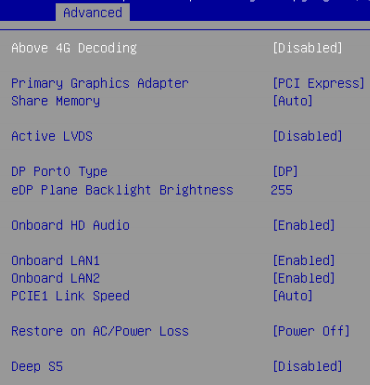
1. Power on the unit and press the F2 key to access the BIOS
2. Navigate to the Advanced tab
3. Open the Chipset Configuration menu
4. Change “Restore on AC/Power Loss” to \[Power On]
5. Press F10 to save changes and exit
6. Auto power on is now enabled
### Clear CMOS
1. Unplug the system completely from power and all peripherals
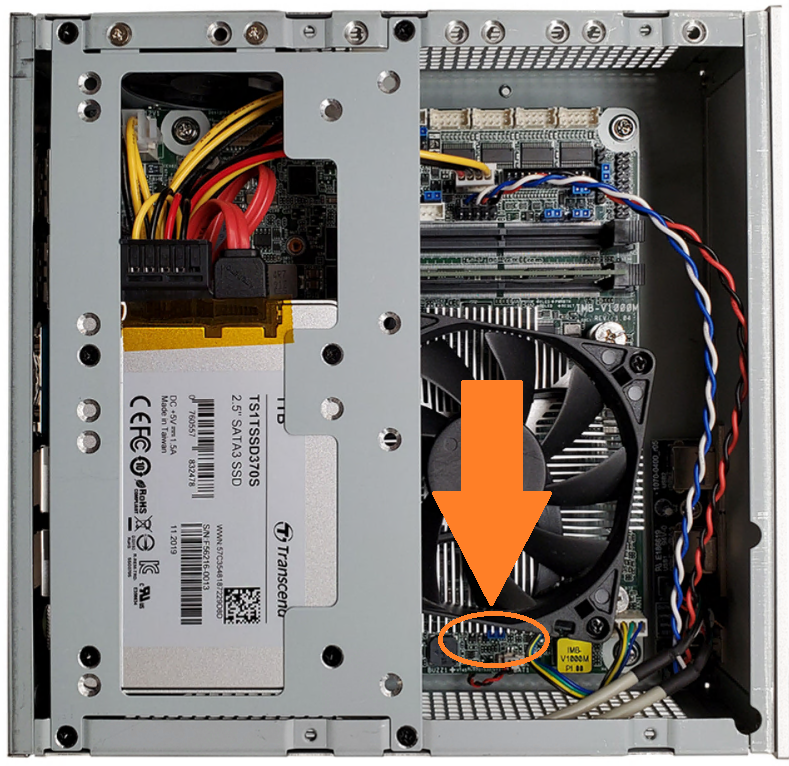
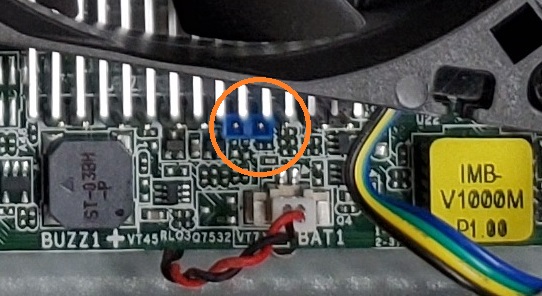
2. Locate the clear CMOS jumper
3. Move the jumper over by 1 pin
4. Wait 30 seconds
5. Restore the jumper to its original position
6. The CMOS is now clear
## Security Advisory
For the latest security advisories concerning OnLogic products, including vulnerability disclosures and necessary updates, please refer to our official Security Advisories page. It is recommended to regularly check this resource for critical security information.\
[**Access Security Advisories**](/support-articles/security-advisories.md)