> For the complete documentation index, see [llms.txt](https://support.onlogic.com/llms.txt). Markdown versions of documentation pages are available by appending `.md` to page URLs; this page is available as [Markdown](https://support.onlogic.com/product-documentation/industrial-products/ml100-series/ml100g-10.md).
# ML100G-10
This page also applies to the TM100 ThinManager Ready platform.
## Technical Resources
### Motherboard Manual
Jetway JNU93-2930 motherboard
### Auto Power On
Disconnect the system from all wire connections (power, ethernet, video, etc), then:
* Disconnect the unit from all wire connections (power, USB, ethernet, etc.)
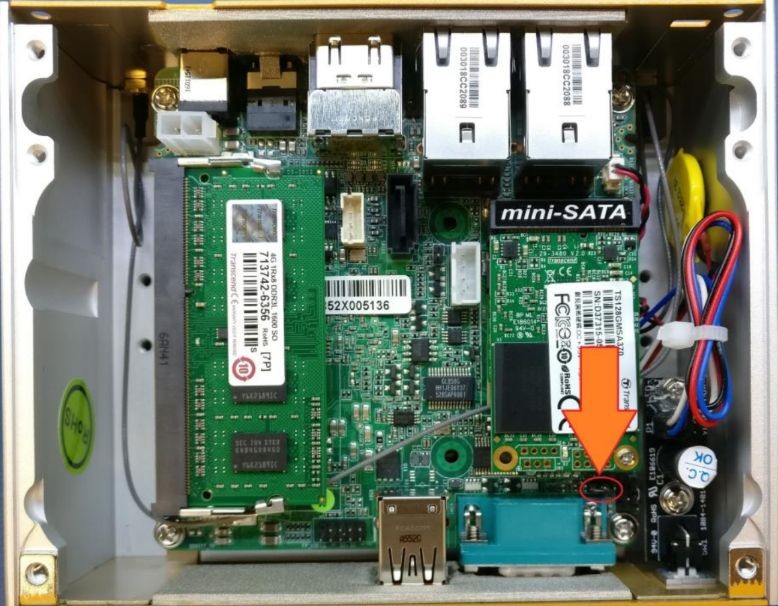
* Locate the auto power on jumper
* The default position is disabled, unless specified otherwise at the time of purchase.
* Lift the jumper off and reinstall it so it connects both pins.
* Auto power on is now enabled.
### clear CMOS
If your unit fails to boot or power on, a CMOS reset may help. You will need to open the unit to perform the reset. This does not void your warranty, however, any damage caused by doing so will not be covered. Ensure your body is discharged of any static electricity by touching a grounded metal surface.
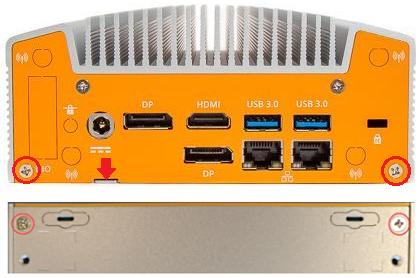
* Remove the 4x phillips screws on the outside of the case.
* Use the tab for leverage to pull the bottom panel off
● Locate the JBAT jumper pins near the ethernet port.\
● Use a flathead screwdriver or other conductive object to short\
the two pins together for 30 seconds.\
● The CMOS is now clear.\
● Power on the unit. Note: it may take 60 seconds to reconfigure\
itself and restart. Wait patiently after turning it on.
## Security Advisory
For the latest security advisories concerning OnLogic products, including vulnerability disclosures and necessary updates, please refer to our official Security Advisories page. It is recommended to regularly check this resource for critical security information.\
[**Access Security Advisories**](/support-articles/security-advisories.md)