> For the complete documentation index, see [llms.txt](https://support.onlogic.com/llms.txt). Markdown versions of documentation pages are available by appending `.md` to page URLs; this page is available as [Markdown](https://support.onlogic.com/product-documentation/components-and-expansion/mounting/vmpl-2024-dual-vesa-through-mounting-bracket.md).
# VMPL-2024 Dual VESA Through-mounting Bracket
## 1- Product Overview
### 1.1- Introduction
The OnLogic VMPL-2024 Dual VESA Through Mounting Bracket is a robust and versatile bracket. The VMPL-2024 is engineered to seamlessly integrate select OnLogic systems with a VESA-compliant monitor and monitor arm, supporting both 75 mm x 75 mm and 100 mm x 100 mm VESA mount patterns.
VMPL-2024 is compatible with the OnLogic ML100, HX401, HX500, HX511, K410, and K430.
### 1.2- Safety
Safety Precautions, Safeguards & Information
Do not open and modify the device! The device complies with various national and international Safety, EMC and Environmental requirements per various standards.
Modification of the device may void certifications, warranty and/or cause possible injury to the user.
1. Care must be taken handling the device to prevent injury to self or possibility of damaging the unit.
2. Read the entire manual before using the product.
3. Install the device securely per users manual instructions.
4. To protect against excessive RF exposure, maintain at least 20cm from any user and the RF antennas. Only use provided dual band antennas of 2dBi/2dBi gain.
5. Wall or ceiling mounting device requires use of OnLogic mounting plate or bracket.
6. Use M3x0.5mm Flat Head screws to attach mounting plate or mounting brackets to threaded holes on bottom of chassis. Screws should be a minimum length of 4mm. Add 1mm of screw length for every mm of additional thickness of plate or bracket beyond 1.5mm.
7. Caution, Hot Surface! It is normal for the unit to heat up and be hot to touch. Do not touch the heatsink area or enclosure during operation and 30 minutes after shutdown allowing the unit to cool down.
8. Ambient operating temperature must be between 0 °C to 40 °C with a non-condensing relative humidity of 10-85%.
9. The device can be stored at temperatures between -10 °C to 85 °C. Note: Unit must be stabilized within operating temperature before use, minimum 3HR.
10. Keep the device away from liquids and flammable materials. Not to be installed in a hazardous environment.
11. Do not clean the device with liquids. The chassis can be cleaned with a dry cloth or duster only. To prevent injury to self and/or damage to the device the unit must be powered down and all connecting power and other peripherals shall be disconnected prior to cleaning.
12. Allow adequate space around all sides of the device for proper cooling and to not exceed its maximum operating temperature limit. If the device is mounted to a vertical surface then recommended device orientation is such that heatsink fins allow air to rise unobstructed. Alternative orientations may result in reduced operational temperature range.
13. This device is intended for indoor operation only.
14. Caution, Risk of Electric Shock! Unit is powered by low voltage DC (Direct Current) only! Do not connect AC (Alternating Current) into the device!
15. To power the device use only UL ITE Listed external power supplies with DC output of 12-24VDC, see specs for details.
16. Wiring methods used for the connection of the equipment to the mains supply shall be in accordance with the National Electrical Code, NFPA 70, and the Canadian Electrical Code, Part I, CSA C22.1.
17. Allow ample space for terminal block wiring connections such that the wires do not bend and are protected from accidental damage.
18. Install the device only with shielded network cables.
19. The installer should be experienced in aftermarket installation and familiar with general practices for installing electronics.
20. Radio device is not intended for emergency service use.
21. Service and repair of the device must be done by qualified service personnel. This includes, but is not limited to, replacement of the CMOS battery. Replacement CMOS battery must be of the same type as the original.
22. Proper disposal of CMOS battery must comply with local governance.
23. Product must only be connected to a certified router, switch or similar network equipment
24. Product is intended for indoor use only.
25. Product cannot be connected to the public network.
26. This equipment is not suitable for use in locations where children are likely to be present.
WARNING: There is danger of explosion if the CMOS battery is replaced incorrectly. Disposal of battery into fire or a hot oven, or mechanically crushing or cutting of a battery can result in an explosion.
Précautions et guide d’installation
Ne pas ouvrir et modifier l'appareil ! L'appareil est conforme à diverses exigences nationales et internationales en matière de sécurité, de CEM et d'environnement selon diverses normes.
La modification de l'appareil peut annuler les certifications, la garantie et/ou causer des blessures à l'utilisateur.
1. Des précautions doivent être prises lors de la manipulation de l'appareil pour éviter de se blesser ou d'endommager l'appareil.
2. Lisez l'intégralité du manuel avant d'utiliser le produit.
3. Installez l'appareil en toute sécurité selon les instructions du manuel de l'utilisateur.
4. Pour vous protéger contre une exposition RF excessive, maintenez au moins 20 cm de tout utilisateur et des antennes RF. Utilisez uniquement les antennes double bande fournies avec un gain de 2 dBi/2 dBi.
5. Le dispositif de montage mural ou au plafond nécessite l'utilisation d'une plaque ou d'un support de montage. La plaque ou le support doit être en métal et avoir une épaisseur minimale de 1 mm.
6. Utilisez des vis à tête plate M4x0,5 mm pour fixer la plaque de montage ou les supports de montage aux trous filetés au bas ou à l'arrière du châssis. Les vis doivent avoir une longueur minimale de 4 mm. Ajoutez 1 mm de longueur de vis pour chaque mm d'épaisseur supplémentaire de plaque ou de support au-delà de 1,5 mm.
7. Attention surface chaude! Il est normal que l'appareil chauffe et soit chaud au toucher. Ne touchez pas la zone du dissipateur thermique ou le boîtier pendant le fonctionnement et 30 minutes après l'arrêt pour permettre à l'unité de refroidir.
8. La température ambiante de fonctionnement doit être comprise entre 0 °C et 40 °C avec une humidité relative sans condensation de 10 à 85 %.
9. L'appareil peut être stocké à des températures comprises entre -10 °C et 85 °C. Remarque : L'unité doit être stabilisée à la température de fonctionnement avant utilisation, minimum 3 heures.
10. Gardez l'appareil à l'écart des liquides et des matériaux inflammables. Ne pas installer dans un environnement dangereux.
11. Ne nettoyez pas l'appareil avec des liquides. Le châssis peut être nettoyé uniquement avec un chiffon sec ou un plumeau. Pour éviter de se blesser et/ou d'endommager l'appareil, l'appareil doit être éteint et toutes les alimentations et autres périphériques doivent être déconnectés avant le nettoyage.
12. Prévoyez un espace suffisant autour de tous les côtés de l'appareil pour un refroidissement correct et pour ne pas dépasser sa limite de température de fonctionnement maximale. Si l'appareil est monté sur une surface verticale, l'orientation recommandée de l'appareil est telle que les ailettes du dissipateur thermique permettent à l'air de monter sans obstruction. Des orientations alternatives peuvent entraîner une plage de températures de fonctionnement réduite.
13. Cet appareil est destiné à une utilisation en intérieur uniquement.
14. Attention, risque de choc électrique ! L'unité est alimentée uniquement par une basse tension CC (courant continu) ! Ne connectez pas le courant alternatif (courant alternatif) à l'appareil !
15. Pour alimenter l'appareil, utilisez uniquement des alimentations externes répertoriées UL ITE avec une sortie CC de 12-24 VCC, voir les spécifications pour plus de détails.
16. Les méthodes de câblage utilisées pour le raccordement de l'équipement à l'alimentation secteur doivent être conformes au Code national de l'électricité, NFPA 70, et au Code canadien de l'électricité, Partie I, CSA C22.1.
17. Prévoyez suffisamment d'espace pour les connexions de câblage du bornier afin que les fils ne se plient pas et soient protégés contre les dommages accidentels.
18. Installez l'appareil uniquement avec des câbles réseau blindés.
19. L'installateur doit avoir de l'expérience dans l'installation de pièces de rechange et être familiarisé avec les pratiques générales d'installation de composants électroniques.
20. L'appareil radio n'est pas destiné aux services d'urgence.
21. L'entretien et la réparation de l'appareil doivent être effectués par un personnel qualifié. Cela inclut, mais sans s'y limiter, le remplacement de la batterie CMOS. La batterie CMOS de remplacement doit être du même type que celle d'origine.
22. L'élimination appropriée de la batterie CMOS doit être conforme à la gouvernance locale.
23. Le produit doit uniquement être connecté à un routeur, un commutateur ou un équipement réseau similaire certifié
24. Le produit est destiné à une utilisation en intérieur uniquement.
25. Le produit ne peut pas être connecté au réseau public.
26. Cet équipement n'est pas adapté à une utilisation dans des endroits où des enfants sont susceptibles d'être présents.
ATTENTION: Il existe un risque d'explosion si la pile CMOS n'est pas remplacée correctement. L'élimination de la batterie dans le feu ou dans un four chaud, ou l'écrasement ou le découpage mécanique d'une batterie peut entraîner une explosion.
### 1.3- Box Contents & Accessories

VMPL-2024 includes the two sections of the bracket as well as the following hardware for Installation:
* 2x M4x0.7 L=6 mm (pre-installed to mate bracket sections)
* 8x M4x0.7 L=8 mm (for VESA installation)
* 4x M3x0.5 L=6 mm (for mounting OnLogic systems to bracket)
* 2x M3x0.5 M-F L=9 mm (required ONLY for OnLogic K410/K430 mounting)
### 1.4- Product Specifications
| **VMPL-2024** | | |
| ----------------------------- | ------------------------------------------------------------------------------------------------------------------------------------------------------------------------------------------------------------------------------------------------------- | -------------------- |
| | | |
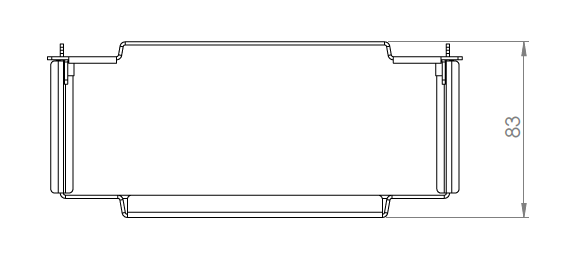
| **System Dimensions** | 196 mm x 227.5 mm x 83 mm | |
| **System Weight** | 1.6 kg / 3.4 lbs | |
| **Regulatory Certifications** | | RoHS 3 (2015/863/EU) |
## 2- Technical Specifications
### 2.1- External Features
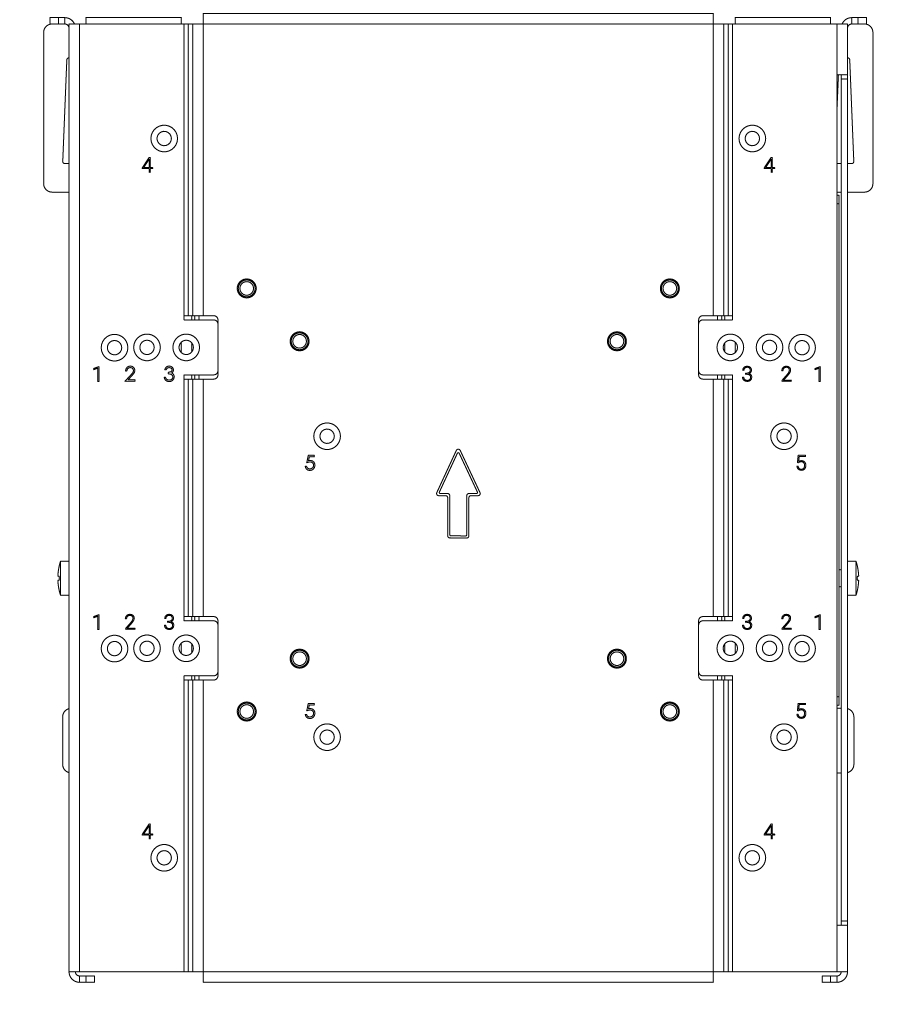
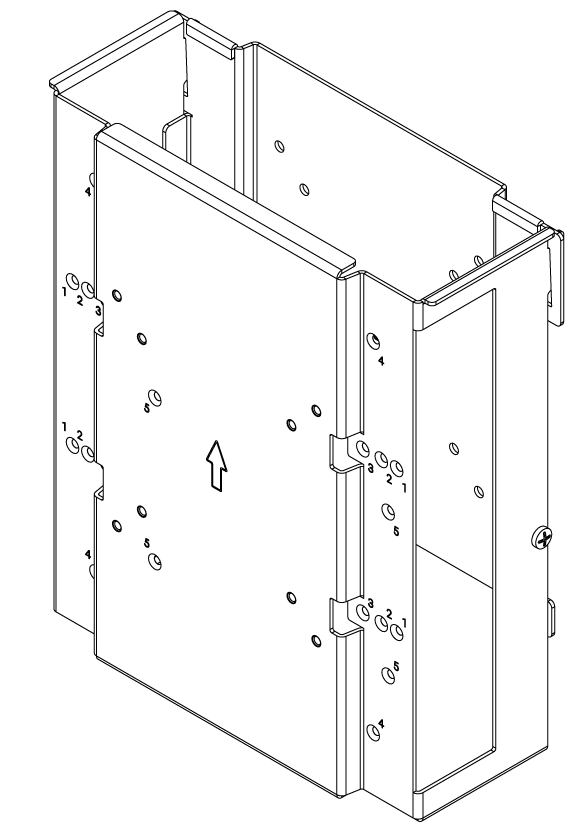
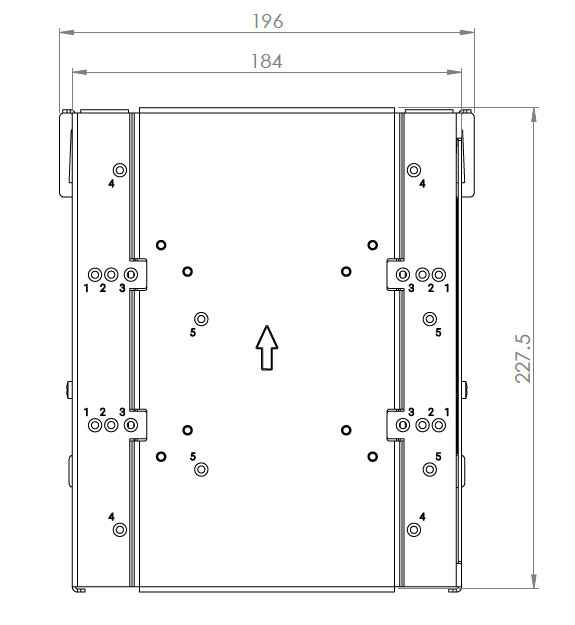
VMPL-2024 consists of two sections that can be separated for mounting. These sections are secured together using 2x M4x0.7 L=6 mm screws. Either section features an engraved arrow indicating the proper direction for “UP” when installing the bracket. The monitor-side section is shown below on the right. The monitor-arm section is shown to the left.

\
The monitor-arm section is the component that the OnLogic system is mounted to. Each series of countersunk screw holes are accompanied by a number to indicate system mounting compatibility as follows:
1. OnLogic HX511
2. OnLogic HX401
3. OnLogic ML100
4. OnLogic HX500
5. OnLogic K410 & K430
## 3- Installation & Mechanical
### 3.1- Installation Instructions
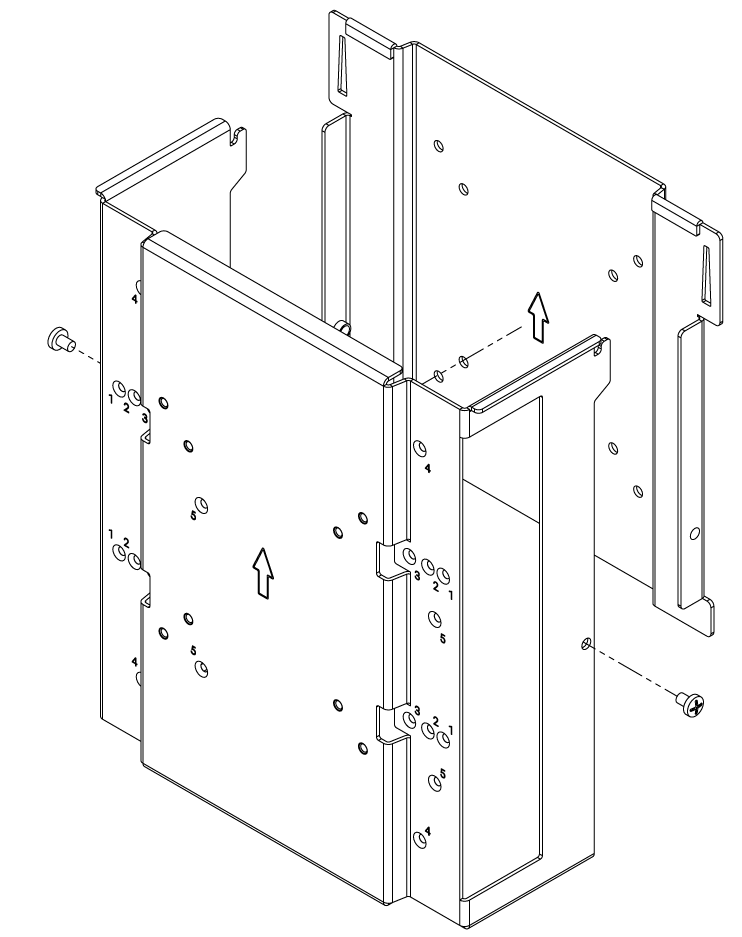
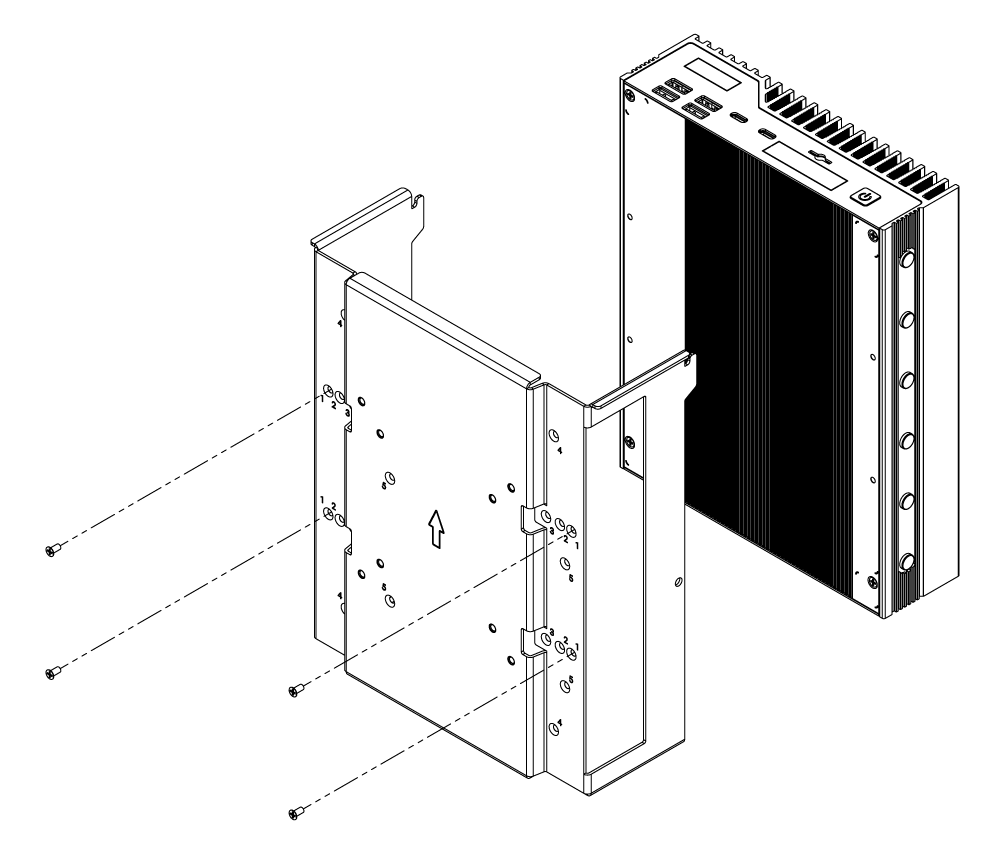
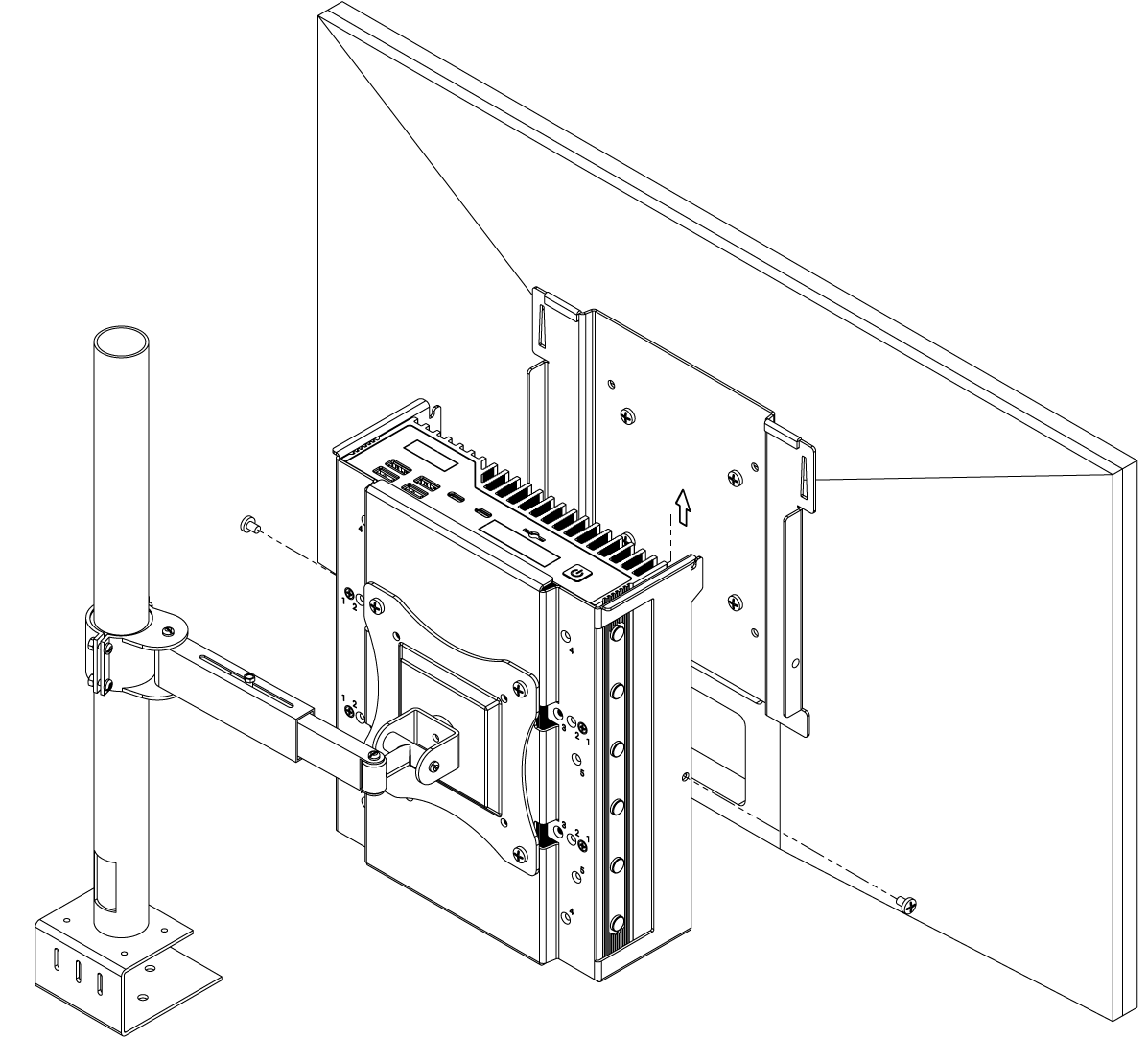
**Step 1:** Separate the two bracket segments by first removing the M4 screw on either side of the bracket (M4X0.7 Phillips head, 6 mm long). With the screws removed, the bracket segments can be separated by removing the monitor-side section from the hooked tabs on the top edge of the monitor arm-side section.
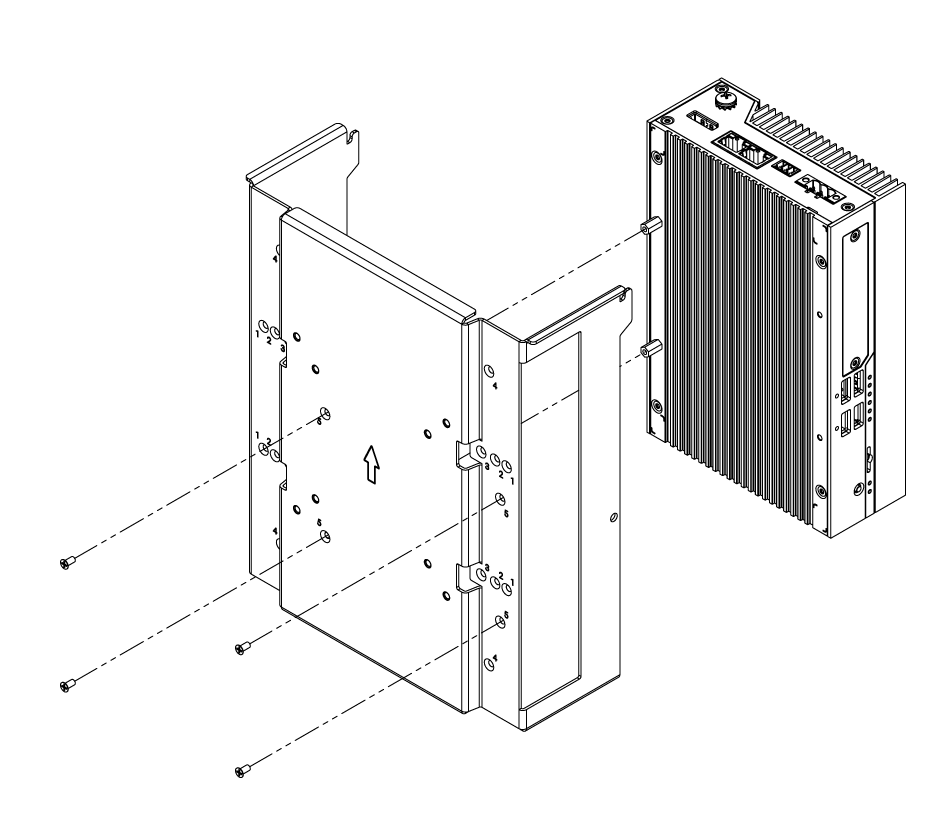
**Step 2:** Identify the screw holes that correspond to the system to be mounted using the information in section 1.4 of this manual. Secure the system using the 4x supplied M3 screws (M3X0.5 Flathead Screw, 6mm Long). Mounting of the OnLogic HX511 is shown as an example.
\
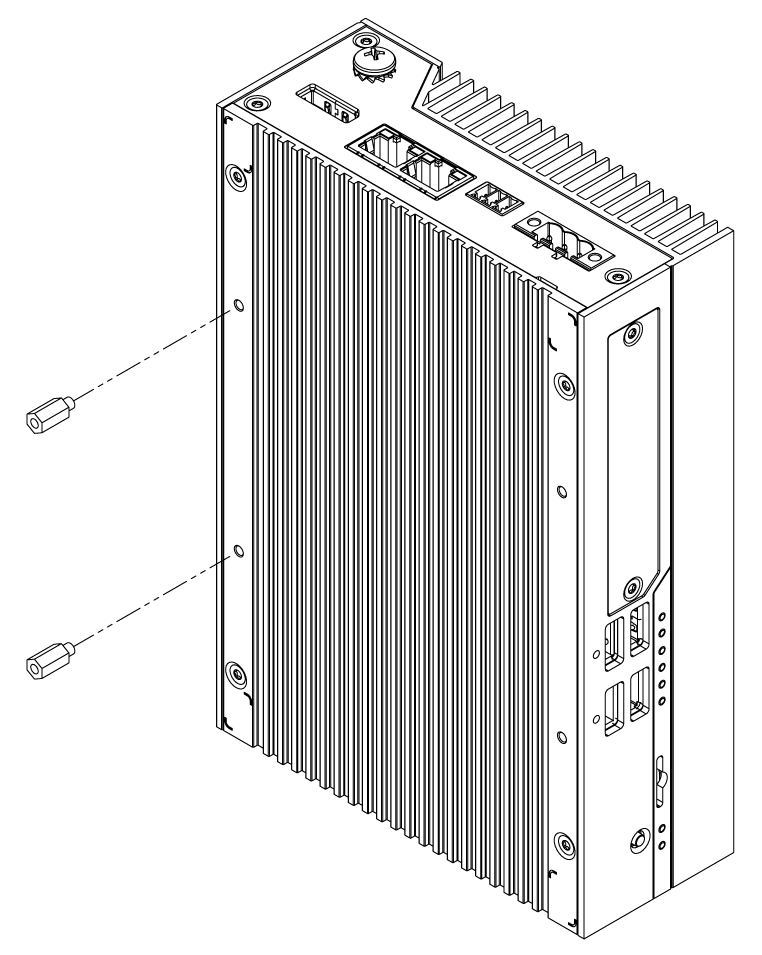
**NOTE:** If mounting an OnLogic K410 / K430 system, install the 2x included M3x0.5 M-F L=9 mm standoffs to the bottom of the OnLogic K400 as shown prior to securing the system to the monitor arm section of the bracket.
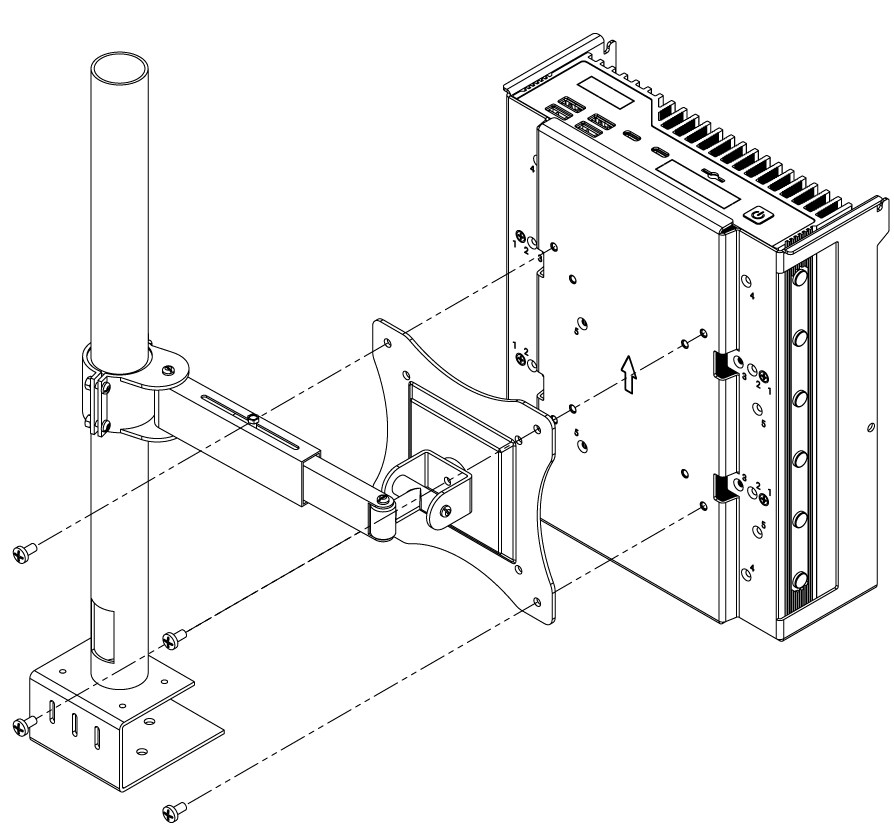
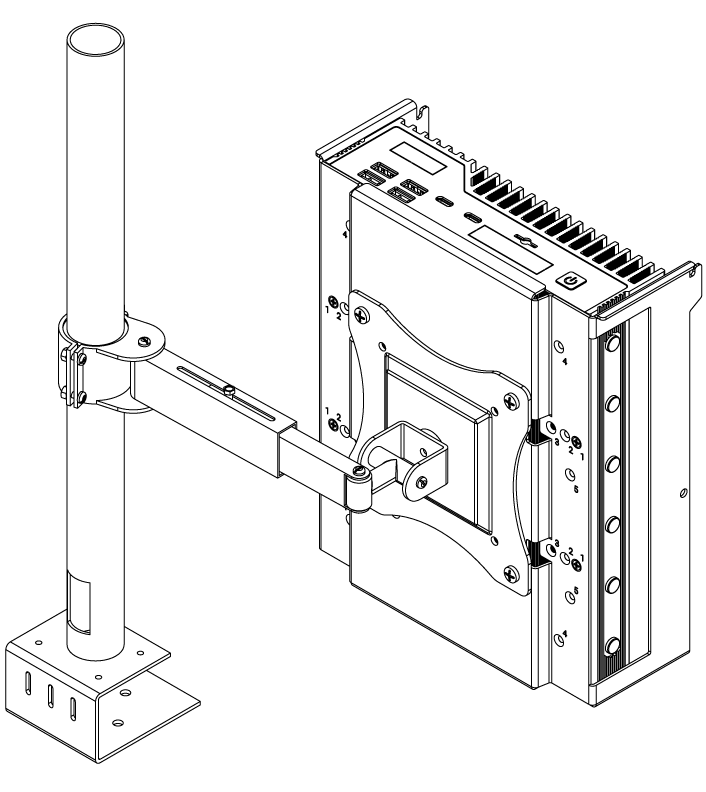
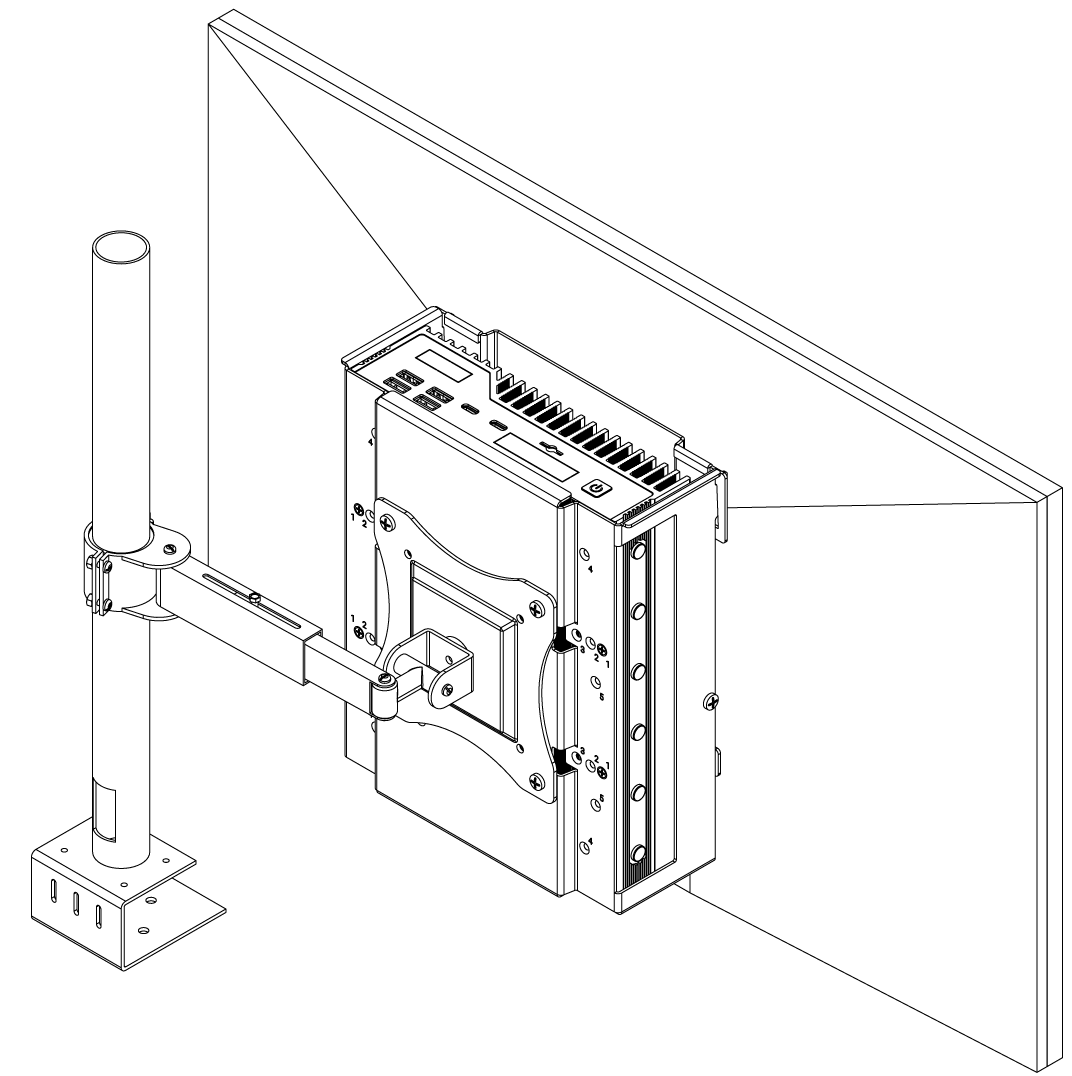
**Step 3:** Install the bracket/system assembly to a VESA 75 or VESA 100 mounting pattern on a monitor stand/arm using the provided M4x0.7 8mm length screws. Note the arrow marking on the bracket indicating which side of the bracket should be facing UP.
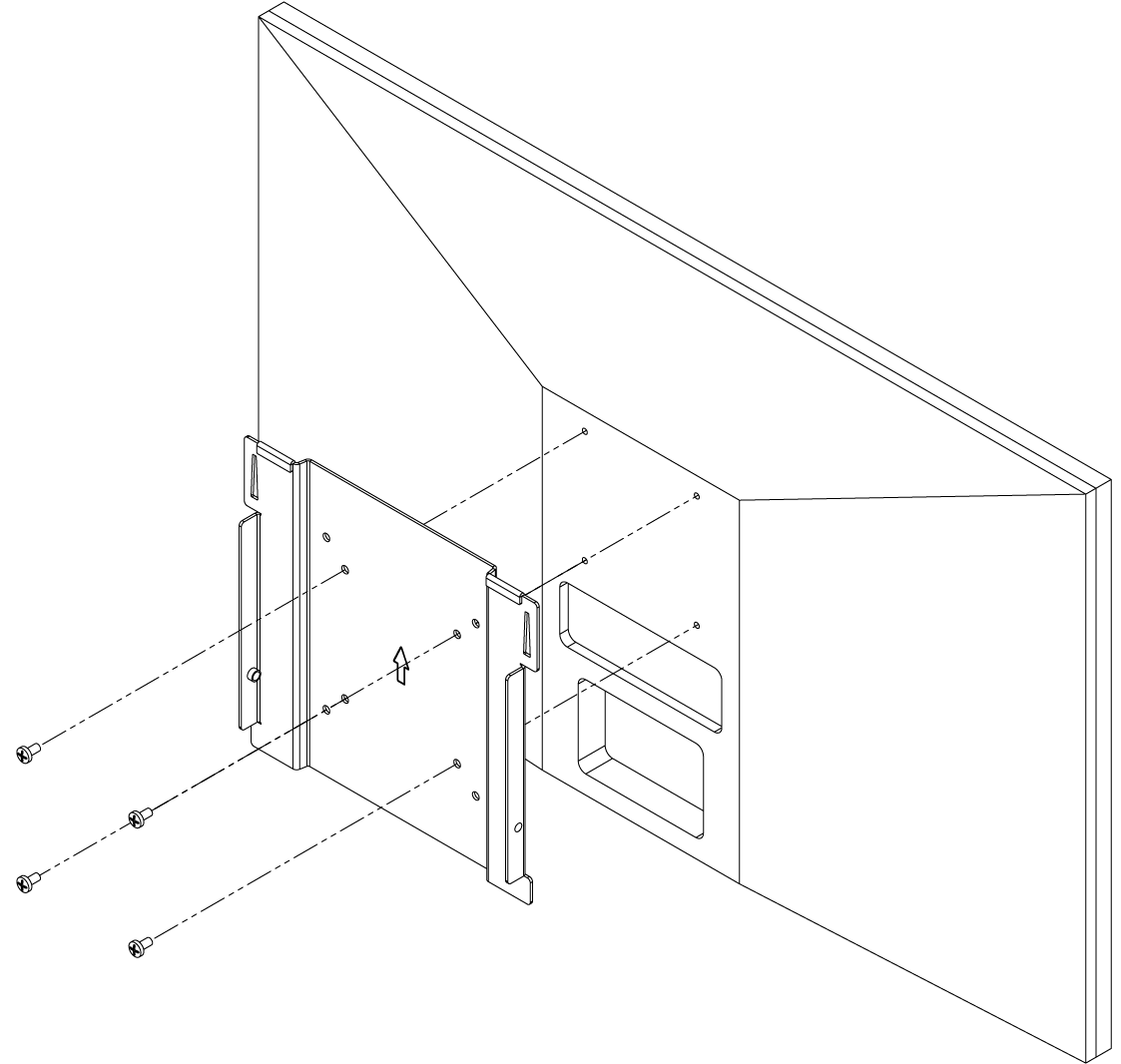
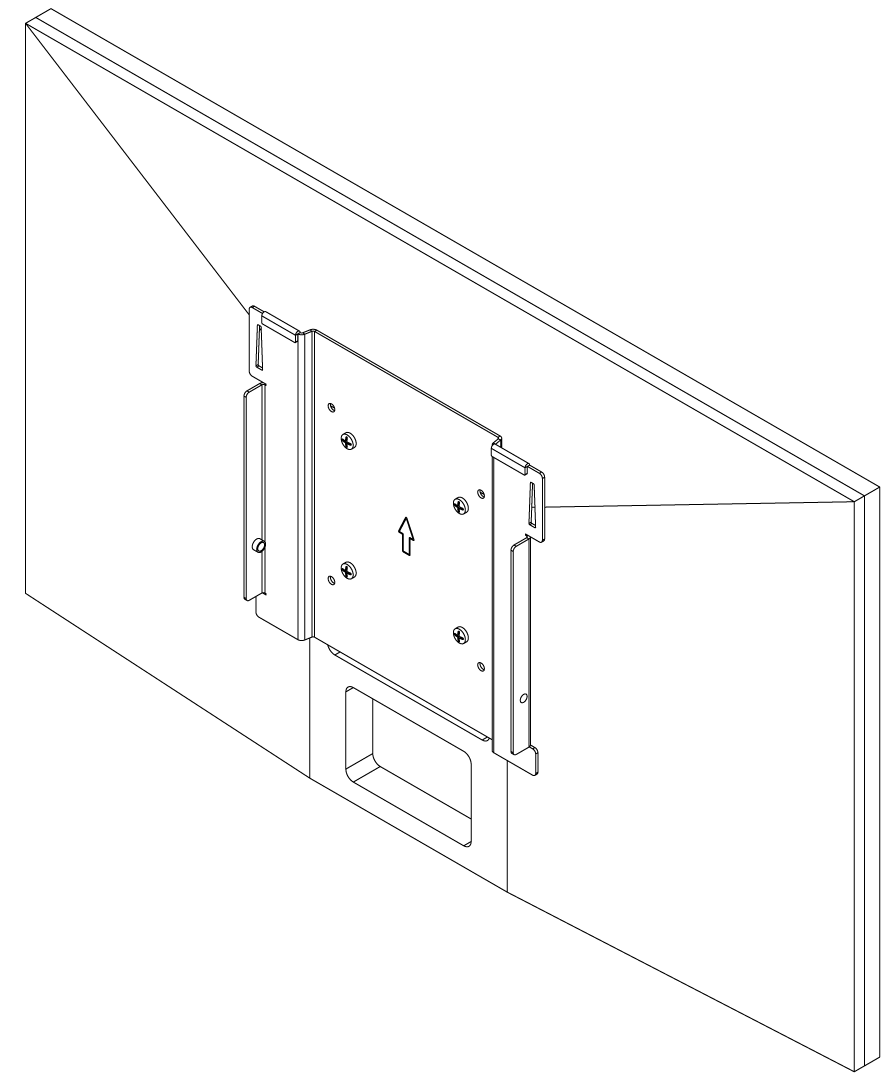
**Step 4:** Install the monitor-side bracket segment to a monitor VESA 75 or VESA 100 mounting pattern using the provided M4x0.7 8mm length screws Note the arrow marking on the bracket indicating which side of the bracket should be facing UP.
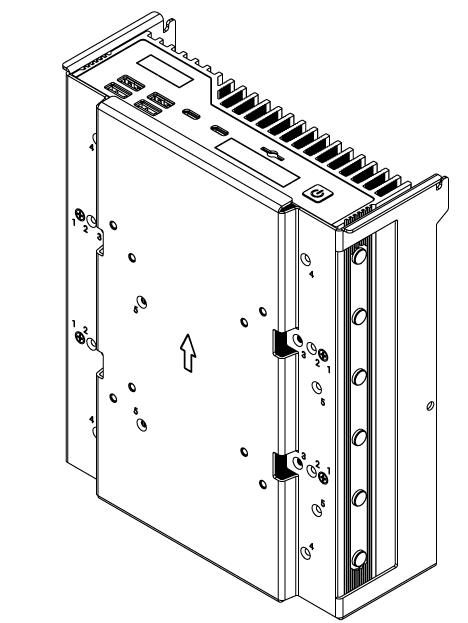
**Step 5:** Install the bracket/monitor assembly to the monitor arm-side assembly by aligning the hooks/tabs and slot the pieces together. Secure the bracket segments together using the 2x M4 screws removed in Step 1.
## 4- Support & Compliance
### 4.1- Regulatory
#### FCC Statement
This device complies with part 15 of the FCC rules as a Class A device. Operation is subject to the following two conditions: (1) this device may not cause harmful interference and (2) this device must accept any interference received, including interference that may cause undesired operation.
#### ISED
This device complies with Industry Canada license-exempt RSS standard(s). Operation is subject to the following two conditions: (1) this device may not cause interference, and (2) this device must accept any interference, including interference that may cause undesired operation of the device.
Le présent appareil est conforme aux CNR d'Industrie Canada applicables aux appareils radio exempts de licence. L'exploitation est autorisée aux deux conditions suivantes: (1) l'appareil ne doit pas produire de brouillage, et (2) l'utilisateur de l'appareil doit accepter tout brouillage radioélectrique subi, même si le brouillage est susceptible d'en compromettre le fonctionnement.
CAN ICES-003(A) / NMB-003(A)
#### UKCA
The computer system was evaluated for medical, IT equipment, automotive, maritime and railway EMC standards as a class A device. The computer complies with the relevant IT equipment directives for the UKCA mark.
#### VCCI
This is a Class A product based on the standard of the Voluntary Control Council for Interference (VCCI). If this equipment is used in a domestic environment, radio interference may occur, in which case the user may be required to take corrective actions.
 | RoHS 3 (2015/863/EU) |
## 2- Technical Specifications
### 2.1- External Features
VMPL-2024 consists of two sections that can be separated for mounting. These sections are secured together using 2x M4x0.7 L=6 mm screws. Either section features an engraved arrow indicating the proper direction for “UP” when installing the bracket. The monitor-side section is shown below on the right. The monitor-arm section is shown to the left.

| RoHS 3 (2015/863/EU) |
## 2- Technical Specifications
### 2.1- External Features
VMPL-2024 consists of two sections that can be separated for mounting. These sections are secured together using 2x M4x0.7 L=6 mm screws. Either section features an engraved arrow indicating the proper direction for “UP” when installing the bracket. The monitor-side section is shown below on the right. The monitor-arm section is shown to the left.