> For the complete documentation index, see [llms.txt](https://support.onlogic.com/llms.txt). Markdown versions of documentation pages are available by appending `.md` to page URLs; this page is available as [Markdown](https://support.onlogic.com/product-documentation/components-and-expansion/dio/mod110-isolated-dio-module.md).
# MOD110 Isolated DIO Module
Guide to the MOD110 Isolated DIO Module, detailing its DIO, CAN, PWM, and QEP features, and control via the Hardware Control Application.
## Features
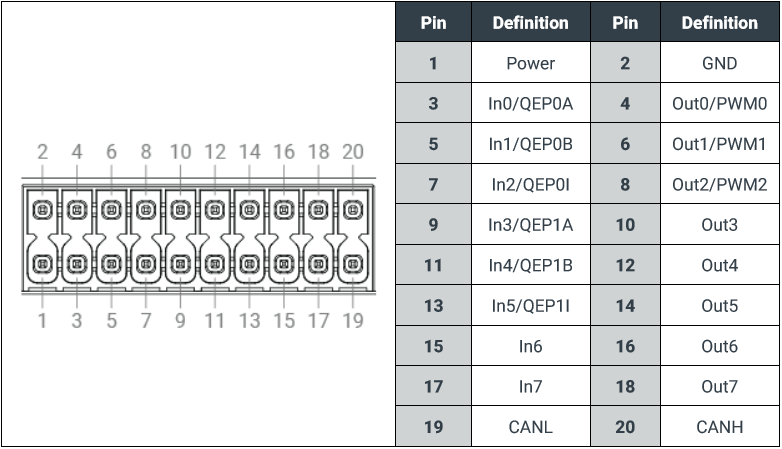
The (optional) MOD110 digital input/output (DIO) expansion adds up to eight digital inputs and outputs to the system, and an additional CAN port. It also optionally provides support for pulse width modulation (PWM) on three of the eight digital output pins, and support for using a quadrature encoder peripheral (QEP) in place of the first and/or second group of three digital inputs.
MOD110 Pinout
### DIO
The isolated digital inputs/outputs are enabled by default, and require an external power source (9 \~ 48 VDC) in order to operate.
The outputs function as open-**drains**, and should not be used to source more than 150mA of current. The input of the DIO are pulled **high when floating**.
### CAN
The additional CAN device supported by the MOD110 DIO Module supports CAN 2.0 A/B at bitrates from 100000 to 1000000. The CAN device is not internally terminated, so a properly terminated CAN cable should be used when connecting to the device.
### PWM
Digital outputs 0, 1, and 2 can be optionally configured to operate in PWM mode. This configuration is performed in the system UEFI BIOS (Setup Menu > Advanced > OnLogic Feature Configuration).
The frequency of the PWM is limited by the switching speed of the isolating optocouplers to 10KHz.
### QEP
Groups of digital inputs (0, 1, 2 and 3, 4, 5) can be optionally configured to operate as a QEP (Quadrature Encoder Peripheral). This configuration is performed in the system UEFI BIOS (Setup Menu > Advanced > OnLogic Feature Configuration).
## Usage
Interfaces on the MOD110 DIO Module are managed of the system’s Host Embedded Controller Interface (HECI). Installing the system Windows driver for this interface is a required prerequisite to using the MOD110, and it can be found as part of the HX310/K400’s [system driver package](/product-documentation/rugged-products/karbon-k400-series/k410-k430.md#drivers).
On Linux systems, see [K400 PSE Configuration (Ubuntu)](/support-articles/how-tos/operating-systems/pse-configuration-ubuntu.md) for driver installation instructions.
Once the driver is installed, the MOD110 can be controlled programmatically over the HECI connection, or by using the provided hardware control command line application.
### Hardware Control Application (HWC)
| Version | Release Date | Link | Release Notes |
| ------- | ------------ | -------------------------------------------------------------------------------------------------------------------------------------------------------------------------------------------- | ---------------------------------------------------------------------------------------------------------------------------------------------------------------------------------------------------------------------------------------------------- |
| v1.2.1 | 10/11/2023 |
\* Note that the CAN baudrateis fixed at 1M. Please see our C-Based PSE-Examples for setting the baudrateprogrammatically.
|
*Make sure your system’s drivers are installed and up-to-date*
Sample code (in C) is also available for [Linux](/support-articles/how-tos/operating-systems/pse-configuration-ubuntu.md). Windows sample code is not currently available.
### DIO
The hardware control application can be used to read and write the states of the digital outputs and inputs.
```
# Set digital output 0
$ hwc.exe dio set digital-output 0
# Clear digital output 0
$ hwc.exe dio clear digital-output 0
```
```
# Read the state of a digital input
$ hwc.exe dio read digital-input 0
```
Additionally, digital-inputs track the number of signal edges detected since device power-on; this count can be reported and cleared by the command line interface:
```
# Clear the toggle-count of a digital input
$ hwc.exe dio clear-count digital-input 0
```
Contextual help information is also available in the application:
```
$ hwc.exe dio --help
Read and write digital IO states
Set outputs, read both inputs and outputs.
USAGE:
hwc.exe dio
FLAGS:
-h, --help
Prints help information
-V, --version
Prints version information
ARGS:
Kind of action to take on the IO pin [possible values: ...]
The type of IO device to target [possible values: ...]
Hardware pin number used by this operation
```
### CAN
The hardware control application support reading and writing CAN frames, as well as enabling/disabling the device.
***NOTE** The MOD110’s CAN device is referenced as device one (-d 1) the onboard CAN is device zero (-d 0).*
```
# Set the device baudrate to 500000
$ hwc.exe can -d 1 set-baudrate 500
# Enable the can device
$ hwc.exe can -d 1 enable
# Send a message
$ hwc.exe can -d 1 write 1FF 3 -- 11 22 33
# Receive a message
$ hwc.exe can -d 1 read
```
Contextual help information is also available in the application:
```
$ hwc.exe can --help
Control system CAN devices
Send and receive messages, set the system baudrate, and report status
USAGE:
hwc.exe can [OPTIONS] [msg-id] [length] [-- ...]
FLAGS:
-h, --help
Prints help information
-V, --version
Prints version information
OPTIONS:
-b, --baudrate
Set the CAN baudrate from 100 - 1000 kbaud [default: 500]
-d, --device
The CAN device to target, if the interface has more than one [default: 0]
-f, --frame-type
Select if this frame is Standard or Remote [default: standard] [possible values: standard, remote]
-i, --id-type
CAN ID format specifier. IDs greater that 0x7FF should be sent as extended, or they will be truncated
[default: standard] [possible values: standard, extended]
ARGS:
CAN action to perform [possible values: read, write, enable, disable, set-baudrate, status-report, status-
clear]
The ID of a CAN message, must be <0x7FF for standard frames and <0x1FFFFFFF for extended frames [default: 0]
The length of this CAN message, 0 - 8 If length is greater than the number of provided bytes, they will be
filled with 00 [default: 8]
...
Can data vector, up to eight bytes in length [default: 00]
```
### PWM
The PWM supports starting/stopping output, as well as setting the period and pulse of the PWM signal.
```
# Set the pwm signal behavior
$ hwc.exe set-cycles --period 1000000 --pulse 500000
# Start the pwm output
$ hwc.exe pwm start
# Stop the pwm output
$ hwc.exe pwm stop
```
In-application help is also available:
```
$ hwc.exe pwm --help
Control system PWM devices
USAGE:
hwc.exe pwm [OPTIONS]
FLAGS:
-h, --help Prints help information
-V, --version Prints version information
OPTIONS:
-t, --period Period, in microseconds [default: 0]
-p, --pulse Pulse, in microseconds [default: 0]
ARGS:
Kind of action to take on the pwm device [possible values: start, stop, set-cycles]
The PWM device to target on this controller
```
### QEP
The Quadrature Encoder Peripheral supports a number of configurations and commands, including setting the edge trigger type, index gating, and switching between edge capture and decoder mode:
```
$ hwc.exe qep --help
Control system QEP (Encoder) peripherals
USAGE:
hwc.exe qep [FLAGS] [OPTIONS]
FLAGS:
-h, --help
Prints help information
--swap-inputs
Swap the Phase A and Phase B inputs
-V, --version
Prints version information
OPTIONS:
-c, --counter-reset
Select which event will cause a reset of the encoder position counter [default: max-count] [possible
values: max-count, index-event]
-a, --data
Data returned from/ sent to a QEP command. Zero if the command does not return a data value
GetDirection: The direction based on the last change event
0: Clockwise, 1: Counter-Clockwise, 2: Unknown
GetPositionCount: The current position count
StartCapture: The number of edges to capture
GetPhaseError: Whether or not a phase error has been detected [default: 0]
-d, --device
The QEP device to interface with, if the controller has more than one [default: 0]
-g, --edge-type
Edge to trigger capture events on in edge capture mode [default: rising] [possible values: rising, falling,
both]
-e, --event
QEP Event to enable or disable Only used when calling 'enable event' or 'disable event' [default: unknown]
[possible values: watchdog-timeout, counter-reset-up, counter-reset-down, direction-change, phase-error,
edge-capture-done, edge-capture-cancelled, unknown]
-f, --filter-width
The noise filter width in nanoseconds. Set to 0 to disable noise filtering [default: 0]
-i, --index-gating
Select the system index gating, which effects the counter reset in index-event mode [default: a-low-b-low]
[possible values: a-low-b-low, a-low-b-high, a-high-b-low, a-high-b-high]
-m, --mode
Select encoder or edge-capture QEP operation [default: decoder] [possible values: decoder, edge-capture]
-p, --pulses-per-rev
The number of pulses per revolution in quadrature decoder mode [default: 0]
-w, --watchdog-timeout
The watchdog timeout in microseconds. The QEP watchdog will trigger an event on stalls when operating in
decoder mode
Set as zero to disable the watchdog [default: 0]
ARGS:
Kind of action to take on the qep device [possible values: configure, start-decode, stop-decode, get-
direction, get-position-count, start-capture, stop-capture, enable-event, disable-event, get-phase-
error]
```
## Troubleshooting
#### Permissions
Interfacing with the HECI driver requires elevated permissions on both Windows and Linux. The commands in this guide should be run from an elevated command prompt.
#### Hardware Control CLI
The hardware control application supports verbose debug output:
`$ hwc.exe -v debug dio read digital-input 0`
Capturing this output is helpful if you’re reaching out to OnLogic for support with an issue using your hardware.