# FR202

## <mark style="color:blue;">FR202 Product Manual</mark>

## <mark style="color:blue;">Revision History</mark>

| Revision History                           | Date       |
| ------------------------------------------ | ---------- |
| First release of FR202 manual              | 2022-09-27 |
| Updated to include new isolated PoE module | 2024-08-05 |
| Updated Analog Current Input Wiring        | 2024-04-19 |
|                                            |            |
|                                            |            |

## <mark style="color:blue;">1- System Overview</mark> <a href="#id-1---system-overview" id="id-1---system-overview"></a>

### <mark style="color:blue;">1.1- System Introduction</mark> <a href="#id-1.1-system-introduction" id="id-1.1-system-introduction"></a>

The Factor 202 (FR202) harnesses the power of the Raspberry Pi Compute Module 4, which provides the core functionality of the Raspberry Pi 4. Combined with our own industry-focused carrier board, and a custom-designed industrial chassis, the Factor 202 has been engineered for today's industrial and embedded applications.

<figure><img src="/files/KeVPvZ6hdPvWe7qTCXzK" alt=""><figcaption></figcaption></figure>

For use as a compact IoT gateway, edge device, or customizable industrial controller, the Factor 202 is the industrial Raspberry Pi solution you've been waiting for.

### <mark style="color:blue;">1.2- In-box Accessories</mark> <a href="#id-1.2--in-box-accessories" id="id-1.2--in-box-accessories"></a>

* 1x Power Terminal Block
* 1x COM Terminal Block
* 7x IO Terminal Block

If you purchased additional items such as mounting brackets, power supplies or terminal block connectors, they will be located in the system box or within the outer shipping carton.

All drivers and product guides can be found on the corresponding product page. For more information on accessories and additional features, visit the Factor 200 Series page.

Factor Series Page: <https://www.onlogic.com/store/computers/industrial/fanless/factor-200/>\
Factor 202 Product Page: <https://www.onlogic.com/store/fr202/>

### <mark style="color:blue;">1.3- Product Specifications</mark> <a href="#id-1.3---product-specifications" id="id-1.3---product-specifications"></a>

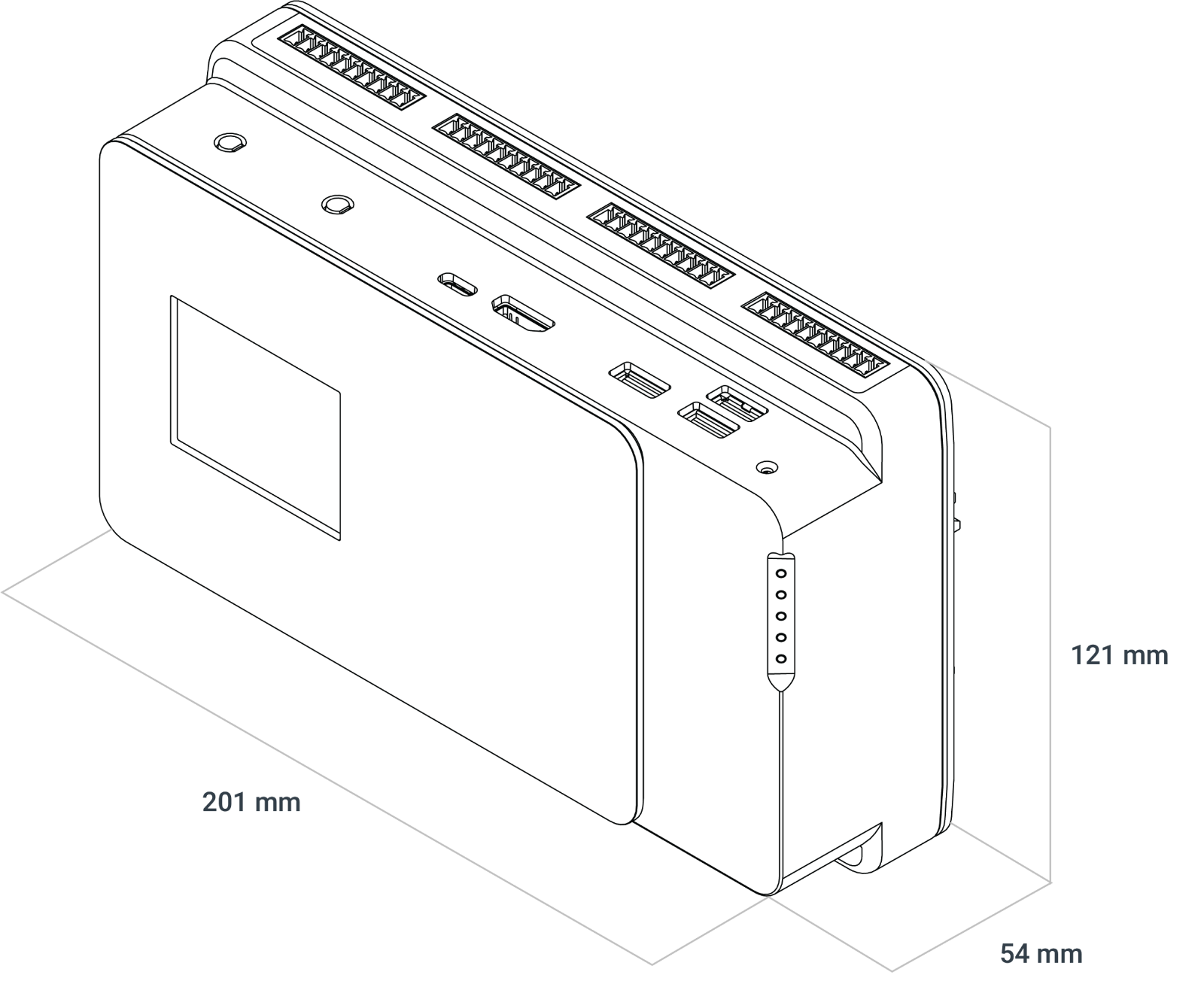
<table><thead><tr><th width="266.27276611328125">Model</th><th>Factor 202 (Includes FR201 IO)</th></tr></thead><tbody><tr><td><strong>System Dimensions</strong></td><td>7.9" x 2.1" x 4.8" 201x 54 x 121 mm</td></tr><tr><td><strong>CPU (on solder side of board)</strong></td><td>Raspberry Pi CM4 Headers</td></tr><tr><td><strong>Memory</strong></td><td>CM4-dependent, up to 32GB</td></tr><tr><td><strong>LAN Controller</strong></td><td>1x Realtek RTL8153B (GbE) 1x from CM4 (GbE)</td></tr><tr><td><strong>Expansion</strong></td><td><p>1x M.2 2280 B-Key (USB 3.2 5Gb/s) </p><p>1x M.2 2280 B-Key (SATA III)</p></td></tr><tr><td><strong>Back I/O</strong></td><td><p>2x 1GbE LAN </p><p>1x 5-pin Serial (RS232/422/485) </p><p>1x 3-pin Terminal Block with 12~24 V input </p><p>4x Analog input (0~5V/0~10V/-5~5V/-10~10V/0-20mA/4-20mA/4-24mA) </p><p>2x Temperature input (RT100/1000) </p><p>1x SPI/I2C/UART/RS485 Header</p></td></tr><tr><td><strong>Front I/O</strong></td><td><p>1x USB 3.0 5Gb/s </p><p>2x USB 2.0 </p><p>1x HDMI </p><p>1x USB-C for CM4 Programming </p><p>1x Reset button 16x Digital input (Isolated) </p><p>16x Digital Output (Isolated)</p></td></tr><tr><td><strong>Onboard Headers &#x26; Connectors</strong></td><td><p>1x Battery on a cable </p><p>1x Raspberry Pi Expansion Header (Female; utilized in expansion) </p><p>1x SPI TPM Header </p><p>1x CM4 Boot Mode Select</p><p>1x PoE PD Header </p><p>1x USB2 Modem Header</p></td></tr><tr><td><strong>Voltage Input</strong></td><td>12~24V or PoE PD</td></tr><tr><td><strong>Power Input</strong></td><td>3-pin Terminal Block or PoE PD via optional add-on</td></tr><tr><td><strong>Operating Systems</strong></td><td>Raspbian, Ubuntu 22.04</td></tr><tr><td><strong>Special Features</strong></td><td><p>RTC </p><p>TPM header - support TPM01 </p><p>Support for 4G LTE and GPS expansion cards</p></td></tr><tr><td><strong>Thermal Standards (Subject to change through RFI and RFQ steps)</strong></td><td><p>Board Operating Temperature: -20-60C </p><p>Storage Temperature: -40-85C </p><p>Operating Humidity: 10% - 95% (non-condensing)</p></td></tr><tr><td><strong>Extra Chassis Features</strong></td><td><p>4 Antenna holes </p><p>DIN Rail Mount</p></td></tr><tr><td><strong>Regulatory</strong></td><td><p>SAFETY Listings + CB ( Intertek File 5019151) </p><p>IEC/UL/EN 62368-1, 61010-1, 61010-2-201 </p><p>EMC CISPR 32/35 Class A </p><p>FCC Part 15 Class A </p><p>IEC/EN 60601-1-2:2014 Medical Immunity </p><p>Radio Equipment Directive (2014/53/EU) [Only applicable for configurations with wireless transmitters and includes LTE/Wifi/BT together] </p><p>RoHS 3 Directive (2015/863/EU) </p><p>WEEE Directive (2012/19/EU)</p></td></tr></tbody></table>

<table><thead><tr><th width="199">Radio Specifications </th><th>when equipped with Raspberry Pi Wi-Fi (device for indoor use) Cypress CYW43455</th></tr></thead><tbody><tr><td><strong>Frequency Bands</strong></td><td>2.4 GHz Wifi</td></tr><tr><td><strong>Operating Frequency</strong></td><td>2400 to 2483.5 GHz (channelized)</td></tr><tr><td><strong>Modulation Type</strong></td><td>802.11b, 802.11g and 802.11n(HT20)</td></tr><tr><td><strong>Channel spacing / Bandwidth</strong></td><td><p>2.4GHz: 802.11b/g/n; 5 MHz / BT: 1MHz Bandwidth: 22 MHz </p><p>5 GHz: 802.11a/n/ac: 20, 40, 80, 160 MHz</p></td></tr><tr><td><strong>RF output power</strong></td><td><p>19 dBm (2400-2485 MHz) IEEE 802.11b/g/n &#x26; BT </p><p>10 dBm (2400-2485 MHz) BLE </p><p>23 dBm (5150-5725 MHz) IEEE 802.11a/n/ac </p><p>13.98 dBm (5725-5875 MHz) IEEE 802.11a/n/ac</p></td></tr><tr><td><strong>Type of Antenna</strong></td><td>1x Reference antenna is PIFA type (2 dBi/2 dBi gain) - external terminal</td></tr></tbody></table>

<table><thead><tr><th width="241.54541015625">Radio Specifications </th><th>when equipped with Amit MDG100 (EU)</th></tr></thead><tbody><tr><td><strong>GPS Receiver</strong></td><td>Operating frequency range: 1559 - 1610 MHz</td></tr><tr><td><strong>GLONASS Receiver</strong></td><td>Operating frequency range: 1559 - 1610 MHz</td></tr><tr><td><strong>BDS Receiver</strong></td><td>Operating frequency range: 1559 - 1610 MHz</td></tr><tr><td><strong>Galileao Receiver</strong></td><td>Operating frequency range: 1559 - 1610 MHz</td></tr><tr><td><strong>QZSS Receiver</strong></td><td>Operating frequency range: 1559 - 1610 MHz</td></tr><tr><td><strong>GSM 900</strong></td><td>Operating frequency range: 880 - 915 MHz, 925 - 960 MHz Maximum output power: 33dBm rated</td></tr><tr><td><strong>GSM 1800</strong></td><td>Operating frequency range: 1710 - 1785 MHz, 1805 - 1880 MHz Maximum output power: 30dBm rated</td></tr><tr><td><strong>WCDMA Band 1</strong></td><td>Operating frequency range: 1920 - 1980 MHz, 2110 - 2170 MHz Maximum output power: 24dBm rated</td></tr><tr><td><strong>WCDMA Band 8</strong></td><td>Operating frequency range: 880 - 915 MHz, 925 - 960 MHz Maximum output power: 24dBm rated</td></tr><tr><td><strong>LTE FDD Band 1</strong></td><td>Operating frequency range: 1920 - 1980 MHz, 2110 - 2170 MHz Maximum output power: 23dBm rated</td></tr><tr><td><strong>LTE FDD Band 3</strong></td><td>Operating frequency range: 1710 - 1785 MHz, 1805 - 1880 MHz Maximum output power: 23dBm rated</td></tr><tr><td><strong>LTE FDD Band 7</strong></td><td>Operating frequency range: 2500 - 2570 MHz, 2620 - 2690 MHz Maximum output power: 23dBm rated</td></tr><tr><td><strong>LTE FDD Band 8</strong></td><td>Operating frequency range: 880 - 915 MHz, 925 - 960 MHz Maximum output power: 23dBm rated</td></tr><tr><td><strong>LTE FDD Band 20</strong></td><td>Operating frequency range: 832 - 862 MHz, 791 - 821 MHz Maximum output power: 23dBm rated</td></tr><tr><td><strong>LTE FDD Band 28A</strong></td><td>Operating frequency range: 703 - 733 MHz, 758 - 788 MHz Maximum output power: 23dBm rated</td></tr><tr><td><strong>LTE FDD Band 38</strong></td><td>Operating frequency range: 2570 - 2620 MHz Maximum output power: 23dBm rated</td></tr><tr><td><strong>LTE FDD Band 40</strong></td><td>Operating frequency range: 2300 - 2400 MHz Maximum output power: 23dBm rated</td></tr><tr><td><strong>E-GSM</strong></td><td>Operating frequency range: 880 - 915 MHz Maximum output power: 33dBm rated</td></tr><tr><td><strong>DCS</strong></td><td>Operating frequency range: 1710 - 1785 MHz Maximum output power: 30dBm rated</td></tr></tbody></table>

<table><thead><tr><th width="243.27276611328125">Radio Specifications </th><th>when equipped with Amit MDG200 (North America)</th></tr></thead><tbody><tr><td><strong>GPS Receiver</strong></td><td>Operating frequency range: 1559 - 1610 MHz</td></tr><tr><td><strong>GLONASS Receiver</strong></td><td>Operating frequency range: 1559 - 1610 MHz</td></tr><tr><td><strong>BDS Receiver</strong></td><td>Operating frequency range: 1559 - 1610 MHz</td></tr><tr><td><strong>Galileao Receiver</strong></td><td>Operating frequency range: 1559 - 1610 MHz</td></tr><tr><td><strong>QZSS Receiver</strong></td><td>Operating frequency range: 1559 - 1610 MHz</td></tr><tr><td><strong>WCDMA Band 2</strong></td><td>Operating frequency range: 1850 - 1910 MHz, 1930 - 1990 MHz Maximum output power: 24dBm rated</td></tr><tr><td><strong>WCDMA Band 4</strong></td><td>Operating frequency range: 1710 - 1755 MHz, 2110 - 2155 MHz Maximum output power: 24dBm rated</td></tr><tr><td><strong>WCDMA Band 5</strong></td><td>Operating frequency range: 824 - 849 MHz, 869 - 894 MHz Maximum output power: 24dBm rated</td></tr><tr><td><strong>LTE FDD Band 12</strong></td><td>Operating frequency range: 699 -716 MHz, 729 - 746 MHz Maximum output power: 23dBm rated</td></tr><tr><td><strong>LTE FDD Band 13</strong></td><td>Operating frequency range: 777 - 787 MHz, 758 - 768 MHz Maximum output power: 23dBm rated</td></tr><tr><td><strong>LTE FDD Band 14</strong></td><td>Operating frequency range: 788 - 798 MHz, 758 - 768 MHz Maximum output power: 23dBm rated</td></tr><tr><td><strong>LTE FDD Band 66</strong></td><td>Operating frequency range: 1710 - 1780 MHz, 2100 - 2200 MHz Maximum output power: 23dBm rated</td></tr><tr><td><strong>LTE FDD Band 71</strong></td><td>Operating frequency range: 663 -698 MHz, 617 - 652 MHz Maximum output power: 23dBm rated</td></tr></tbody></table>

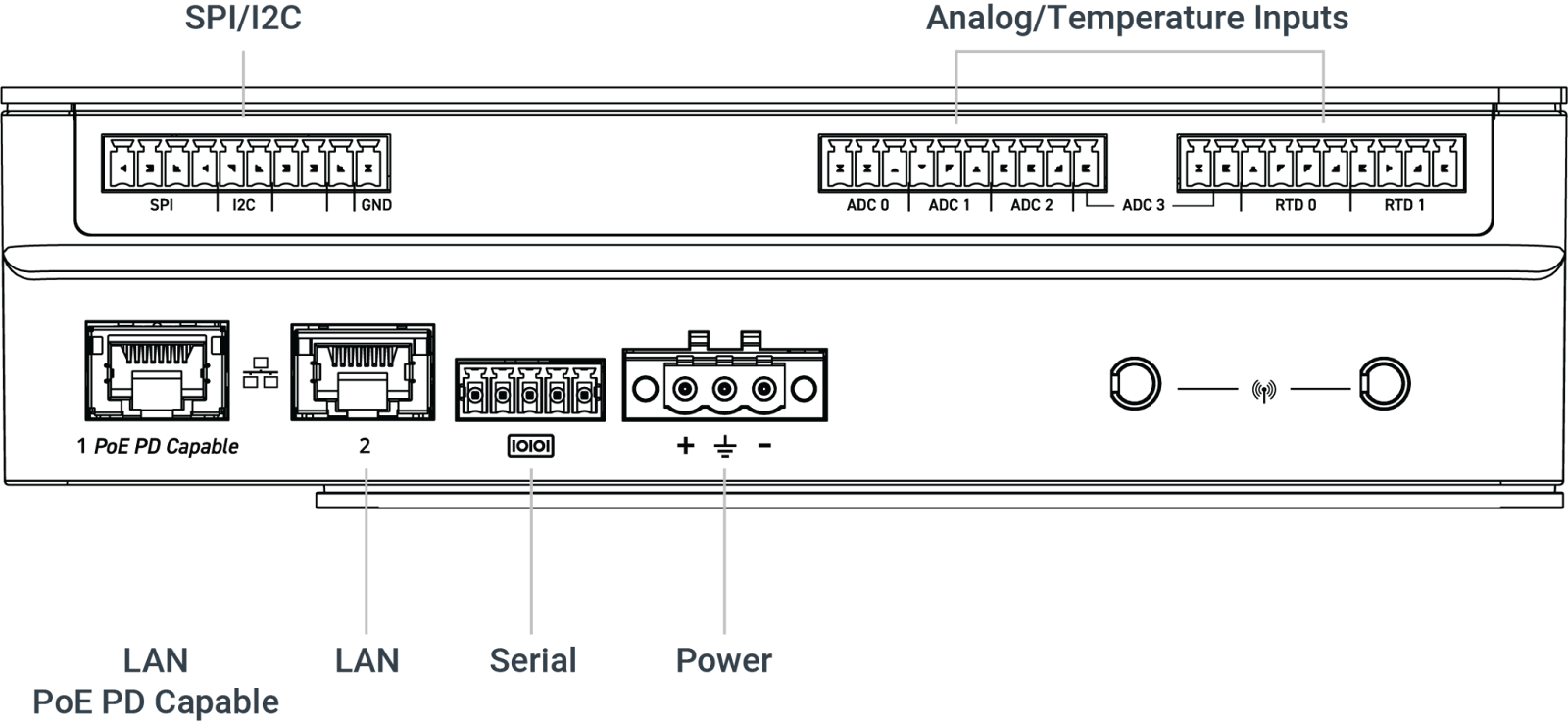
### <mark style="color:blue;">1.4- Exterior Features and Dimensions</mark> <a href="#id-1.4---exterior-features-and-dimensions" id="id-1.4---exterior-features-and-dimensions"></a>

#### <mark style="color:blue;">Top I/O</mark> <a href="#id-1.4.1-top-i-o" id="id-1.4.1-top-i-o"></a>

<div data-full-width="false"><figure><img src="/files/tGoPZlZj1AC7X3wLr8Is" alt=""><figcaption></figcaption></figure></div>

#### <mark style="color:blue;">Bottom I/O</mark> <a href="#id-1.4.2-bottom-i-o" id="id-1.4.2-bottom-i-o"></a>

<figure><img src="/files/VDq3aWgxB3LiXDoBQGp3" alt=""><figcaption></figcaption></figure>

#### <mark style="color:blue;">Factor 202 Dimensions (FR202)</mark> <a href="#id-1.4.3-factor-202-dimensions-fr202" id="id-1.4.3-factor-202-dimensions-fr202"></a>

<figure><img src="/files/Z6FYW7YeYL2TM2YmJC9S" alt=""><figcaption></figcaption></figure>

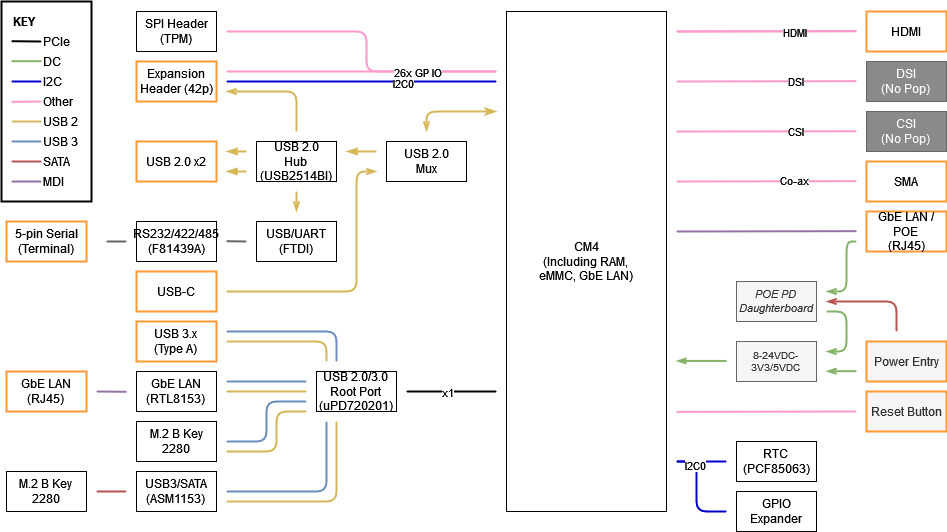
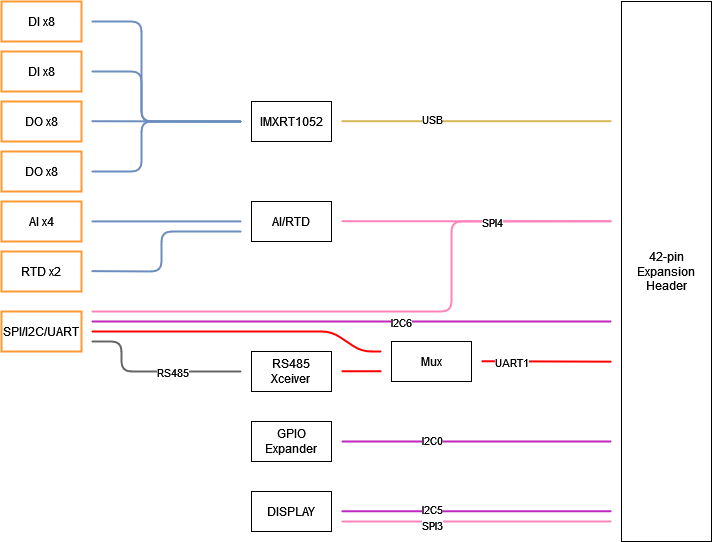
### <mark style="color:blue;">1.5- System Block Diagrams</mark> <a href="#id-1.5---system-block-diagrams" id="id-1.5---system-block-diagrams"></a>

<figure><img src="/files/XUUWo2OMmYpGjvznTvFv" alt=""><figcaption></figcaption></figure>

<figure><img src="/files/q9eLa0zwfOLMO8aEvf3L" alt=""><figcaption></figcaption></figure>

## <mark style="color:blue;">2- I/O Definitions</mark> <a href="#id-2-i-o-definitions" id="id-2-i-o-definitions"></a>

### <mark style="color:blue;">2.1- Top I/O Definition</mark> <a href="#id-2.1-top-i-o-definition" id="id-2.1-top-i-o-definition"></a>

<figure><img src="/files/yJcwYM0JZ2m8yycddXdd" alt=""><figcaption></figcaption></figure>

#### <mark style="color:blue;">USB-C Config Port (CM4 Update)</mark> <a href="#usb-c-config-port-cm4-update" id="usb-c-config-port-cm4-update"></a>

A USB-C port is provided to connect to the CM4 in USB 2.0 device mode, to update the bootloader firmware or modify the eMMC filesystem in USB MSD mode.

A USB 2.0 host used to connect the FR201 must provide a 5V output in order to enable the USB-C connection to the CM4. System power for the FR201 must also be provided separately via the main power input or optional PoE.

USB 3.x, alternate function modes, and power output are not supported on this connector.

#### <mark style="color:blue;">HDMI</mark> <a href="#hdmi" id="hdmi"></a>

FR201 uses the CM4’s integrated HDMI to drive the external HDMI Port. Resolutions up to 4096x2304 @ 60Hz are supported. CEC (Consumer Electronics Control) functionality is also supported, depending on software configuration.

#### <mark style="color:blue;">USB 3.2 Gen1 5Gb/s</mark> <a href="#usb-3.2-gen1-5gb-s" id="usb-3.2-gen1-5gb-s"></a>

One USB 3.2 Gen1 (5Gb/s) port is provided for peripherals or boot media.\
By default, this port is disabled during system boot to ensure that the CM4 boots from internal media. This behavior can be changed in software, or via the jumper header located in the center of the motherboard. See the [headers section](#raspberry-pi-header) of this manual for more information.

#### <mark style="color:blue;">USB 2.0</mark> <a href="#usb-2.0" id="usb-2.0"></a>

Two USB 2.0 ports are provided for peripheral usage. Together, they may deliver a maximum of 2A at 5V, depending on peripheral and device configuration.

#### <mark style="color:blue;">Reset Button</mark> <a href="#reset-button" id="reset-button"></a>

The front reset button can be used to trigger a reset of the CM4. The reset button is a momentary contact button that is tool-accessible through the chassis.

#### <mark style="color:blue;">Digital Inputs</mark> <a href="#digital-inputs" id="digital-inputs"></a>

<figure><img src="/files/Lozbj55DK3SYA6eEWefn" alt=""><figcaption><p>DI terminal pinout</p></figcaption></figure>

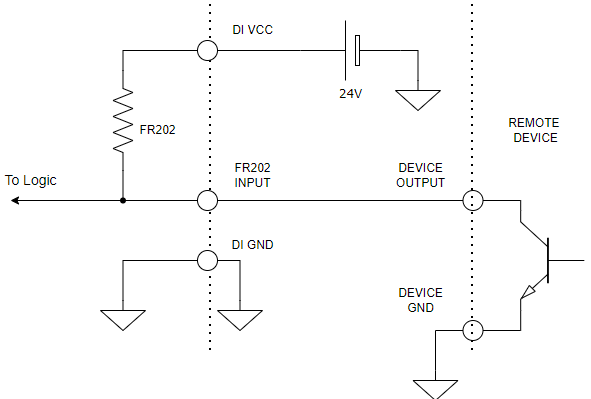
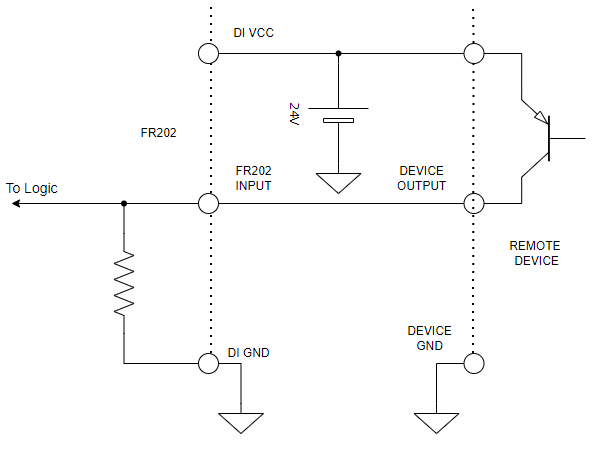
16 optically isolated digital inputs are provided via 2 10-pin terminal block connecters (Dinkle 0221-2010 or equivalent). Performance is optimized for 12-24V operation.

Each group of 4 inputs (DI0-3, DI4-7, DI8-11, and DI12-15) is software-configurable to active-high or active-low. The active-low configuration activates internal pull-ups to the VCC pin of the same header. Customers must connect both VCC and GND of that group’s connector for the IOs to function correctly.

Inputs are active at voltages exceeding 11.5V and inactive below 4.5V.

<mark style="color:blue;">**“Active-Low” / Sinking Output-Compatible Input Wiring**</mark>

<figure><img src="/files/b1Tn9edhyVD1VC8lORKh" alt=""><figcaption></figcaption></figure>

<mark style="color:blue;">**“Active-High” / Sourcing Output-Compatible Input Wiring**</mark>

<figure><img src="/files/tqnZS0A3c3ldSPKSlwt0" alt=""><figcaption></figcaption></figure>

#### <mark style="color:blue;">Digital Outputs</mark> <a href="#digital-outputs" id="digital-outputs"></a>

<figure><img src="/files/FYNB3ZJfgI2JY0Qh6ltf" alt=""><figcaption><p>DO terminal pinout</p></figcaption></figure>

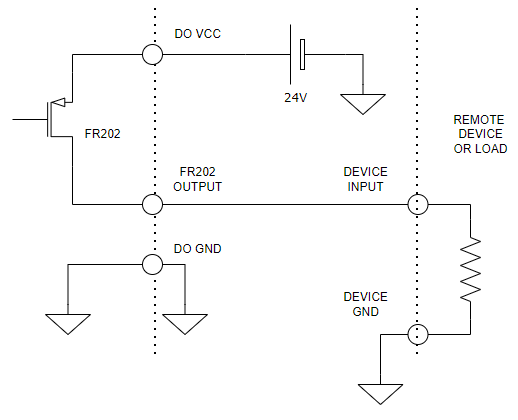
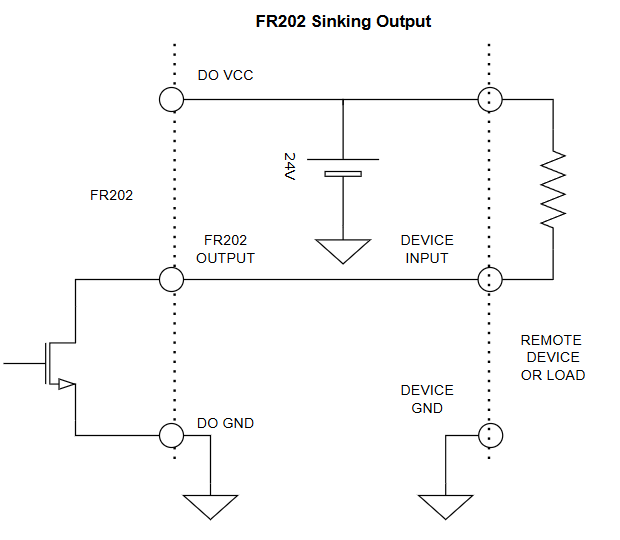
16 optically isolated digital outputs are provided via 2 10-pin terminal block connecters (Dinkle 0221-2010 or equivalent). Performance is optimized for 12-24V operation. Operating voltage should not exceed 24V. Each output has a 0.5A resettable fuse.

Each group of 4 outputs (DO0-3, DO4-7, DO8-11, and DO12-15) is software-configurable to sourcing or sinking (high- or low-side switched). For all configurations, customers must supply a VCC and GND connection on the same connector as the outputs in use. No power is sourced for the outputs through the system power connector.

<mark style="color:blue;">**Sourcing Output Wiring**</mark>

<figure><img src="/files/fODsx4a4452uPF3iizXQ" alt=""><figcaption></figcaption></figure>

<mark style="color:blue;">**Sinking Output Wiring**</mark>

<figure><img src="/files/1YXtwmqlAHNKGi5ZRaCS" alt=""><figcaption></figcaption></figure>

### <mark style="color:blue;">2.2- Bottom I/O Definition</mark> <a href="#id-2.2-bottom-i-o-definition" id="id-2.2-bottom-i-o-definition"></a>

<figure><img src="/files/VDq3aWgxB3LiXDoBQGp3" alt=""><figcaption></figcaption></figure>

#### <mark style="color:blue;">3-Pin Terminal Block Power Connector</mark> <a href="#id-3-pin-terminal-block-power-connector" id="id-3-pin-terminal-block-power-connector"></a>

Mainboard power is applied to the FR201 platform by way of a 3-pin terminal block connector (Mating part: Dinkle 2ESSM-03P or equivalent). The system is operational from 8V\~24V. The maximum rated current of the connector is 15A per pin. Use a wire gauge that is rated for the operational current. See below for on-board connector pinout.\
**Note: DC power input should not be connected when the system is supplied with POE power via the add-on module.**

<figure><img src="/files/mCJ6cBuv7Bv0Zfe3Bvp0" alt=""><figcaption><p>3-Pin terminal power pinout</p></figcaption></figure>

#### <mark style="color:blue;">5-Pin COM Terminal Block</mark> <a href="#id-5-pin-com-terminal-block" id="id-5-pin-com-terminal-block"></a>

The serial port supports RS-232, RS-422, and RS-485 configurations by way of a 5-pin terminal block connector (Mating part: Dinkle 0221-2005 or equivalent). The mode can be selected from within the operating system using available configuration tools. See [FR201 software documentation](/product-documentation/industrial-products/factor-fr200-series/fr201.md#id-4-software-and-firmware) for details.

<figure><img src="/files/duWyGLXVp7X37WmdtzJj" alt=""><figcaption><p>COM terminal pinout</p></figcaption></figure>

#### <mark style="color:blue;">LAN1 - CM4 Driven</mark> <a href="#lan1---cm4-driven" id="lan1---cm4-driven"></a>

The CM4 LAN Port on FR201 supports up to 1Gbps link speeds over standard shielded CAT5e or CAT6 cables. The connector is the industry standard RJ45 connector. The LAN link state is shown by the two LEDs enclosed in the port. Activity is also indicated by the LAN1 LED on the side of the system. The default configuration is included below, but the behavior can be customized using the CM4 boot configuration file.\
PoE PD (power input) support is available optionally by adding the ADP125 FR200 isolated POE PD module to the system.\
**Note: DC power input should not be connected when the system is supplied with POE power via the non-isolated ADP122 add-on module.**

<figure><img src="/files/x7W6oQ70Vl0ZY652RKhb" alt=""><figcaption><p>LAN activity light description</p></figcaption></figure>

#### <mark style="color:blue;">LAN2 - Realtek RTL8153B</mark> <a href="#lan2---realtek-rtl8153b" id="lan2---realtek-rtl8153b"></a>

The second LAN Port on FR201 supports up to 1Gbps link speeds over standard shielded CAT5e or CAT6 cables. The connector is the industry standard RJ45 connector. The LAN link state is shown by the two LEDs enclosed in the port. The description is included below. Activity is also indicated by the LAN2 LED on the side of the system.

<figure><img src="/files/rJBf5pA2FGbQ0hvmAxrb" alt=""><figcaption><p>LAN activity light description</p></figcaption></figure>

#### <mark style="color:blue;">Analog/Temperature Inputs</mark> <a href="#analog-temperature-inputs" id="analog-temperature-inputs"></a>

<figure><img src="/files/vHPogLkBiTUFNRcnL15e" alt=""><figcaption><p>AI terminal pinout</p></figcaption></figure>

4 analog inputs and two temperature inputs are provided on the two 10-pin headers shown above.\
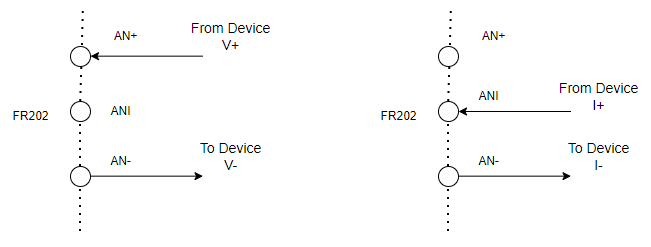
Each analog input accepts 0\~5V, 0\~10V, -5\~5V, -10\~10V, 0-20mA, 4-20mA, or 4-24mA signals, internally scaled and measured by an ADC connected to the SPI4 bus. Voltage inputs are connected by supplying V+ and GND to the connector from the signal source. Current inputs are connected using I+ and GND. Final values are computed based on software configuration.

An application to configure and use the analog inputs is provided by OnLogic and ships in OnLogic-installed operating systems. Calibration updates can be made in the application by adjusting the scaling factor applied as measurements are computed.\
For details of use, see the [software and firmware documentation](#id-5-software-and-firmware) section.

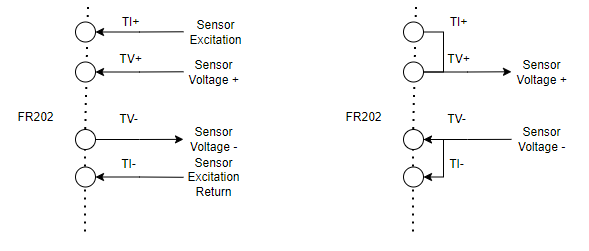
Temperature inputs may be connected to 2-, 3-, or 4-wire RTD sensors. Excitation current is supplied between TI+ and TI-, and the sensor input is measured between TV+ and TV-. To connect a 2- or 3-wire sensor, short the appropriate missing wires at the connector (ex. for a 2-wire sensor, connect TI+ to TV+, TI- to TV-, and then connect TV+ and TV- to the sensor).\
Excitation current is configurable via software, and the temperature must be derived from the voltage measurement based on the performance curve of the sensor connected.

<figure><img src="/files/SQlGqqQeQky51paPrZGp" alt=""><figcaption><p>Left: Analog Voltage Input Wiring. Right: Analog current input wiring</p></figcaption></figure>

<figure><img src="/files/ICeaTNsBMjC2YdMMbxiR" alt=""><figcaption><p>Left: 4-Wire Temperature Sensor Wiring. Right: 2-Wire Temperature Sensor Wiring</p></figcaption></figure>

#### <mark style="color:blue;">SPI/I2C/UART/RS485 Header (Isolated)</mark> <a href="#spi-i2c-uart-rs485-header-isolated" id="spi-i2c-uart-rs485-header-isolated"></a>

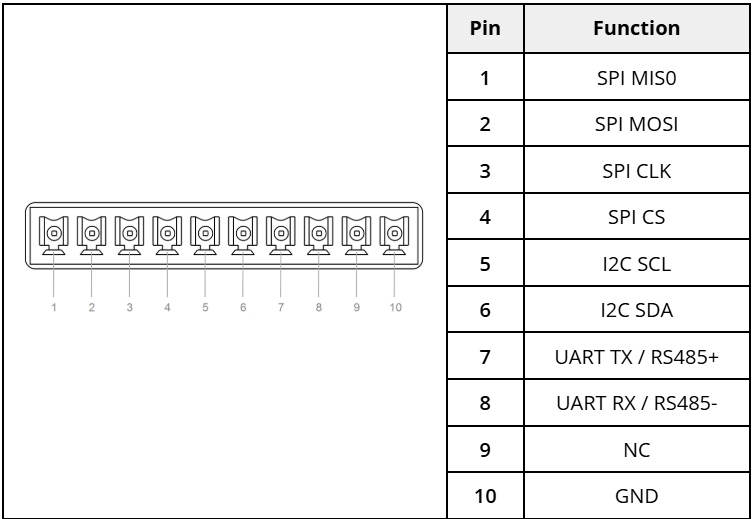
<figure><img src="/files/Ch26vJHJ4yoNWdzOycze" alt=""><figcaption><p>Communication terminal pinout</p></figcaption></figure>

SPI, I2C, and UART/RS485 interfaces not used internally are isolated and exposed on a communications header on the bottom IO face.\
In the standard configuration, the following interfaces are connected:

* SPI4 (chip select #1)
* I2C6
* UART1

UART1 may also be routed to an onboard RS485 transceiver outputting on the same connector pins. TX/RX control is implemented via Pi/BCM GPIO 17.

Where necessary, internal pull-ups on the SPI and I2C interfaces are provided. Depending on the length and configuration of the external wiring, customers may need to provide additional components for signal conditioning.

#### <mark style="color:blue;">Front Display</mark> <a href="#front-display" id="front-display"></a>

A 320x240 full-color backlit display with capacitive touchscreen is provided for customer use, for displaying diagnostic or setup information. It can be configured as an additional desktop display using a framebuffer driver or used independently of the operating system graphics system via the SPI3 interface.

A demonstration application with basic diagnostic information is provided as part of OnLogic-supplied operating systems. Example code and additional information is available in the [FR200 software documentation](/support-articles/how-tos/firmware-bios-drivers/fr201-and-fr202-technical-resources.md#front-display).

### <mark style="color:blue;">2.3- Motherboard Connectors</mark> <a href="#id-2.3---motherboard-connectors" id="id-2.3---motherboard-connectors"></a>

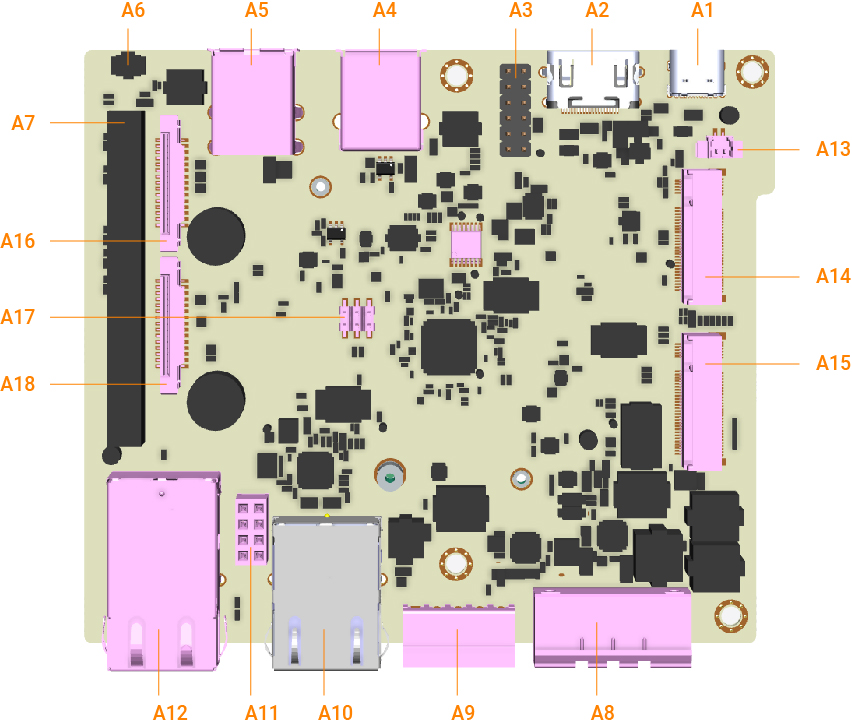
<figure><img src="/files/kFZTLPqtfyUc4RQs4S5w" alt=""><figcaption></figcaption></figure>

<table><thead><tr><th width="102">Item</th><th>Function Description</th></tr></thead><tbody><tr><td>A1</td><td>USB-C (USB 2.0 for CM4 Firmware Update)</td></tr><tr><td>A2</td><td>HDMI</td></tr><tr><td>A3</td><td>TPM</td></tr><tr><td>A4</td><td>USB 3.2</td></tr><tr><td>A5</td><td>USB 2.0 (x2)</td></tr><tr><td>A6</td><td>Pinhole Reset Button</td></tr><tr><td>A7</td><td>Raspberry Pi Header</td></tr><tr><td>A8</td><td>Power Input</td></tr><tr><td>A9</td><td>Serial Terminal Block</td></tr><tr><td>A10</td><td>RJ45 Gb Ethernet (RTL8153)</td></tr><tr><td>A11</td><td>PoE Add-on Connector</td></tr><tr><td>A12</td><td>RJ45 Gb Ethernet (CM4)</td></tr><tr><td>A13</td><td>RTC Battery Connector</td></tr><tr><td>A14</td><td>M.2 B-Key (SATA)</td></tr><tr><td>A15</td><td>M.2 B-Key (USB3)</td></tr><tr><td>A16</td><td>DSI Connector (Not Populated)</td></tr><tr><td>A17</td><td>CM4 Boot Function Jumper Header</td></tr><tr><td>A18</td><td>CSI Connector (Not Populated)</td></tr></tbody></table>

#### <mark style="color:blue;">M.2 B-Key</mark> <a href="#m.2-b-key" id="m.2-b-key"></a>

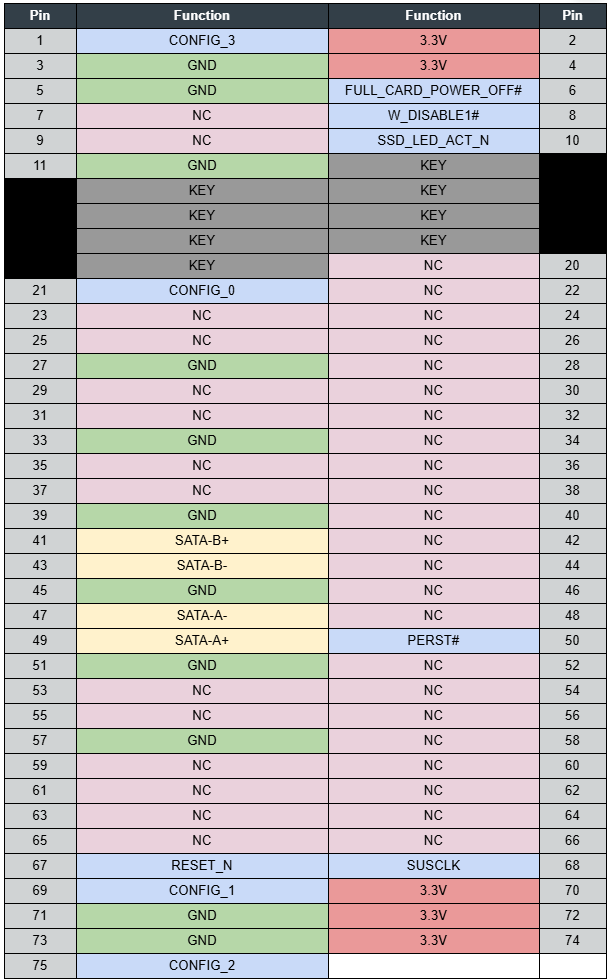
An M.2 B-Key port is present on the FR201 motherboard to allow support for B-Key form-factor expansion cards. Supported cards include 3042, 2242, and 2260 form-factors with an adapter and 2280 form-factor without. The B-Key connector at A14 on the FR201 platform supports SATA Gen I (1.5Gbps), SATA Gen II (3.0Gbps), and SATA Gen III (6.0Gbps) devices. The B-Key connector at A15 on the FR201 platform supports USB 3.2 5Gb/s and USB 2.0 devices.

A full pinout table for this expansion slot is provided in [**Appendix D**](#id-6.5-appendix-d-expansion-port-pinout).

#### <mark style="color:blue;">Boot Function Jumper Header</mark> <a href="#boot-function-jumper-header" id="boot-function-jumper-header"></a>

A 2mm pin header and jumpers are used to configure some CM4 boot settings.

To enable booting from media attached to the USB3 port, short pins 5 and 6 and apply power to the system.

To disable write-protect for the bootloader, short pins 3 and 4 and apply power.

To disable OS boot and place the CM4 in bootloader update mode, short pins 1 and 2 and apply power. The system will wait for a connection from an outside system via the USB-C configuration port in order to perform firmware updates.

<figure><img src="/files/OtVPSH7fELd1pSo0CN0o" alt=""><figcaption><p>ATX/CMOS header pinout</p></figcaption></figure>

#### <mark style="color:blue;">RTC Battery Header</mark> <a href="#rtc-battery-header" id="rtc-battery-header"></a>

The RTC battery on the FR201 platform is used to retain platform settings and maintain the real-time clock for the system. If the RTC battery is low, CMOS settings will not be retained and you may receive an alert in the operating system. The cabled RTC battery should be replaced with a Maxell CR2032-WK11 (or UL listed equivalent). An equivalent battery shall use a Hirose DF13-2S-1.25c connector to mate with the on-board connector.

#### <mark style="color:blue;">Raspberry Pi Header</mark> <a href="#raspberry-pi-header" id="raspberry-pi-header"></a>

The Raspberry Pi header is used as the main connection between the FR202 IO board and the motherboard. The pinout and description are provided here as a reference.

The Raspberry Pi header is designed to mimic the header on the standard Raspberry Pi 4, with additional features. For a detailed list of standard features that this header supports, see the Raspberry Pi documentation. The connector on the Factor 201 is female, but is pinned such that a developer can install a male-to-male interposer and use it as a standard hat header, if the developer notes the following changes:

1. A USB2.0 connection is added at pins 41 & 42.
2. The header’s I2C connection (typically noted as ID\_SC and ID\_SD) is changed to the system I2C bus, rather than the Raspberry Pi ID bus.
3. The header’s GPIO16, 18, 20, & 21 connections are shared with the TPM (configured as SPI6 when installed). If TPM support is desired, developers must avoid implementing these pins on the expansion header as well.

<figure><img src="/files/cynQkQhOLYnyqF5ARmqk" alt=""><figcaption><p>Raspberry Pi header pinout</p></figcaption></figure>

#### <mark style="color:blue;">DSI Header (Not Populated)</mark> <a href="#dsi-header-not-populated" id="dsi-header-not-populated"></a>

The DSI (MIPI display) header is pinned identically to the Raspberry Pi 4 DSI header, but is not implemented or installed by default, and is not supported at this time.

#### <mark style="color:blue;">CSI Header (Not Populated)</mark> <a href="#csi-header-not-populated" id="csi-header-not-populated"></a>

The CSI (MIPI camera) header is pinned identically to the Raspberry Pi 4 DSI header, but is not implemented or installed by default, and is not supported at this time.

#### <mark style="color:blue;">POE Add-on Connector</mark> <a href="#poe-add-on-connector" id="poe-add-on-connector"></a>

The POE PD Add-on connector is designed to support the OnLogic ADP125 POE PD add-on module. Other uses are not supported.\
See specifications for the ADP125 [here](/support-articles/how-tos/firmware-bios-drivers/fr201-and-fr202-technical-resources.md#adp125)

#### <mark style="color:blue;">CM4 Headers</mark> <a href="#cm4-headers" id="cm4-headers"></a>

The dual-header CM4 connectors support installation of Raspberry Pi CM4 modules. Two mounting standoffs are included to secure the module.

#### <mark style="color:blue;">MCU Update Header</mark> <a href="#mcu-update-header" id="mcu-update-header"></a>

A two-pin header is provided to force the DIO controller into bootloader mode. DIO controller updates should be performed by this method only when instructed.

## <mark style="color:blue;">3- Mounting Instructions</mark> <a href="#id-3---mounting-instructions" id="id-3---mounting-instructions"></a>

#### <mark style="color:blue;">DIN Rail Mounting</mark> <a href="#gkbjihjqu79" id="gkbjihjqu79"></a>

<figure><img src="/files/hMEFexMpi417j33idOOK" alt=""><figcaption></figcaption></figure>

<figure><img src="/files/1LmusUwBT4k7No1KAxL5" alt=""><figcaption></figcaption></figure>

**Step 1 (DIN Bracket only):** Align the mounting holes of the din clip bracket to the two mounting holes on the back of the chassis.

**Step 2 (DIN Bracket):** Mount system onto the DIN rail.

#### <mark style="color:blue;">Wall Mounting</mark> <a href="#id-8vwy3aiu7xnx" id="id-8vwy3aiu7xnx"></a>

<figure><img src="/files/GRCq97YWLRPFZD2frOem" alt=""><figcaption></figcaption></figure>

<figure><img src="/files/LW6s1dKbEAoPTkY3ulYZ" alt=""><figcaption></figcaption></figure>

**Step 1:** Align the four screw holes on the bottom of the system with the respective holes on the mounting brackets.

**Step 2:** Attach wall mounting brackets (MTW101) to the system using the supplied M3 screws (M3X0.5 Flathead Screw, 4mm Long)

**Step 3 (Wall Mount only):** Install system to surface using keyhole slots on wall mount brackets and appropriate hardware for the surface (not provided).

*Note: The mounting brackets are required to support 4x the hanging weight of the system.*\
\&#xNAN;*The mating surface and hardware must be capable of supporting the same load.*

## <mark style="color:blue;">4- Power Management</mark> <a href="#id-4---power-management" id="id-4---power-management"></a>

### <mark style="color:blue;">4.1- Protection Circuitry</mark> <a href="#id-4.1---protection-circuitry" id="id-4.1---protection-circuitry"></a>

<table><thead><tr><th width="574.5">Parameter</th><th>Value</th></tr></thead><tbody><tr><td>Nominal operating voltage (Rated DC value of input)</td><td>12~24V</td></tr><tr><td>Undervoltage protection trip DC level (system turns off)</td><td>6.5V</td></tr><tr><td>Maximum safe DC voltage (system not damaged)</td><td>27V</td></tr></tbody></table>

These DC levels specified are the absolute max values for the pins for function and safety of the system. The protection circuitry allows for brief transient voltages above these levels without the system turning off or being damaged. A transient voltage suppressor on the power input allows momentary excursions above stated limits. For input power consumption and current see [**Appendix A**](#id-6.1-appendix-a-power-consumption)**.**

### <mark style="color:blue;">4.2- Input Voltage Qualification</mark> <a href="#id-4.2---input-voltage-qualification" id="id-4.2---input-voltage-qualification"></a>

The base FR202 system is capable of operation with an input voltage ranging from 12V - 24V DC, however different configurations will impact total system draw and may limit input voltage flexibility in the final application.

## <mark style="color:blue;">5- Software & Firmware</mark>

### <mark style="color:blue;">5.1- Downloads</mark>

For downloads see [Factor Series Technical Support](/support-articles/how-tos/firmware-bios-drivers/fr201-and-fr202-technical-resources.md#manuals-and-downloads) in [Factor Series Technical Support](/support-articles/how-tos/firmware-bios-drivers/fr201-and-fr202-technical-resources.md).

### <mark style="color:blue;">5.2- Features & Configuration</mark> <a href="#yrmb4midipsf" id="yrmb4midipsf"></a>

For features see [Factor Series Technical Support](/support-articles/how-tos/firmware-bios-drivers/fr201-and-fr202-technical-resources.md#factor-series-features) in [Factor Series Technical Support](/support-articles/how-tos/firmware-bios-drivers/fr201-and-fr202-technical-resources.md)

## <mark style="color:blue;">6- Regulatory Compliance</mark> <a href="#id-5---regulatory-compliance" id="id-5---regulatory-compliance"></a>

#### <mark style="color:blue;">CE</mark> <a href="#id-5.1---ce" id="id-5.1---ce"></a>

The computer system was evaluated for medical, IT equipment, and maritime EMC standards as a class A device. The computer complies with the relevant equipment directives for the CE mark. Modification of the system may void the certifications. Testing includes: EN 55032, EN 55035, IEC 60601-1, EN 62368-1, EN 60950-1, and IEC 60945. The computer is approved for coexistence of the two provided radio transmitters when used with the specified antennas.

#### <mark style="color:blue;">FCC Statement</mark> <a href="#id-5.2---fcc-statement" id="id-5.2---fcc-statement"></a>

This device complies with part 15 of the FCC rules as a Class A device. Operation is subject to the following two conditions: (1) this device may not cause harmful interference and (2) this device must accept any interference received, including interference that may cause undesired operation.

#### <mark style="color:blue;">ISED</mark> <a href="#id-5.3---ised" id="id-5.3---ised"></a>

This device complies with Industry Canada license-exempt RSS standard(s). Operation is subject to the following two conditions: (1) this device may not cause interference, and (2) this device must accept any interference, including interference that may cause undesired operation of the device.

Le présent appareil est conforme aux CNR d'Industrie Canada applicables aux appareils radio exempts de licence. L'exploitation est autorisée aux deux conditions suivantes: (1) l'appareil ne doit pas produire de brouillage, et (2) l'utilisateur de l'appareil doit accepter tout brouillage radioélectrique subi, même si le brouillage est susceptible d'en compromettre le fonctionnement.

**CAN ICES-003(A) / NMB-003(A)**

#### <mark style="color:blue;">UKCA</mark> <a href="#id-5.4---ukca" id="id-5.4---ukca"></a>

The computer system was evaluated for IT equipment EMC standards as a class A device. The computer complies with the relevant IT equipment directives for the UKCA mark.

#### <mark style="color:blue;">VCCI</mark> <a href="#id-5.5---vcci" id="id-5.5---vcci"></a>

This is a Class A product based on the standard of the Voluntary Control Council for Interference (VCCI). If this equipment is used in a domestic environment, radio interference may occur, in which case the user may be required to take corrective actions.

<figure><img src="/files/wpqTa3idD3VG6KifpDCe" alt=""><figcaption></figcaption></figure>

#### <mark style="color:blue;">Regulatory Uploads</mark>

{% file src="/files/swgdVDaJG8r1lE9r9B3F" %}

{% file src="/files/4rzbWmrgyg6rRFyDXn0N" %}

{% file src="/files/3hPli42ERHWu2fqzIl5w" %}

{% file src="/files/KOy9mreNT7sizHpv4NSK" %}

{% file src="/files/t0NwZLJ2VWLDl9G7ocxs" %}

{% file src="/files/0zkxpBfiRDaemo45TOOf" %}

{% file src="/files/aB477RP7ilx6rLMZYt9x" %}

{% file src="/files/JcWRwZNXu1JTtgzCoXzM" %}

## <mark style="color:blue;">7- Appendices</mark> <a href="#id-6.-appendices" id="id-6.-appendices"></a>

### <mark style="color:blue;">7.1- Appendix A: Power Consumption</mark> <a href="#id-6.1-appendix-a-power-consumption" id="id-6.1-appendix-a-power-consumption"></a>

The power consumption of the Factor 202 was measured for various system configurations, workloads, and power states at both 12V and 24V system input voltages. The build configurations and power consumption are listed in the tables below.

\*The configurations below are using representative samples of internal devices, the specific components mentioned below may vary from the devices provided by OnLogic.

| System Component |   Config 1 Low  |          Config 2 Mid         |         Config 3 High         |
| :--------------: | :-------------: | :---------------------------: | :---------------------------: |
|        CPU       |   CM4 BCM2711   |          CM4 BCM2711          |          CM4 BCM2711          |
|      Memory      |       2GB       |              4GB              |              8GB              |
|   SATA Storage   |       none      | Innodisk DEM28-A28M41BW1DC-27 | Innodisk DEM28-A28M41BW1DC-27 |
|  M.2 B-Key Modem |       none      |              none             |             MDG200            |
|        OS        | Raspberry Pi OS |        Raspberry Pi OS        |        Raspberry Pi OS        |

The power consumption for each system configuration is recorded below

|      Config 1 Low     |             |             |
| :-------------------: | :---------: | :---------: |
| **Power Consumption** | **12V (W)** | **24V (W)** |
|        OS Idle        |     5.9     |     6.2     |
|  CPU / 1-Core Stress  |     7.9     |     7.4     |
|  CPU / 4-Core Stress  |     8.7     |     9.3     |

|      Config 2 Mid     |             |             |
| :-------------------: | :---------: | :---------: |
| **Power Consumption** | **12V (W)** | **24V (W)** |
|        OS Idle        |     6.6     |     6.9     |
|  CPU / 1-Core Stress  |     8.7     |     8.9     |
|  CPU / 4-Core Stress  |     9.6     |     10.0    |

|     Config 3 High     |             |             |
| :-------------------: | :---------: | :---------: |
| **Power Consumption** | **12V (W)** | **24V (W)** |
|        OS Idle        |     7.3     |     7.5     |
|  CPU / 1-Core Stress  |     9.4     |     9.6     |
|  CPU / 4-Core Stress  |     10.2    |     10.4    |

### <mark style="color:blue;">7.2- Appendix B: Software Documentation</mark> <a href="#id-6.3-appendix-b-software-documentation" id="id-6.3-appendix-b-software-documentation"></a>

For a detailed overview of the configuration and individual settings, please refer to the [Raspberry Pi Technical Resource Section](/support-articles/how-tos/firmware-bios-drivers/fr201-and-fr202-technical-resources.md). Instructions for updating the BIOS and Firmware can also be found in[ this section](/support-articles/how-tos/firmware-bios-drivers/fr201-and-fr202-technical-resources.md#firmware-updates).&#x20;

### <mark style="color:blue;">7.3- Appendix C: System Thermal Results</mark> <a href="#id-6.4-appendix-c-system-thermal-results" id="id-6.4-appendix-c-system-thermal-results"></a>

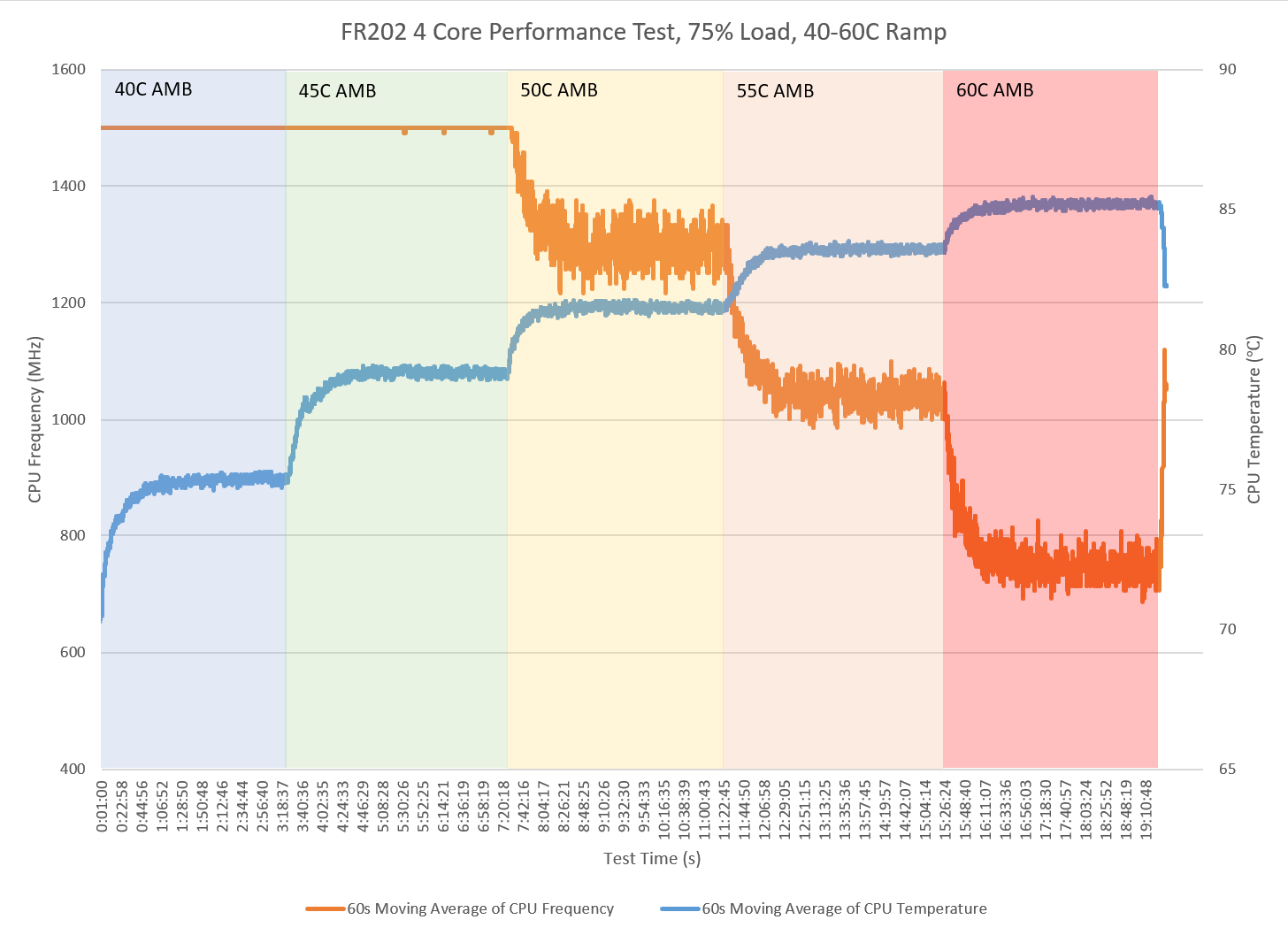
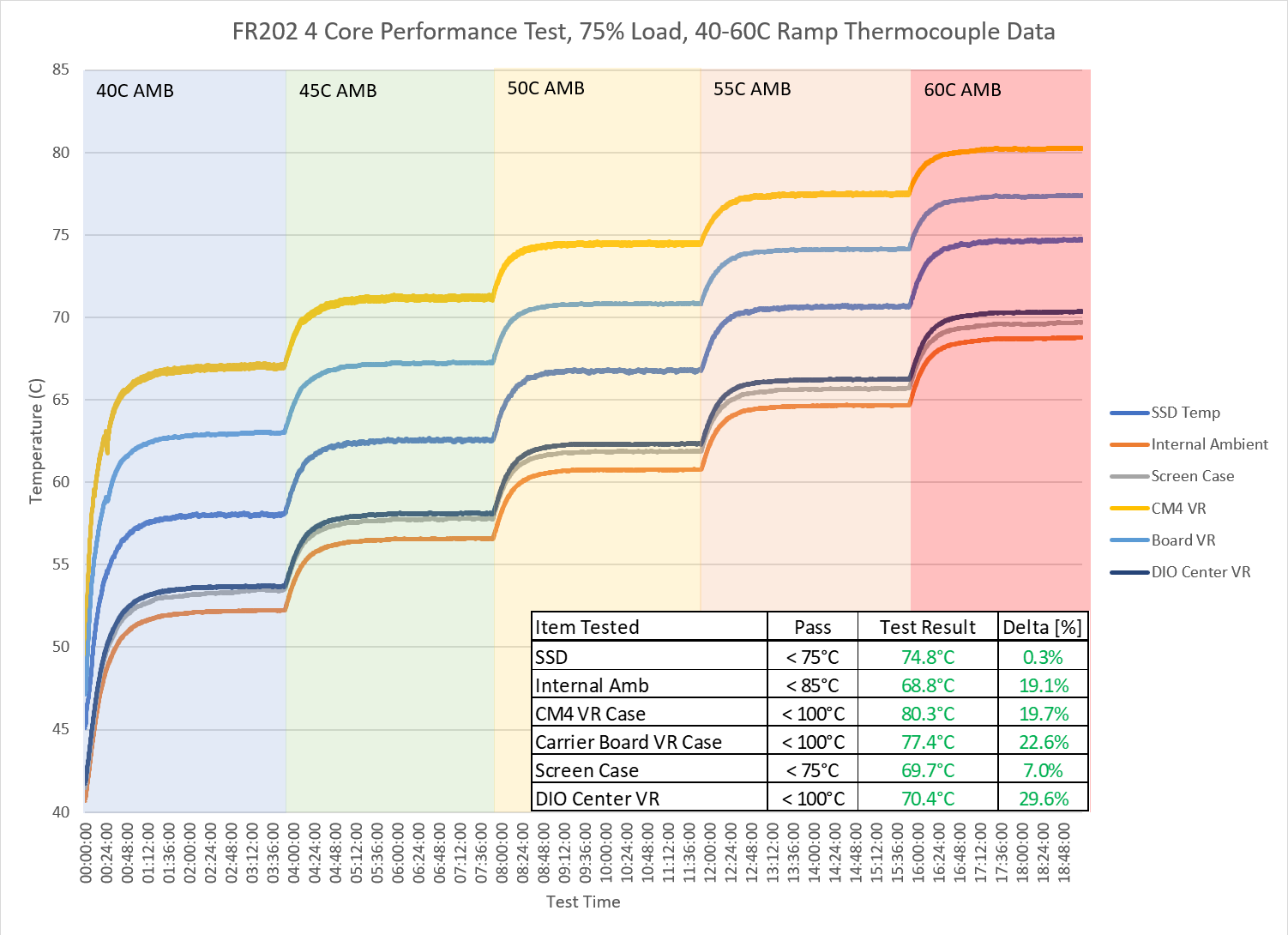
The thermal performance of the FR202 was validated by loading the system to simulate expected workloads while the test system was exposed to high ambient temperatures in a thermal chamber environment. The test workload was a 4 core load designed to simulate heavy processing. The system was run at 100% load for 45 seconds and then the load was removed for a 15 second rest. In order to profile performance at a variety of thermal conditions, the thermal chamber temperature was raised from 40°C to 60°C with a 4 hour dwell at each 5° increment. The results were analyzed by comparing the average clock speed over the duration of the test to the expected base clock speed. CPU throttling was observed beginning at 50°C, with performance gradually decreasing to just above the maximum throttle state (600 MHz) at 60°C.

***FR202 - 4 Core 75% Load Thermal Testing Graph -** The image below shows the thermal test results from an FR202 in a thermal chamber with 75% full 4 core workload (45s at 100% followed by 15s rest) over a temperature range from 40-60°C with a 4 hour dwell every 5°C.*

<figure><img src="/files/m2cfrU5piWYt5XuPu3FP" alt=""><figcaption></figcaption></figure>

***FR202 - 4 Core 75% Load Thermal Testing Component Results -** the graph below shows the key component temperature values from the above test. The table is the maximum observed temperature and component test limits*

<figure><img src="/files/uUBwwql9X624Wrlur5gr" alt=""><figcaption></figcaption></figure>

### <mark style="color:blue;">7.4- Appendix D: Expansion Port Pinout</mark> <a href="#id-6.5-appendix-d-expansion-port-pinout" id="id-6.5-appendix-d-expansion-port-pinout"></a>

#### <mark style="color:blue;">M.2 B-Key (MODEM)</mark> <a href="#id-6.5.1-m.2-b-key-modem" id="id-6.5.1-m.2-b-key-modem"></a>

<figure><img src="/files/ngeNCqKwv5LnBXdcL0U7" alt=""><figcaption></figcaption></figure>

#### <mark style="color:blue;">M.2 B-Key (SATA)</mark> <a href="#id-6.5.2-m.2-b-key-sata" id="id-6.5.2-m.2-b-key-sata"></a>

<figure><img src="/files/dsIgiFF0ul5PXyjgfw84" alt=""><figcaption></figcaption></figure>

### <mark style="color:blue;">7.5- Appendix E: Safety Information</mark> <a href="#id-6.6-appendix-e-safety-information" id="id-6.6-appendix-e-safety-information"></a>

Do not open or modify the device. The device uses components that comply with FCC and CE regulations. Modification of the device may void these certifications.

#### <mark style="color:blue;">Safe Use and Installation Instructions</mark> <a href="#id-6.6.1-safe-use-and-installation-instructions" id="id-6.6.1-safe-use-and-installation-instructions"></a>

1. Install the device securely. Be careful handling the device to prevent injury and do not drop.
2. Wall or ceiling mounting the device requires use of a mounting plate or bracket. The plate or bracket must be of metal construction and have a minimum thickness of 1mm.
3. Use M4x0.5mm Flat Head screws to attach mounting plate or mounting brackets to threaded holes on bottom or rear of chassis. Screws should be a minimum length of 4mm. Add 1mm of screw length for every mm of additional thickness of plate or bracket beyond 1.5mm.
4. Ambient operating temperature must be between 0 °C to 60 °C with a non-condensing relative humidity of 10-90%.
5. The device can be stored at temperatures between -10 °C to 85 °C.
6. Keep the device away from liquids and flammable materials.
7. Do not clean the device with liquids. The chassis can be cleaned with a cloth.
8. Allow at least 2 inches of space around all sides of the device for proper cooling. It is recommended to mount the device such that the metal side plates are vertical to allow air to rise unobstructed. Alternative orientations may result in reduced operational temperature range.
9. This device is intended for indoor operation only.
10. Use only antennas provided. Maintain 20cm of distance from the antenna.
11. Use UL Listed external power supply with rated output 12Vdc
12. Install the device only with shielded network cables.
13. Only use SAE approved cables for automotive installation.
14. The installer should be experienced in aftermarket installation and familiar with general practices for installing electronics devices in vehicles.
15. The device should not be installed in the driver’s area of a vehicle.
16. The device should be mounted in accordance with accepted aftermarket practices and materials for vehicle installation.
17. Only use UL Listed connectors for power and serial.
18. Service and repair of the device must be done by qualified service personnel. This includes, but is not limited to, replacement of the CMOS battery. Replacement CMOS battery must be of the same type as the original.
19. Proper disposal of CMOS battery must comply with local governance.

![](data:image/png;base64,iVBORw0KGgoAAAANSUhEUgAAACwAAAArCAYAAAADgWq5AAAEGklEQVR4Xu2X205TQRSGpwWqoJYCHm58A2+89sbEF9D38CG89sIH4NbQEiBaxeIRBU944qAoJCaalHpATTQkAgVEt7NmZu29Zs10Q0uLvXAlf9LOrD3z7b9rDhWizvEh13mqmO3+U8p2TfG+pouFbNe3zYIIUAv93QHPaZqYuCDaKWwInc3M89ymiFJ/jwMLWr7S2nwuy5rd5KCWy7kmK42f+TYHkquUy5T5c/8sOJxPH/szzeHyQs5fuz4F50Qrf35X493FfYc5VJxgYfIxdjWqcRcVDIoUH2dXYvGiOPxLAlSrf+byUj4V/BoRWte3IcwdgROwa5mP1/CwYG5sQyT/80B6d12Gg8KCuYlKBBtE8F21e+D5mA2L972iM4S6ZevsGQUS6sQx4eTgs8Vcz282dGMCFk04+W1bgsCieE4ELneMQCSswesdn4ZFhzX5HVvCB8xyKHixv8EuK3fp5KNa66PJYP1u0oEFQd+Gkskn4GuyNGRSY1yGhYaQCBjqnlYy4QE2fVY+voAcr2H78lJhjw2KIKAxrZPHbdijh0TYZ+WbMdD1yV7RxqbbeTigCDIe6feEXRZvBxJRP+ZTeDNmMdvzh023syj2dW/Gga7db1Eqj7dYwCtjuh1E811otWDrE/Ky0hKCMsC1B0QPteARFLaFOfgcvgBxXF7w59jUtQXcyBDWAUUg0CMtQYGhjebQF6Suy/Hr8jfqU6/o8MIySKXHWoICm7Ywh8Nz6L7MaYZQXfwo7I1gOagEKT9u1ZqIJAzs4Pmk1Q55Djxze3VULdraIxYWQZ7YEujuM9bnAyfQ6HTNpx9sNRascSZ0lMI8jdTTqYHLAEzaObgDbVz+mt9fm8vfr7U7zjqwCANwUqvP24KZIV3H8BmEfRZ4JacNNGfZMmBnUO5SWFoCDFLpRYwovA+cQctfd5MzVQz5VzzllALWLIF1QCe1VuTnn9BuvisR8BCalIhyGs2BecequBTBZSQEprsBK4EQFqGmtATZ1lQbheZOx7m8ncVXynavcXfDukXQZ2ZihJVQK9OgVJDw3NagHV+GgnNoq55NLQdbXfDVQqPAlUqBwK4C7ExK6chBG3Zfu9B9CE3dli9u1bPP5a0uRRXdhQF53SLstIZdeaklqLumzYH2uUx3jXDHiLkUlXJdZQeYbmEedy3YV0azRPDdgjYvCs/DWOgyLwuyxVWsZedUo8BPWe16YJdn9wTLr43eRJ8t8DiXPYsPTz/Oqk61LYHj3JVQFuxcBG0By3woIwW9DeCKB8n6mP5nELfgvMD4cyMwws4TaOk8BQ5drgLYWXyfh9L1AwbYOgPDyWsBQ0Bxf7l8IPiSj7R4Ja111WiYqjNYvEZUMBoxwu80BwTP4Rg4Lgjmyaft+S+l/bD/o4HxF8CtACoqrvA+AAAAAElFTkSuQmCC)**WARNING:** There is danger of explosion if the CMOS battery is replaced incorrectly. Disposal of battery into fire or a hot oven, or mechanically crushing or cutting of a battery can result in an explosion.

#### <mark style="color:blue;">Instructions d'utilisation et d'installation en toute sécurité</mark> <a href="#id-6.6.2-instructions-dutilisation-et-dinstallation-en-toute-securite" id="id-6.6.2-instructions-dutilisation-et-dinstallation-en-toute-securite"></a>

1. Installez l'appareil en toute sécurité. Manipulez l'appareil avec précaution pour éviter de vous blesser et ne le laissez pas tomber.
2. Le montage mural ou au plafond de l'appareil nécessite l'utilisation d'une plaque ou d'un support de montage. La plaque ou le support doit être en métal et avoir une épaisseur minimale de 1 mm.
3. Utilisez des vis à tête plate M4x0,5 mm pour fixer la plaque de montage ou les supports de montage aux trous filetés au bas ou à l'arrière du châssis. Les vis doivent avoir une longueur minimale de 4 mm. Ajoutez 1 mm de longueur de vis pour chaque mm d'épaisseur supplémentaire de plaque ou de support au-delà de 1,5 mm.
4. La température ambiante de fonctionnement doit être comprise entre 0 °C et 60 °C avec une humidité relative sans condensation de 10 à 90 %.
5. L'appareil peut être stocké à des températures comprises entre -10 °C et 85 °C.
6. Gardez l'appareil à l'écart des liquides et des matériaux inflammables.
7. Ne nettoyez pas l'appareil avec des liquides. Le châssis peut être nettoyé avec un chiffon.
8. Laissez au moins 2 pouces d'espace autour de tous les côtés de l'appareil pour un refroidissement correct. Il est recommandé de monter l'appareil de manière à ce que les plaques latérales métalliques soient verticales pour permettre à l'air de monter sans obstruction. Des orientations alternatives peuvent entraîner une plage de températures de fonctionnement réduite.
9. Cet appareil est destiné à une utilisation en intérieur uniquement.
10. Utilisez uniquement les antennes fournies. Maintenez une distance de 20cm avec l’antenne.
11. Utilisez une alimentation externe homologuée UL avec sortie nominale 12 Vdc
12. Installez l'appareil uniquement avec des câbles réseau blindés.
13. Utilisez uniquement des câbles approuvés par SAE pour une installation automobile.
14. L'installateur doit avoir de l'expérience dans l'installation du marché secondaire et être familiarisé avec les pratiques générales d'installation d'appareils électroniques dans les véhicules.
15. L'appareil ne doit pas être installé dans le poste de conduite d'un véhicule.
16. L'appareil doit être monté conformément aux pratiques acceptées du marché secondaire et aux matériaux d'installation du véhicule.
17. Utilisez uniquement des connecteurs homologués UL pour l'alimentation et la série.
18. L'entretien et la réparation de l'appareil doivent être effectués par un personnel qualifié. Cela inclut, mais sans s'y limiter, le remplacement de la batterie CMOS. La batterie CMOS de remplacement doit être du même type que celle d'origine.
19. L'élimination appropriée de la batterie CMOS doit être conforme à la gouvernance locale.

![](data:image/png;base64,iVBORw0KGgoAAAANSUhEUgAAACwAAAArCAYAAAADgWq5AAAEGklEQVR4Xu2X205TQRSGpwWqoJYCHm58A2+89sbEF9D38CG89sIH4NbQEiBaxeIRBU944qAoJCaalHpATTQkAgVEt7NmZu29Zs10Q0uLvXAlf9LOrD3z7b9rDhWizvEh13mqmO3+U8p2TfG+pouFbNe3zYIIUAv93QHPaZqYuCDaKWwInc3M89ymiFJ/jwMLWr7S2nwuy5rd5KCWy7kmK42f+TYHkquUy5T5c/8sOJxPH/szzeHyQs5fuz4F50Qrf35X493FfYc5VJxgYfIxdjWqcRcVDIoUH2dXYvGiOPxLAlSrf+byUj4V/BoRWte3IcwdgROwa5mP1/CwYG5sQyT/80B6d12Gg8KCuYlKBBtE8F21e+D5mA2L972iM4S6ZevsGQUS6sQx4eTgs8Vcz282dGMCFk04+W1bgsCieE4ELneMQCSswesdn4ZFhzX5HVvCB8xyKHixv8EuK3fp5KNa66PJYP1u0oEFQd+Gkskn4GuyNGRSY1yGhYaQCBjqnlYy4QE2fVY+voAcr2H78lJhjw2KIKAxrZPHbdijh0TYZ+WbMdD1yV7RxqbbeTigCDIe6feEXRZvBxJRP+ZTeDNmMdvzh023syj2dW/Gga7db1Eqj7dYwCtjuh1E811otWDrE/Ky0hKCMsC1B0QPteARFLaFOfgcvgBxXF7w59jUtQXcyBDWAUUg0CMtQYGhjebQF6Suy/Hr8jfqU6/o8MIySKXHWoICm7Ywh8Nz6L7MaYZQXfwo7I1gOagEKT9u1ZqIJAzs4Pmk1Q55Djxze3VULdraIxYWQZ7YEujuM9bnAyfQ6HTNpx9sNRascSZ0lMI8jdTTqYHLAEzaObgDbVz+mt9fm8vfr7U7zjqwCANwUqvP24KZIV3H8BmEfRZ4JacNNGfZMmBnUO5SWFoCDFLpRYwovA+cQctfd5MzVQz5VzzllALWLIF1QCe1VuTnn9BuvisR8BCalIhyGs2BecequBTBZSQEprsBK4EQFqGmtATZ1lQbheZOx7m8ncVXynavcXfDukXQZ2ZihJVQK9OgVJDw3NagHV+GgnNoq55NLQdbXfDVQqPAlUqBwK4C7ExK6chBG3Zfu9B9CE3dli9u1bPP5a0uRRXdhQF53SLstIZdeaklqLumzYH2uUx3jXDHiLkUlXJdZQeYbmEedy3YV0azRPDdgjYvCs/DWOgyLwuyxVWsZedUo8BPWe16YJdn9wTLr43eRJ8t8DiXPYsPTz/Oqk61LYHj3JVQFuxcBG0By3woIwW9DeCKB8n6mP5nELfgvMD4cyMwws4TaOk8BQ5drgLYWXyfh9L1AwbYOgPDyWsBQ0Bxf7l8IPiSj7R4Ja111WiYqjNYvEZUMBoxwu80BwTP4Rg4Lgjmyaft+S+l/bD/o4HxF8CtACoqrvA+AAAAAElFTkSuQmCC)**AVERTISSEMENT:** Il existe un risque d'explosion si la pile CMOS n'est pas remplacée correctement. L'élimination de la batterie dans le feu ou dans un four chaud, ou l'écrasement ou le découpage mécanique d'une batterie peut entraîner une explosion.

### <mark style="color:blue;">7.6- Appendix F: CAD Files</mark>

{% file src="/files/5QoR2AApbslrTE56Oyyz" %}

### <mark style="color:blue;">7.7- Appendix G: Technical Resources</mark>

For technical resources, see [Factor Series Technical Support](/support-articles/how-tos/firmware-bios-drivers/fr201-and-fr202-technical-resources.md)

### <mark style="color:blue;">7.8- Appendix H: NWK300 Spec sheet</mark>

For the NWK300 module, see [NWK300](/product-documentation/components-and-expansion/wireless-connectivity/nwk300.md)

## <mark style="color:blue;">8- Security Advisory</mark>

For the latest security advisories concerning OnLogic products, including vulnerability disclosures and necessary updates, please refer to our official Security Advisories page. It is recommended to regularly check this resource for critical security information.\
[**Access Security Advisories**](/support-articles/security-advisories.md)


---

# Agent Instructions: Querying This Documentation

If you need additional information that is not directly available in this page, you can query the documentation dynamically by asking a question.

Perform an HTTP GET request on the current page URL with the `ask` query parameter:

```
GET https://support.onlogic.com/product-documentation/industrial-products/factor-fr200-series/fr202.md?ask=<question>
```

The question should be specific, self-contained, and written in natural language.
The response will contain a direct answer to the question and relevant excerpts and sources from the documentation.

Use this mechanism when the answer is not explicitly present in the current page, you need clarification or additional context, or you want to retrieve related documentation sections.